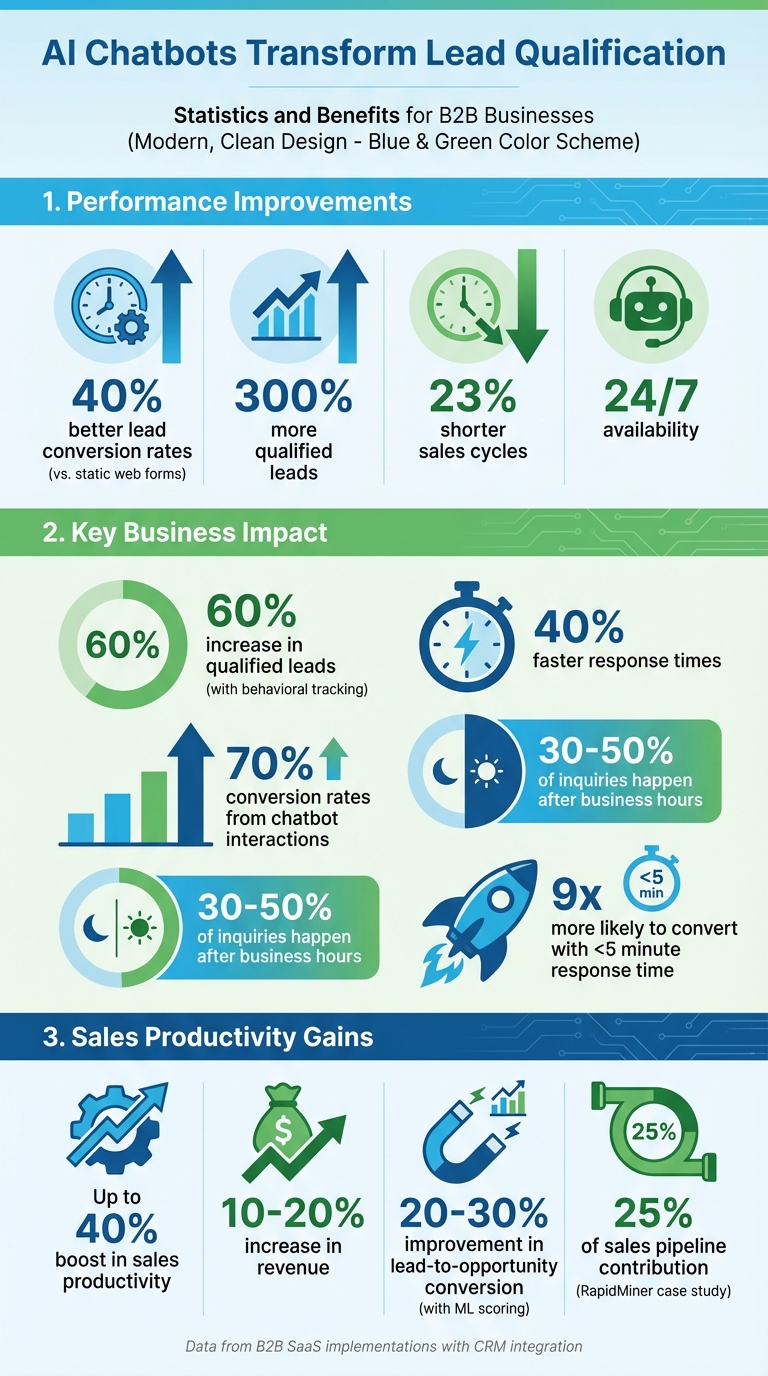
AI chatbots are changing how businesses handle lead qualification by automating conversations and gathering valuable insights. They engage prospects instantly, ask targeted questions, and sort leads based on their potential. Compared to static web forms, chatbots deliver 40% better lead conversion rates, 300% more qualified leads, and 23% shorter sales cycles. By using proven frameworks like BANT, CHAMP, or MEDDIC, chatbots ensure sales teams focus on the most promising opportunities.
Key Benefits for U.S. Businesses:
- 24/7 Availability: Handles after-hours inquiries, reducing missed opportunities.
- Cost Savings: Automates repetitive tasks, cutting the need for extra staff.
- Improved Data Collection: Tracks firmographic, demographic, and behavioral signals for better lead scoring.
- Faster Lead Response: Reduces delays, increasing chances of conversion.
With proper setup, integration with CRMs like HubSpot or Pipedrive, and ongoing optimization, AI chatbots streamline lead qualification, saving time and boosting revenue. Whether you're a small business or enterprise, these tools can transform your sales process.
AI Chatbot Lead Qualification Statistics and Performance Metrics
How Lead Qualification Works with AI Chatbots
Lead Generation vs. Lead Qualification Chatbots
Lead generation and lead qualification are two distinct stages in the sales funnel. Lead generation chatbots focus on the top of the funnel, where potential customers are just becoming aware of your business. Their primary job? Gathering basic contact details - like name, email, and company - from website visitors. Think of them as the digital version of collecting business cards at an event.
Lead qualification chatbots, on the other hand, dive deeper. They operate in the middle of the funnel, engaging prospects during the consideration stage. These bots ask targeted questions about things like budget, needs, and timelines. Instead of simply collecting emails, they identify which leads are genuinely ready to make a purchase. By filtering out less promising prospects, they help sales teams focus on high-value opportunities, delivering better conversion rates compared to basic contact collection methods.
The two types of chatbots complement each other perfectly. Lead generation bots gather initial data and feed it into your CRM. From there, lead qualification bots pick up the baton, triggering automated workflows to evaluate and prioritize leads. Together, they create a smooth process, moving prospects seamlessly from initial interest to sales-ready opportunities - an especially effective system for U.S.-based sales teams.
Qualification Frameworks: BANT, CHAMP, and MEDDIC
AI chatbots don’t just ask random questions - they rely on tried-and-true sales frameworks that have been used for decades. The most common ones are BANT (Budget, Authority, Need, Timeline), CHAMP (Challenges, Authority, Money, Prioritization), and MEDDIC (Metrics, Economic Buyer, Decision Criteria, Decision Process, Identify Pain, Champion).
BANT is the classic method. It’s straightforward: the chatbot asks about budget, decision-making authority, challenges, and timeline. This approach works well for quickly screening small and mid-sized business (SMB) prospects, helping sales teams focus on leads that meet basic criteria.
CHAMP takes a different approach, starting with the prospect’s pain points rather than their budget. The chatbot might ask something like, “What business problems are keeping you up at night?” From there, it moves on to Authority, Money, and Prioritization. This consultative tone resonates with prospects, leading to 45-60% higher engagement rates compared to static forms. It emphasizes solving the prospect’s problems before discussing costs.
MEDDIC is a heavyweight framework designed for complex B2B sales. It goes beyond basic qualification, focusing on measurable outcomes (Metrics: “What ROI are you looking for?”), identifying the Economic Buyer, understanding Decision Criteria and Processes, surfacing Pain points, and finding a Champion within the organization. AI chatbots use MEDDIC by combining behavioral analysis with adaptive scripts, collecting detailed information over multiple interactions. Over time, machine learning helps refine these conversations, improving accuracy.
| Framework | Focus | Best For | Chatbot Implementation |
|---|---|---|---|
| BANT | Budget, Authority, Need, Timeline | Quick SMB screening | Straightforward yes/no questions with automated scoring |
| CHAMP | Challenges, Authority, Money, Prioritization | Pain-focused qualification | Dynamic, challenge-first conversations |
| MEDDIC | Metrics, Economic Buyer, Decision Criteria, Decision Process, Identify Pain, Champion | Enterprise B2B sales | Multi-session insights with machine learning |
Data Points Chatbots Collect
To make these frameworks work, AI chatbots gather a variety of data points that help qualify leads effectively. This data falls into three main categories: firmographic, demographic, and behavioral signals.
Firmographic data includes details like company name, industry, employee count, annual revenue, and location. Demographic and role data adds layers such as job title, department, seniority, and decision-making authority. Together, these details determine if a prospect fits your Ideal Customer Profile (ICP). For instance, if your product is designed for tech companies with 100+ employees and annual revenue above $10 million, the chatbot can instantly flag leads that don’t meet these criteria. It also tailors its approach based on whether it’s engaging with a decision-maker, influencer, or end-user.
Behavioral intent signals provide even more context. While prospects answer questions, the chatbot tracks their actions - like which pages they’ve visited, how much time they’ve spent on your pricing page, whether they’ve downloaded resources, or if they’ve returned multiple times. One SaaS company reported that combining explicit answers with behavioral tracking resulted in 60% more qualified leads and 40% faster response times. This is because sales teams could see both what prospects said and what their actions revealed about their buying intent.
All this data is automatically stored in your CRM, creating a comprehensive lead profile. It includes not just the prospect’s responses but also their behavioral patterns, helping sales teams gauge intent more effectively. For U.S. teams, the chatbot ensures details like phone numbers, dollar amounts, and time zones are correctly formatted for smooth follow-ups.
Setting Up an AI Lead Qualification Chatbot
Preparing for Chatbot Implementation
Before you roll out your AI chatbot, it’s crucial to get your foundational systems ready. Start by using a reliable CRM like HubSpot or Pipedrive - both highlighted on Sales, Leads & CRM. Make sure your CRM is set up with clear lifecycle stages (e.g., subscriber to customer) and standardized fields for contact details. Add custom fields for essential qualification criteria like budget range (in USD), decision-making authority, and timeline. This ensures that the chatbot’s data integrates seamlessly into your system.
Take time to clean up your database. Deduplicate records, validate emails, and standardize company names. Clearly define your Ideal Customer Profile (ICP). For example, you might focus on companies in a specific industry, those with 100+ employees, annual revenues of $10 million or more, and located in particular regions. Create detailed buyer personas that outline job titles, departments, and common challenges. This preparation helps your chatbot prioritize the right leads and route them effectively.
Translate your ICP into CRM fields and scoring rules. For instance, you could qualify leads that meet your ICP, have a clear need, a minimum monthly budget of $1,000, and plan to evaluate within 90 days. Assign scores to each criterion - C-level titles might earn +30 points, while being in a target industry could add +20 points. Define thresholds for lead qualification, such as 70+ points for a Sales Qualified Lead (SQL) and 40–69 points for a Marketing Qualified Lead (MQL). Track success metrics like the number of chatbot-qualified leads, conversion rates from chat to meetings, and reductions in response time. Some businesses have seen up to a 60% boost in qualified leads and conversion rates as high as 70% from chatbot interactions.
With your systems and scoring rules in place, it’s time to focus on building an engaging conversation flow.
Designing Chatbot Flows for Lead Qualification
Start your chatbot interaction with a personalized, context-aware greeting that matches the visitor’s landing page or UTM parameters. For example: "I see you’re checking out our pricing. Can I help you estimate costs for your team?" Follow this up with a quick value proposition and a polite ask, like: "I can help you figure out if this works for you in under a minute - okay if I ask a few quick questions?" This approach aligns with the visitor’s intent and encourages them to engage.
Create a concise sequence of 5–8 qualification questions. Begin with simple, low-pressure inquiries about company size, role, or use case, using multiple-choice options to make it easy for users to respond. Gradually move to more specific questions about budget and timeline. For U.S. audiences, use clear budget ranges in USD (e.g., "Less than $500/month," "$500–$2,000/month," or "More than $2,000/month") and time references like "this month," "this quarter," or "within 90 days."
Incorporate dynamic branching into your chatbot flow. For example, if a visitor gives high-intent responses, the bot can immediately offer to book a meeting. For those who are still exploring, the bot might share helpful resources or guide them into a nurturing path. If a visitor isn’t a decision-maker, the chatbot can pivot to collect decision-maker details and send an introductory email. Make sure there’s a clear handoff point: once the lead meets qualification thresholds, the chatbot should offer to schedule a call, book a demo, or connect them to a live representative. Simultaneously, the bot should push a structured summary - including responses and lead scores - into your CRM. Wrap up the interaction by confirming next steps, sending a calendar invite or email, and securing consent for future communications in line with U.S. standards.
Integrating with Sales and Marketing Tools
Once your chatbot flow is ready, it’s time to ensure it integrates smoothly with your sales and marketing tools. Authenticate the chatbot with your CRM’s API and map fields like budget, use case, and timeline to the appropriate contact properties. For example, in HubSpot, you can set up BANT or MEDDIC fields and workflows that trigger based on updates. In Pipedrive, the system can automatically create new deals in a specific stage (e.g., "Chatbot Qualified – Needs Review") and assign them to reps based on criteria like territory or segment.
Next, connect email automation tools such as Mails AI to launch tailored nurture sequences based on factors like intent, product interest, or readiness. For LinkedIn outreach, tools like Octopus CRM or Dripify - both featured on Sales, Leads & CRM - can automatically add qualified leads into structured LinkedIn campaigns, leveraging the insights the chatbot gathered during conversations.
Set up real-time notifications via Slack or email to alert your team when a hot lead is actively engaging. Tools like Apollo can enhance chatbot data with verified contact details, while email verification services help ensure messages reach the right inboxes before automated sequences kick off. A great example of this system in action is RapidMiner’s "MarlaBot", which qualified over 4,000 leads and contributed to 25% of their sales pipeline after implementation. By automating data entry and connecting your chatbot to a well-organized sales infrastructure, you’ll set your team up for success.
How to Build an AI Sales Bot to Qualify Leads (Beginners Tutorial)
sbb-itb-8aac02d
Advanced Use Cases and Optimization Methods
Once you've set up and designed your chatbot flows, these advanced strategies can take your lead qualification process to the next level.
High-Value Chatbot Use Cases
Inbound lead routing simplifies how U.S. sales teams handle website leads. Picture this: a visitor lands on your pricing page, and the chatbot jumps into action, gathering details like company size, budget (in USD), and project timeline. It then directs high-priority leads to the right representative based on territory, product line, or deal size. This not only cuts response time but also increases conversion rates. For example, enterprise leads with budgets over $25,000 can go straight to senior account executives, while smaller deals are sent to inside sales teams.
After-hours qualification makes sure no lead slips through the cracks. With 30–50% of inbound inquiries happening outside regular U.S. business hours, a 24/7 chatbot can qualify these visitors, suggest meeting times in their local time zone, and log detailed CRM records. By the time the East Coast team starts their day at 9:00 AM, they’ll have a list of qualified leads with scheduled meetings and full chat transcripts ready for follow-up.
Account-based targeting (ABM) uses firmographic data and reverse-IP lookups to recognize when someone from a target account visits your site. Instead of generic questions, the chatbot tailors its approach based on the visitor's industry - whether it’s healthcare, SaaS, or something else. It might ask about their tech stack, number of locations, or compliance needs. High-value accounts are connected directly to dedicated account executives, and the bot can even offer tools like a custom ROI calculator or suggest a workshop demo. This targeted approach can also extend across multiple channels, including your website, in-app chat, SMS, Facebook Messenger, WhatsApp, and LinkedIn, ensuring a seamless experience across platforms.
Lead Scoring and Automation
Advanced lead scoring turns raw data into actionable insights, helping your team focus on the most promising opportunities.
This scoring method combines three main data sources: explicit responses from chatbot interactions (like budget, role, and timeline), behavioral signals (such as pages visited, content downloaded, or session duration), and firmographic details (like company size, industry, and revenue). For example, a rules-based system might assign points for Director or VP roles (+20), budgets over $25,000 (+15), or visits to the pricing page (+10). Machine learning can take this further by analyzing closed-won data to identify patterns - like specific content combinations or mid-tier budgets - that are linked to higher win rates. Using predictive models, businesses can improve lead-to-opportunity conversion rates by 20–30% compared to manual scoring.
Once a lead is scored, automation kicks in. High-scoring leads (70+ points) can automatically trigger opportunity creation in tools like Pipedrive or HubSpot, assign ownership to the right team member, and send real-time alerts via email or Slack. Warm leads (40–69 points) might enter nurturing sequences in platforms like Mails AI or Instantly, with personalized content based on their timeline and needs. Low-scoring leads can be added to newsletters or remarketing campaigns. For high-value accounts, integrations with platforms like Apollo can instantly enrich data, while LinkedIn automation tools like Octopus CRM or Dripify can launch personalized outreach campaigns. Speed matters - responding to leads within 5 minutes makes businesses 9x more likely to convert them compared to a 30-minute delay.
These scoring and automation techniques lay the groundwork for testing and refining chatbot performance.
Testing and Improving Chatbot Performance
To get the most out of your chatbot, A/B testing is a must. Experiment with different opening messages (e.g., value-driven versus question-driven), the order and phrasing of qualification questions, and the ideal number of questions (short BANT-style versus more detailed frameworks). You can also test various calls-to-action, like booking a meeting versus offering a downloadable resource. Pay close attention to user behavior - track how many visitors start conversations, complete all questions, and convert into qualified leads. If a high percentage of users drop off after a specific question, consider rewording it or moving it later in the flow.
Keep an eye on key performance metrics, such as the number of qualified leads, meeting booking rates, attendance rates for scheduled calls, and downstream conversion rates. Compare chatbot-qualified leads to those from other channels to measure ROI. For after-hours workflows, analyze how many leads come in outside business hours and whether they convert at similar rates to daytime leads. Regularly revisit and refine your scoring models based on closed-won and closed-lost data. For instance, if certain industries or budget ranges consistently perform better, adjust the scoring weights accordingly. With consistent optimization and real-world data, AI-driven lead qualification can boost sales productivity by up to 40% and increase revenue by 10–20%.
Best Practices for U.S.-Based Teams
Data Privacy and Consent Compliance
Navigating privacy regulations in the U.S. can be challenging, especially with laws like the California Consumer Privacy Act (CCPA) setting strict standards. For instance, under the CCPA, companies must disclose their use of AI in automated decision-making processes, such as lead qualification. California residents also have the right to opt out, and violations can lead to fines of up to $7,500 per intentional breach. Other states, including Virginia (VCDPA) and Colorado (CPA), have introduced similar laws, making it critical for businesses operating in multiple regions to stay compliant.
To ensure your chatbot meets these standards, ask for clear and explicit consent early in the interaction. For example, use a prompt like, "By continuing, you agree to our Privacy Policy and data use for sales follow-up", before collecting any personal details such as names, emails, or budget information. Keep detailed records by logging timestamps and user responses in your CRM (e.g., HubSpot or Pipedrive), creating audit-ready documentation. Adding a double opt-in via email confirmation can further strengthen your consent practices. Make sure the chatbot halts any qualification process until consent is granted, and always provide privacy notices upfront while making data deletion requests simple. These steps not only help build trust but also reduce legal risks.
Once your compliance measures are in place, focus on aligning your internal teams to implement them effectively.
Team Alignment and Governance
Compliance is just one piece of the puzzle - team coordination is essential to maximize the value of chatbot insights. Sales, marketing, and RevOps teams should work from a unified playbook that standardizes lead definitions and routing processes. Start by hosting cross-team workshops to agree on shared qualification criteria using established frameworks like BANT, CHAMP, or MEDDIC. Define service-level agreements (SLAs), such as responding to leads scoring 80+ points within 30 minutes. Ensure your CRM sends notifications with chat transcripts, BANT data, and behavioral insights to streamline the process.
For example, one SaaS company integrated chatbots with HubSpot CRM and aligned their teams using shared BANT dashboards. This approach led to 60% more qualified leads and 40% faster response times, all while maintaining CCPA compliance through consent banners.
To keep things running smoothly, set up a central RevOps-led committee with representatives from sales, marketing, and legal. This group should oversee chatbot updates and approve any changes to qualification flows. Review routing rules quarterly to ensure mid-tier leads (scoring 40–69 points) are nurtured by marketing, while high-value opportunities are prioritized by sales. Track key metrics like consent capture rates (aim for >95%), lead handoff success (90% within SLA), and qualification accuracy (>90%) to measure performance and identify areas for improvement.
Conversational Design and Quality Control
Creating natural and engaging conversations is key to effective lead qualification. Use casual, approachable language tailored to U.S. audiences, such as asking, "What's your ballpark budget?" Keep responses short to make them easy to read on mobile devices. Incorporate natural language processing (NLP) to handle common American slang and misspellings. A/B testing different conversation flows - like varying opening messages, question sequences, and calls-to-action - can help you achieve 70%+ engagement rates.
Quality control is an ongoing process. Review 10% of chat transcripts weekly to ensure accurate data collection and scoring based on frameworks like BANT. Use analytics to monitor drop-off rates (target <20%) and identify where users are abandoning conversations. Adding sentiment analysis can help flag frustrated users for immediate escalation to a live representative - a practice that has helped SaaS companies boost qualified leads by 60%.
Additionally, retrain your chatbot models regularly using feedback from sales teams. This can help refine questions, address friction points, and improve overall performance. By continuously optimizing your chatbot based on real conversation data, you’ll ensure it consistently delivers high-quality leads to your sales team.
These strategies not only improve lead qualification but also enhance the overall chatbot experience for users.
Conclusion
AI chatbots have reshaped the way U.S. businesses qualify leads, turning what used to be a manual, time-consuming process into a seamless, 24/7 automated system. By engaging prospects within seconds, asking structured questions based on frameworks like BANT, CHAMP, or MEDDIC, and delivering objective lead scoring, chatbots allow sales teams to zero in on the most promising opportunities. The benefits are clear: faster response times, improved conversion rates, shorter sales cycles, and reduced costs per qualified lead - all while managing higher volumes without increasing staff.
Real-world results back this up. Businesses that integrate AI chatbots with CRM platforms like HubSpot or Pipedrive see measurable improvements. These integrations ensure that data from conversations, lead scores, and behavioral insights automatically flow into the sales process, creating a more streamlined and effective workflow.
But simply implementing a chatbot isn’t enough. The most successful teams treat their chatbots like virtual SDRs, constantly refining workflows, updating questions, and tweaking scoring models to reflect shifts in their market and buyer behavior. They track key metrics - qualified leads, booked meetings, and conversion rates - to understand what’s working and identify areas for improvement. By aligning sales, marketing, and RevOps teams around consistent qualification criteria and maintaining strict privacy and consent practices, businesses can turn chatbots into long-term assets that grow smarter and more effective over time.
To take your AI lead qualification strategy further, explore tools listed on Sales, Leads & CRM. This directory offers top-tier solutions like Apollo for prospecting, HubSpot and Pipedrive for CRM, and outreach tools such as Mails AI and Instantly. Pairing these tools with chatbots creates a complete, end-to-end sales system that enhances every stage of your process.
Moving from manual to AI-driven lead qualification isn’t just about automation. It’s about equipping your sales team with deeper insights, better-qualified opportunities, and more time to focus on high-value conversations that close deals. With the right setup, continuous optimization, and strong collaboration across teams, AI chatbots can become a powerful competitive edge that drives real growth for your business.
FAQs
How can AI chatbots boost lead conversion rates compared to traditional methods?
AI chatbots boost lead conversion rates by providing immediate, personalized responses to potential customers. This ensures timely interactions that traditional approaches often struggle to achieve. Plus, since chatbots are available 24/7, businesses can connect with prospects at any time - even beyond regular office hours.
They also simplify the lead qualification process by automating tasks like collecting essential details and pinpointing promising leads. This not only minimizes delays but also keeps prospects engaged, ultimately improving the likelihood of converting them into paying customers.
What sets the BANT, CHAMP, and MEDDIC lead qualification frameworks apart?
When it comes to qualifying leads, BANT, CHAMP, and MEDDIC are widely-used frameworks, each with its own strengths:
- BANT focuses on four key factors: Budget, Authority, Need, and Timeline. It’s a practical choice for spotting prospects who are ready to act within a specific timeframe.
- CHAMP shifts the focus to Challenges, Authority, Money, and Prioritization. This method emphasizes solving the prospect’s pain points, making it highly customer-centric.
- MEDDIC takes a broader and more detailed approach. It evaluates Metrics, Economic Buyer, Decision Criteria, Decision Process, Identify Pain, and Champion. This makes it particularly effective for navigating the complexities of larger sales cycles.
The key difference between these frameworks lies in their focus. BANT is driven by budget and timing, CHAMP targets the prospect’s challenges, and MEDDIC offers a thorough guide for managing intricate decision-making processes in bigger organizations.
How do AI chatbots connect with CRM systems like HubSpot or Pipedrive?
AI chatbots can connect to CRM systems like HubSpot or Pipedrive through API connections, automation tools, or built-in integrations. These links allow data to flow seamlessly, enabling chatbots to qualify leads, update CRM records, and monitor customer interactions in real time.
Integrating a chatbot with your CRM simplifies sales processes, ensures accurate data collection, and boosts customer interaction. It lets your team concentrate on high-priority leads while automating repetitive tasks to save time and enhance productivity.