Best Alternatives to Spreadsheets for Customer Tracking: HubSpot CRM and 5 Other Tools Compared
This article contains affiliate links. If you sign up for HubSpot through these links, we may earn a commission at no additional cost to you.
HubSpot CRM, along with other popular tools, is often used as a replacement for spreadsheets in customer tracking because it helps businesses organize contacts, deals, and customer interactions in a structured and scalable system. While spreadsheets remain common at the early stages of business, they become harder to manage as customer data grows and teams expand.
As organizations scale, spreadsheets introduce challenges such as manual data entry, limited collaboration, and a lack of automation for tracking customer activity across the pipeline. Modern platforms like HubSpot software and other CRM systems address these gaps by centralizing data and connecting workflows across CRM software, marketing automation, and customer support functions.
Alongside HubSpot CRM, tools such as Airtable, Notion, Salesforce, Zoho CRM, and Pipedrive offer different approaches to replacing spreadsheets depending on how structured or flexible a business wants its system to be.
Quick Rundown
• HubSpot CRM – Structured CRM tracking with automation, activity logging, and full customer lifecycle visibility
• Airtable – Spreadsheet-style system with relational database structure and flexible workflows
• Notion – Lightweight CRM-style tracking combined with notes and documentation
• Salesforce – Enterprise CRM with advanced automation, reporting, and customization
• Zoho CRM – Cost-effective CRM for structured lead and deal tracking
• Pipedrive – Visual sales pipeline system focused on deal progression and simplicity
Why Spreadsheets Fail for Customer Tracking and When to Replace Them with CRM Tools
Spreadsheets are often the first tool businesses use for customer tracking because they are simple, flexible, and easy to set up without training. They work well when customer data is small and managed by only a few people.
However, as teams grow and customer data becomes more complex, limitations start to appear. Spreadsheets are not designed to manage relationships between customers, activities, and sales stages, and they rely heavily on manual updates. This increases the likelihood of errors, missing information, and inconsistent records.
According to research on workplace productivity, employees spend a significant amount of time searching for or manually updating information when systems are not centralized, which is a key limitation of spreadsheet-based workflows.
In daily use, these limitations often show up as duplicate entries, unclear ownership of leads, and difficulty understanding where each customer is in the pipeline. Collaboration also becomes more difficult when multiple people edit the same file.
At the same time, customer tracking becomes more dynamic as businesses grow. Teams need to understand not just basic contact details, but also how customers interact across emails, websites, sales pipelines, and support channels. Spreadsheets are not built to connect these activities into a single, structured view of the customer journey.
This is typically when businesses start considering CRM tools like HubSpot CRM, which organize customer data into structured records and update interactions in real time. The shift is less about replacing a tool and more about moving from static lists to systems that reflect ongoing customer activity and improve collaboration across teams.
Best Alternatives to Spreadsheets for Customer Tracking
1. HubSpot CRM
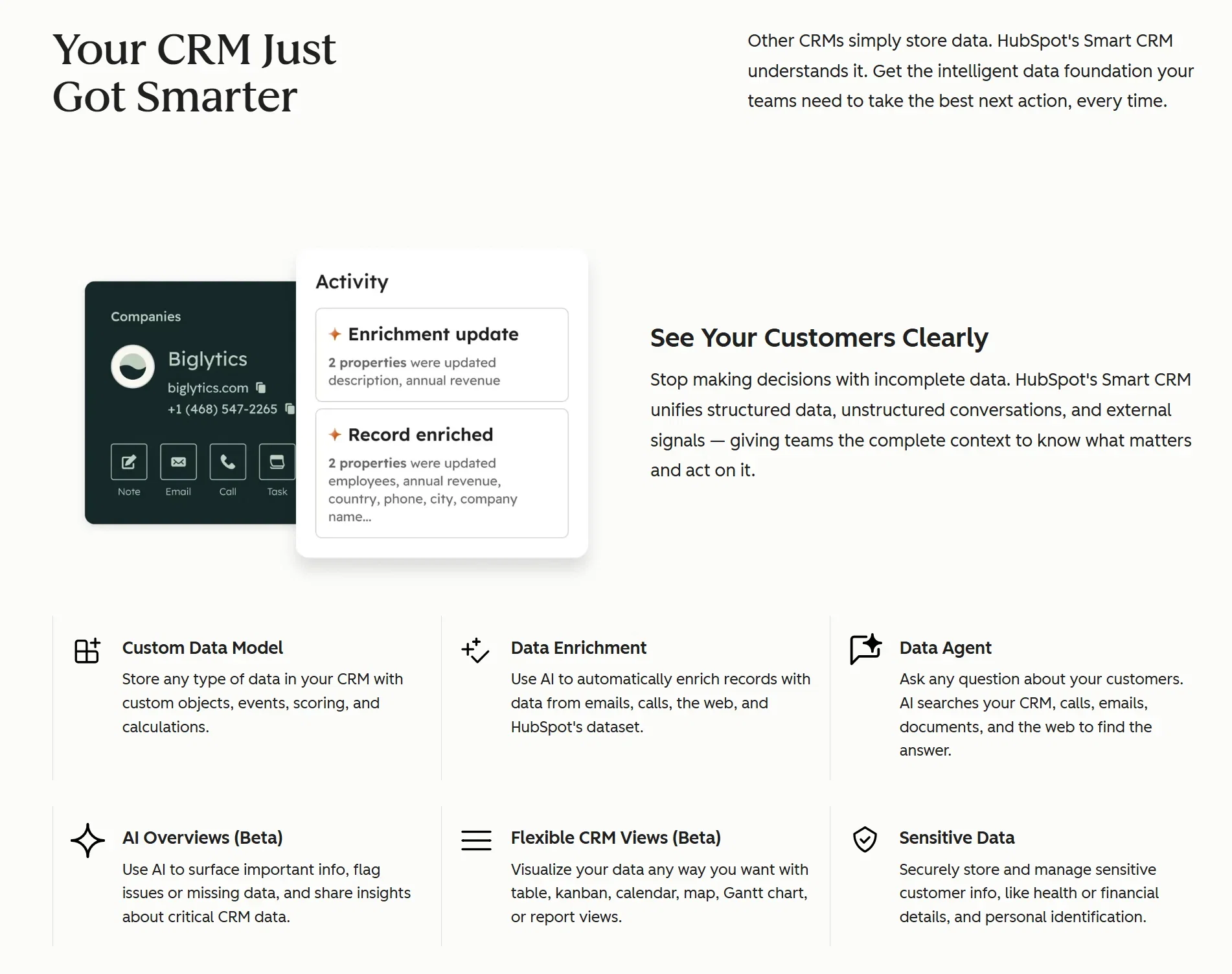
HubSpot CRM replaces spreadsheets by turning scattered customer data into structured records that automatically capture every interaction across the customer journey.
Instead of manually updating rows, HubSpot logs emails, calls, meetings, website visits, form submissions, and deal updates inside a single contact timeline. This removes the need for teams to maintain multiple spreadsheets for different stages of the customer lifecycle.
In real-world use, HubSpot CRM often replaces spreadsheets used for lead tracking, sales pipelines, and basic reporting. Instead of tracking leads in one sheet and deal progress in another, HubSpot consolidates everything into one system where updates happen in real time.
A key practical benefit is reduced manual coordination. When a new lead comes in from a website form, HubSpot can automatically create a contact, assign it to a pipeline stage, and notify the sales team without anyone touching a spreadsheet. This helps teams respond faster and avoid missed follow-ups.
It also improves visibility across teams. Marketing, sales, and customer support can all view the same customer record, which reduces the need for separate tracking files and constant syncing between spreadsheets.
Try HubSpot for free to start organizing customer tracking, automating follow-ups, and managing your sales pipeline in one place.
2. Airtable
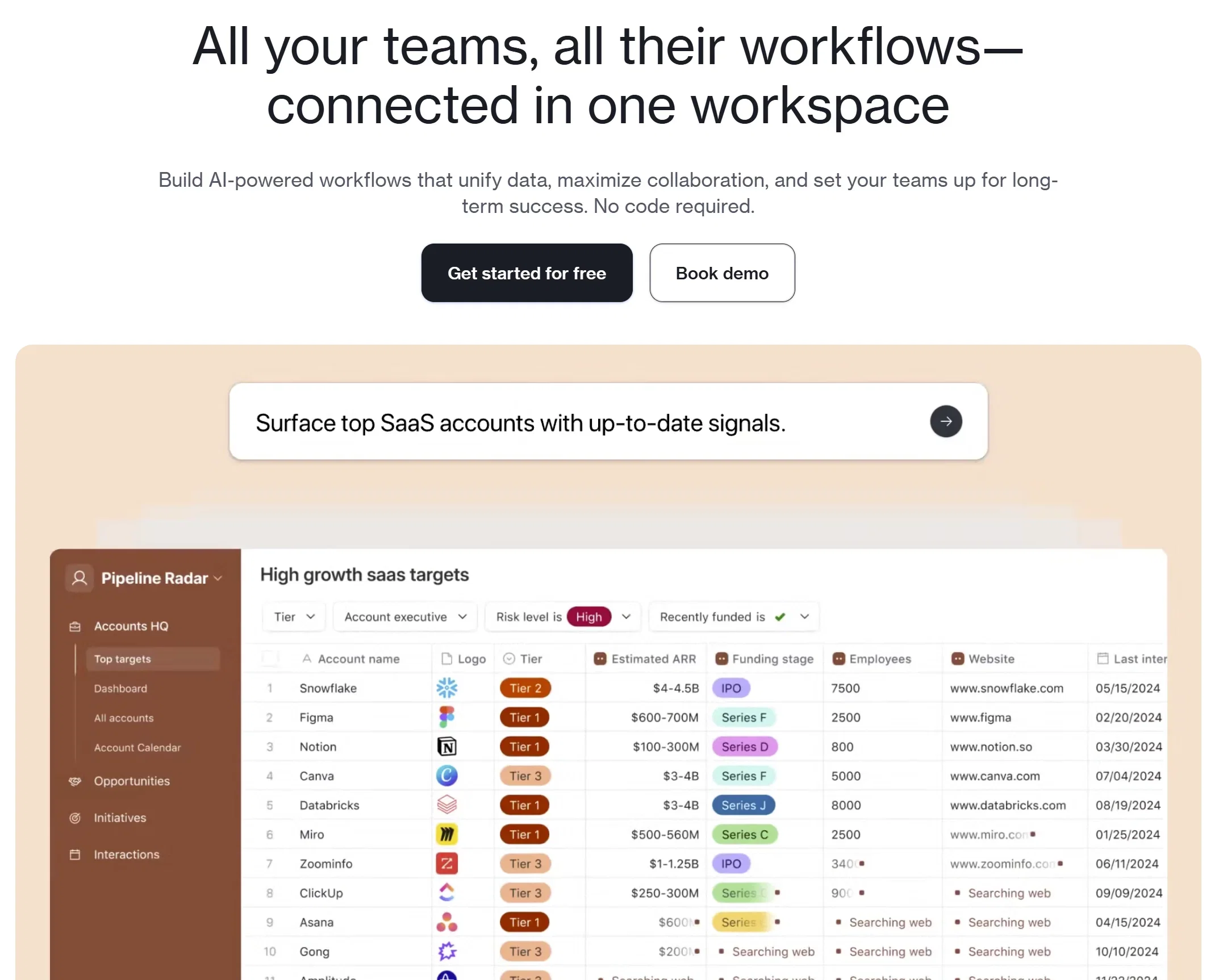
Airtable replaces spreadsheets by turning them into connected databases that behave like lightweight applications while still feeling familiar to spreadsheet users.
At a surface level, it looks like Excel or Google Sheets, but underneath, Airtable allows relationships between data. Instead of duplicating customer information across multiple sheets, users can link records such as contacts, deals, projects, and tasks.
In practice, this makes Airtable a common “step-up” from spreadsheets. A team might use one table for leads, another for sales opportunities, and another for customer feedback, all connected so updates in one area reflect everywhere else.
It is especially useful for teams that want to design their own system rather than follow a predefined CRM structure. However, because it is highly flexible, it still requires manual setup of workflows and does not fully automate customer tracking like dedicated CRM platforms.
3. Notion
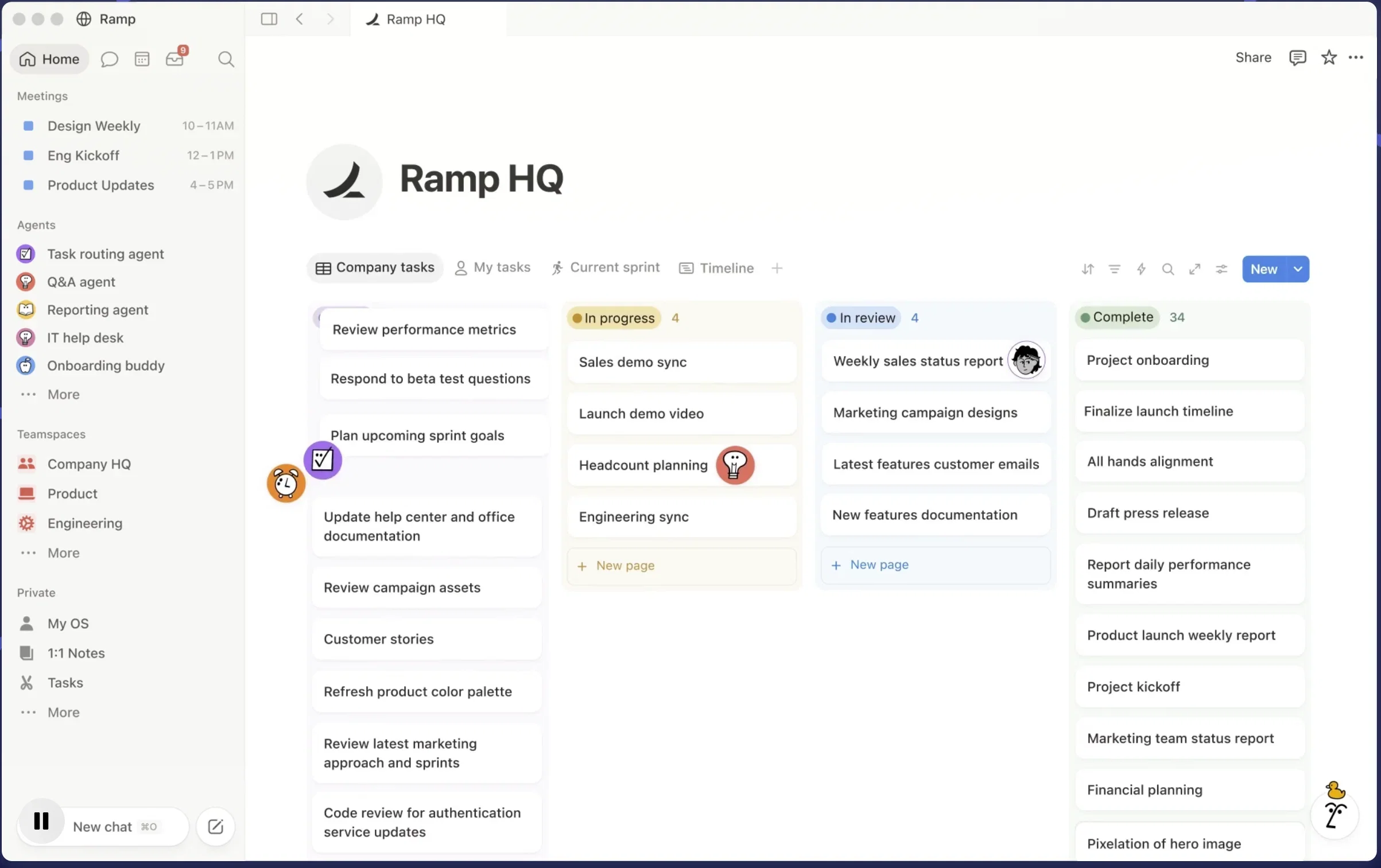
Notion replaces spreadsheets by combining databases, documents, and lightweight task management into one flexible workspace.
Instead of maintaining separate spreadsheets, documents, and project trackers, teams can store customer lists alongside meeting notes, onboarding steps, proposals, and internal documentation in one place.
In real use cases, Notion often functions as a “manual CRM” for small teams or freelancers. For example, a consultant might track clients, project status, meeting notes, and deliverables in a single workspace instead of switching between multiple tools.
The main advantage is context. Everything related to a customer can live in one page, making it easier to understand history and communication.
However, Notion still relies heavily on manual updates. It does not automatically capture customer interactions like emails or website visits, so it works best for lightweight tracking rather than full customer lifecycle management.
4. Salesforce
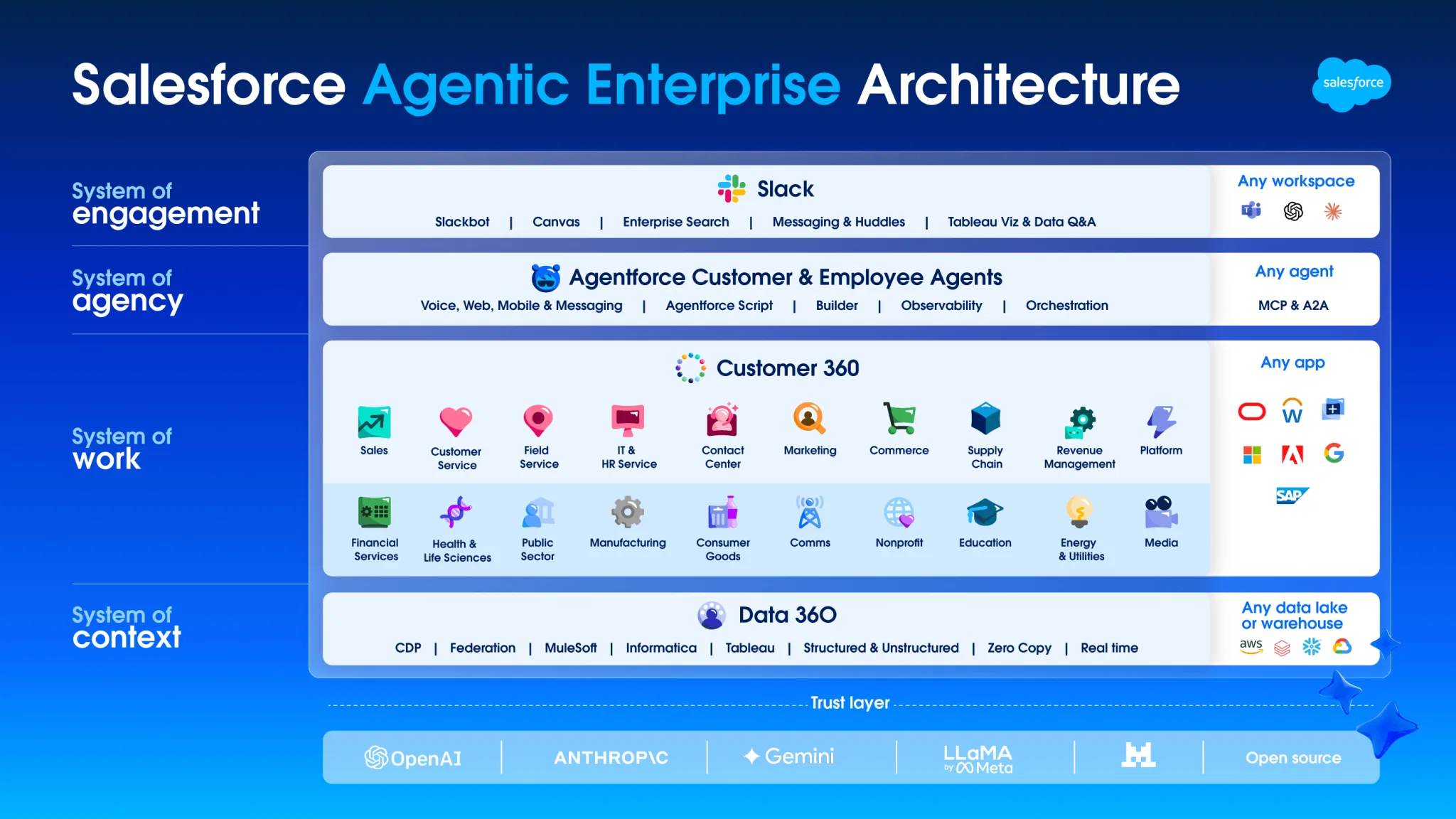
Salesforce replaces spreadsheets by providing a highly customizable enterprise CRM system designed for complex, large-scale customer tracking and automation.
Instead of managing multiple spreadsheets across departments, Salesforce centralizes customer data into one system that supports advanced workflows, reporting, and automation.
Large organizations use Salesforce to manage everything from lead assignment rules to multi-stage enterprise sales pipelines. For example, leads can be automatically routed based on region, industry, or deal size, while dashboards update in real time based on pipeline activity.
According to Statista, CRM systems are widely adopted across industries, with global CRM software revenue projected to exceed $80 billion in 2025, highlighting the rapid shift away from spreadsheet-based tracking systems.
It is also commonly used for forecasting and performance tracking across teams. Managers can view pipeline health, revenue projections, and conversion rates without manually compiling spreadsheet reports.
However, Salesforce requires significant setup and configuration. Many companies also need dedicated administrators to maintain workflows and ensure the system runs correctly as it scales.
5. Zoho CRM
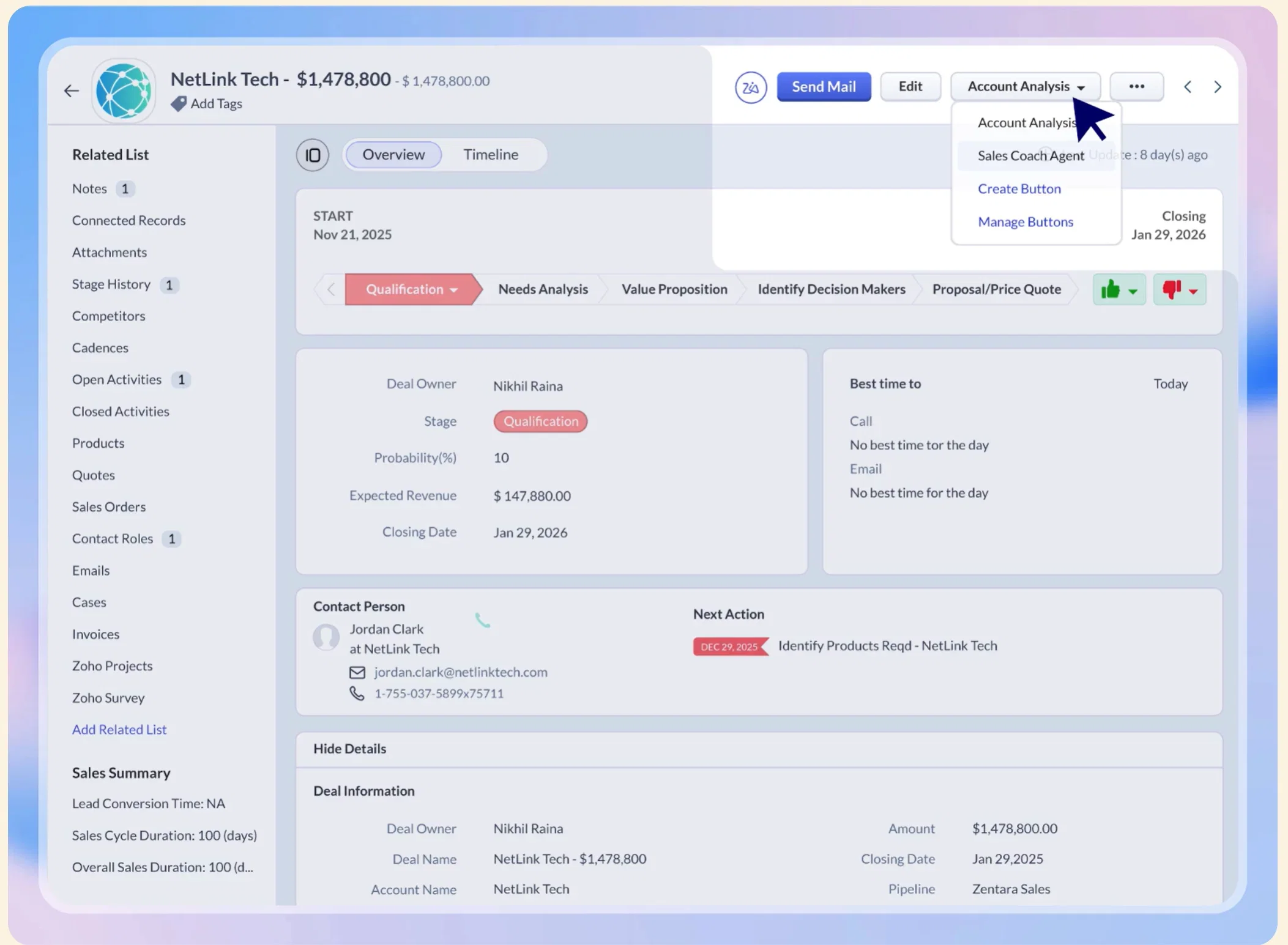
Zoho CRM replaces spreadsheets by providing structured customer tracking with automation at a more accessible cost for small and mid-sized businesses.
Instead of manually updating spreadsheets, Zoho CRM automates core sales activities like lead capture, follow-ups, task creation, and deal stage updates.
A common use case is replacing lead tracking spreadsheets. When a customer submits a form or inquiry, Zoho CRM automatically creates a record, assigns it to a sales rep, and triggers follow-up tasks without manual input.
It also provides basic reporting dashboards, allowing teams to track performance without building formulas or pivot tables in spreadsheets.
Zoho CRM is often chosen by growing businesses that want structure and automation but do not need the complexity or cost of enterprise platforms.
6. Pipedrive
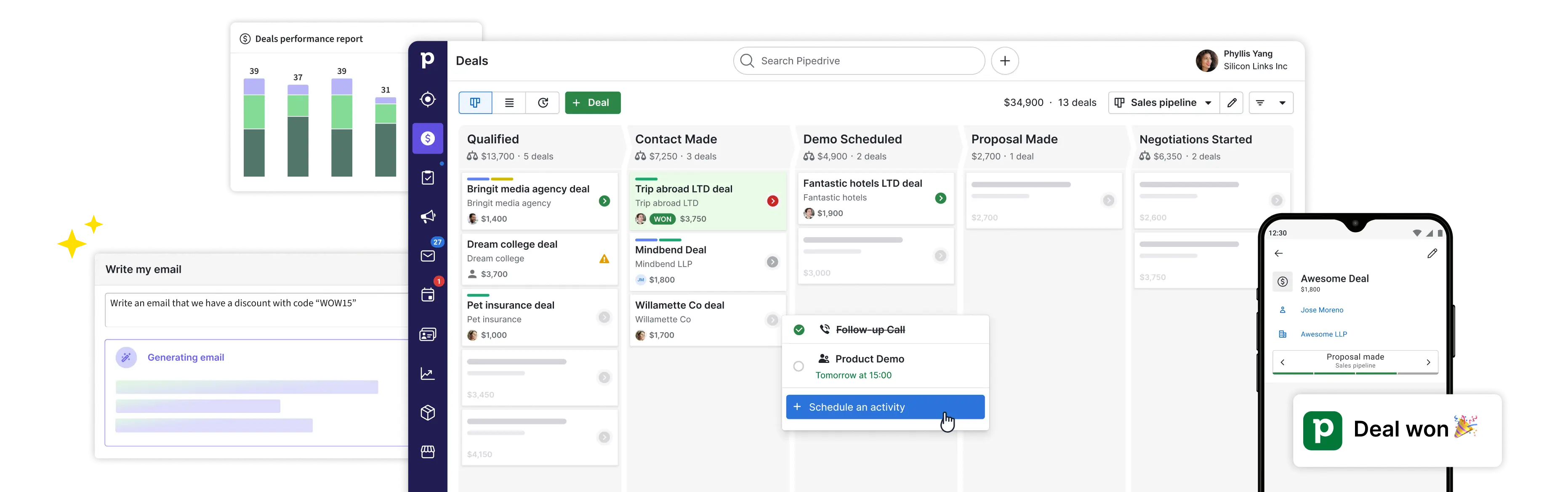
Pipedrive replaces spreadsheets by focusing on visual sales pipeline management that makes tracking deals simple and intuitive.
Instead of rows and columns, deals are displayed as cards that move through stages like “Lead,” “Contacted,” and “Won.” This makes it easy to see the entire sales process at a glance.
In real-world use, Pipedrive often replaces spreadsheets used for manual deal tracking. Instead of updating multiple columns in a sheet, sales teams simply drag and drop deals between stages as they progress.
It also helps reduce missed follow-ups because each deal is tied to activities like calls, emails, and reminders directly inside the system.
Pipedrive is especially effective for teams that want clarity and speed without needing heavy automation or complex configuration.
Comparison Table: Best Alternatives to Spreadsheets for Customer Tracking
| Platform | Best For | Main Strength | Key Limitation | Ease of Use |
|---|---|---|---|---|
| HubSpot CRM | All-in-one customer tracking | Automation, centralized customer data, and lifecycle visibility | Advanced features may require paid upgrades | Very Easy |
| Airtable | Flexible custom workflows | Spreadsheet-style relational database structure | Requires manual workflow setup | Moderate |
| Notion | Lightweight CRM-style organization | Combines notes, databases, and project tracking | Limited automation for customer activity tracking | Easy |
| Salesforce | Enterprise customer management | Advanced automation, reporting, and customization | Complex setup and ongoing administration | Advanced |
| Zoho CRM | Budget-friendly CRM adoption | Affordable automation and structured tracking | Less scalable for highly complex enterprise workflows | Easy to Moderate |
| Pipedrive | Visual sales pipeline tracking | Simple drag-and-drop deal management | Less suited for full customer lifecycle management | Very Easy |
How to Choose the Best Alternatives to Spreadsheets for Customer Tracking
Choosing the right tool depends less on feature lists and more on how your team actually works day to day.
If your main goal is to move away from spreadsheets quickly and reduce manual tracking, HubSpot CRM is often a practical starting point because it centralizes customer data and automatically tracks activity in one place. It works well when you want structure without needing heavy setup or technical configuration.
If your team prefers flexibility and wants to design its own system instead of following a fixed CRM structure, Airtable or Notion can feel more natural. Both tools allow you to build custom workflows, although they still require more manual management compared to automated CRM systems.
If your business is larger and needs advanced reporting, automation, and coordination across multiple teams, Salesforce is usually the better fit. It is powerful and highly customizable, but it also comes with more setup time and ongoing management.
If your focus is mainly on sales tracking and you want something simple and visual, Pipedrive keeps things lightweight by focusing on a clear pipeline view without unnecessary complexity.
Zoho CRM sits in the middle, offering structured CRM features at a more accessible cost, making it a common choice for teams that have outgrown spreadsheets but are not ready for more complex enterprise systems.
FAQ: Best Alternatives to Spreadsheets for Customer Tracking
What is a CRM tool used for in customer tracking?
A CRM tool is used to store, organize, and manage customer data in one system while tracking interactions like emails, deals, and support activity in real time.
How do CRM tools differ from spreadsheets?
CRM tools differ from spreadsheets by automatically updating customer records, connecting related data, and reducing manual entry, while spreadsheets rely heavily on manual updates and static rows.
Can spreadsheets still be used for customer tracking?
Yes, spreadsheets can still be used for very small datasets or early-stage businesses, but they become harder to manage as customer data grows and teams need collaboration and automation.
Which tool is best for replacing spreadsheets?
The best tool depends on use case. Airtable and Notion work well for flexible setups, Pipedrive is strong for sales pipelines, Zoho CRM fits budget-focused teams, Salesforce is built for large enterprises, and HubSpot CRM is often used for all-in-one structured tracking.
Is HubSpot CRM easy to set up for beginners?
Yes, HubSpot CRM is generally considered easy to set up. Most users can start by importing contacts, setting up pipelines, and using built-in onboarding guides without needing technical skills or complex configuration.
Do CRM tools improve team collaboration?
Yes, CRM tools improve collaboration by allowing multiple users to access the same updated customer records in real time instead of working from separate spreadsheet files.
When should a business move away from spreadsheets?
A business should move away from spreadsheets when manual updates become time-consuming, data becomes inconsistent, or teams need better visibility into customer interactions and sales progress.
Final Thoughts
HubSpot CRM and tools like Airtable, Notion, Salesforce, Zoho CRM, and Pipedrive all replace spreadsheets by introducing structure, automation, and more reliable customer tracking systems. Each tool solves the same core problem in a different way, depending on how simple or complex your workflow needs to be.
Spreadsheets still have a place for basic lists and early-stage tracking, but they quickly reach their limits once customer data becomes active, shared, and fast-moving. At that point, switching to a CRM or structured system is less about upgrading software and more about making customer information easier to trust and use.
For teams that want a straightforward starting point, HubSpot CRM is often chosen because it combines contact management, pipeline tracking, and automation in one system without requiring heavy setup. Other tools like Airtable, Notion, Salesforce, Zoho CRM, and Pipedrive fit different needs depending on flexibility, scale, and complexity. You can try HubSpot for free to see if it works for you.
Ultimately, the goal isn’t just replacing spreadsheets but building a system that keeps customer data accurate, connected, and usable as your business grows.