AI-powered CRMs are transforming how businesses manage customer relationships by automating tasks, analyzing data, and increasing sales using AI. Here’s a breakdown of the top AI CRMs available today:
Key Highlights:
- HubSpot: Offers advanced AI tools like Breeze AI for automated workflows, predictive lead scoring, and data enrichment. Users report a 69% increase in closed deals within six months.
- Pipedrive: Known for its visual pipeline and AI Sales Assistant, it helps prioritize leads and streamline sales processes at a lower cost.
- Apollo: Focuses on lead generation with AI-powered email personalization, meeting intelligence, and a vast contact database.
- Octopus CRM: Specializes in LinkedIn automation with tools for connection requests, messaging, and lead generation funnels.
- Dripify: Automates LinkedIn outreach with AI message composers, A/B testing, and GDPR-compliant drip campaigns.
Quick Comparison of The Best AI CRMs
| Platform | Key Features | Pricing (Annual) | Best For |
|---|---|---|---|
| HubSpot | AI-powered workflows, lead scoring, call summaries | Free to $75/seat/month | All-in-one sales, marketing & service |
| Pipedrive | Visual pipeline, AI Sales Assistant | $14–$99/user/month | Sales-focused teams |
| Apollo | Lead generation, AI email tools, meeting intelligence | Free to $119/user/month | High-volume outreach |
| Octopus CRM | LinkedIn automation, multi-step funnels | $6.99–$24.99/month | LinkedIn-centric networking |
| Dripify | LinkedIn drip campaigns, A/B testing | $39–$79/month | LinkedIn outreach optimization |
Each platform has unique strengths. HubSpot is ideal for businesses seeking a unified CRM with robust AI tools, while Pipedrive is a cost-effective option for smaller sales teams. Apollo excels in lead generation, and Octopus CRM and Dripify cater to LinkedIn-focused strategies. Assess your team’s needs to choose the right tool.
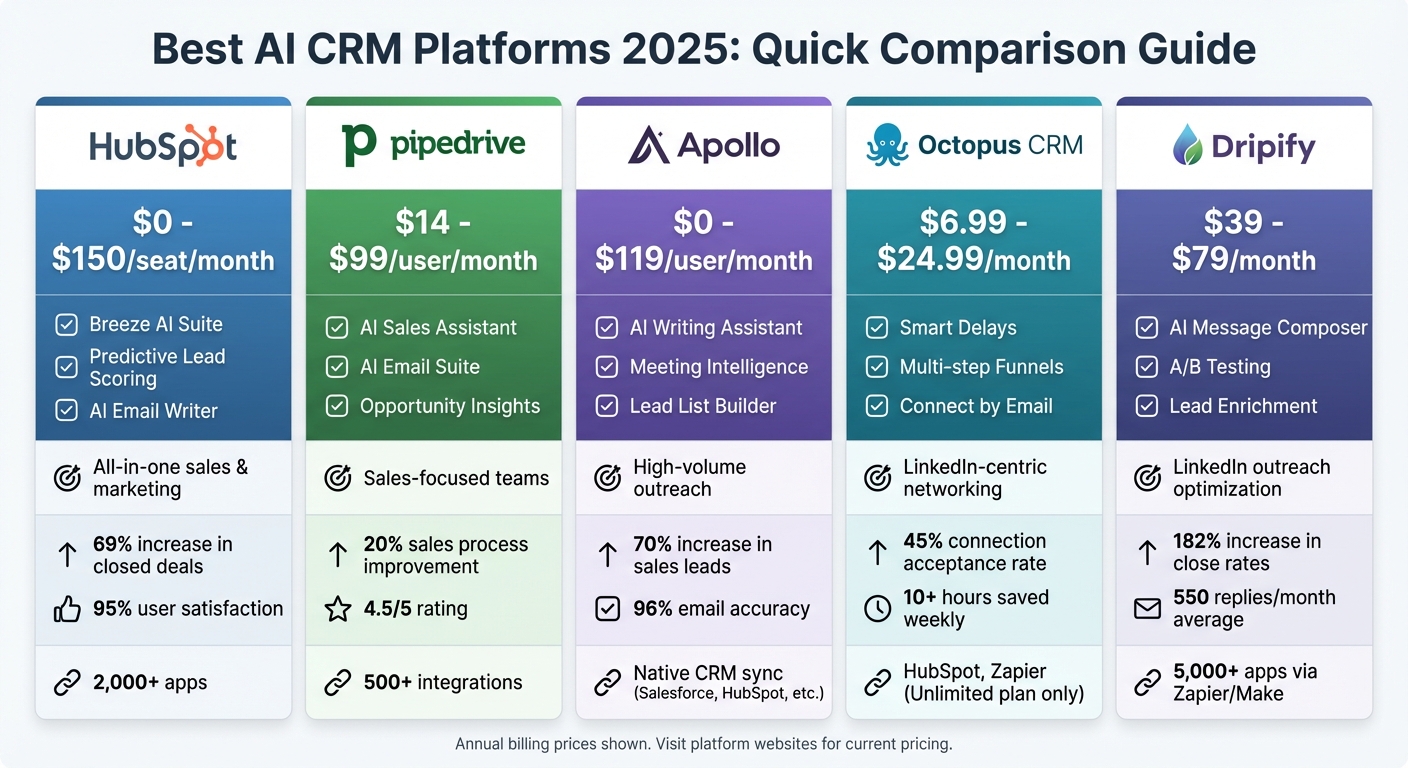
AI CRM Platform Comparison: Features, Pricing, and Best Use Cases
1. HubSpot
AI Features
The Breeze AI Suite is transforming how sales teams operate. With tools like the Breeze Assistant, which handles daily tasks, and Breeze Agents, which manage entire workflows, teams can save time and focus on strategy. For instance, the Prospecting Agent digs into potential customers and identifies buying signals, while the Data Agent uses natural language queries to pull CRM data from calls, emails, and documents.
HubSpot’s Conversational Intelligence takes call recordings and email threads and turns them into summaries, highlighting key buying signals like budget discussions or mentions of competitors. Predictive Lead Scoring goes a step further, using real-time behavioral analysis to rank leads based on their likelihood to convert, rather than relying on outdated static systems. Plus, contact and company records are automatically enriched with data from calls, emails, and HubSpot's own dataset - no manual entry required.
The results speak for themselves. In 2025, Agicap reported saving 750 hours per week and speeding up deal velocity by 20% thanks to Breeze AI tools. Sandler saw equally impressive results, with 25% more engagement and a fourfold increase in sales leads by using Breeze to deliver personalized customer experiences.
All these AI tools integrate seamlessly with HubSpot’s sales features, making them even more effective.
Sales Tools
HubSpot’s sales tools are designed to simplify every step of the sales process. With flexible CRM views like Kanban boards, Gantt charts, and custom reports, sales leaders can quickly spot pipeline issues. The AI Email Writer helps reps craft tailored outreach and follow-up emails directly within the CRM or through a Chrome extension for Gmail and Outlook. Meanwhile, Revenue Intelligence analyzes the sales funnel, identifying deal risks, forecasting trends, and assessing pipeline health.
For added convenience, sales reps can use the HubSpot Chrome extension to draft emails with generative AI right in Gmail or Outlook, avoiding the need to switch platforms. Managers also get AI-generated call highlights, which make real-time coaching easier by eliminating the need to listen to full call recordings.
Integration Options
HubSpot’s Marketplace offers access to over 2,000 apps, including both HubSpot-built and third-party tools, making integrations straightforward. Two-way data sync ensures that information stays updated across HubSpot and external apps, while integrated workflows allow teams to trigger actions in other tools directly from HubSpot.
Breeze Intelligence further enhances integrations by automatically updating records with over 40 attributes from external signals. Additionally, HubSpot’s specialized Hubs (Marketing, Sales, Service, Commerce, Content, and Data) work together, consolidating customer data into a single, unified source. Elisabeth Norberg, Revenue Operations Manager, sums it up well:
"Thanks to HubSpot, because we don't have everything dispersed across systems, we're able to give the customer a much better experience."
Cost
HubSpot uses a seat-based pricing model with two tiers: Core Seats, which include full access to advanced tools, and View-Only Seats, which are free and allow users to view the subscription services without making any changes to their account. Choosing annual billing can save businesses between 10% and 40% compared to monthly payments. For example, the Starter plan costs $9 per seat per month when billed annually, compared to $15 for monthly billing.
| Smart CRM Plan | Monthly Cost (Annual) | Monthly Cost (Monthly) | Key Features |
|---|---|---|---|
| Free Tools | $0 | $0 | 1 Pipeline, Meeting scheduler, Mobile app |
| Starter | $9/seat | $15/seat | 2 Pipelines, Basic automation, No branding |
| Professional | $45/seat | $50/seat | 300 Workflows, Sequences, Forecasting |
| Enterprise | $75/seat | N/A | 1,000 Workflows, Custom objects, Predictive AI |
HubSpot’s impact is clear: customers report a 36% increase in deals closed within 12 months of using Sales Hub. Deal close rates improve by 109%, while average deal sizes grow by 61%. On top of that, rep productivity jumps by 79%, with 63% of users saving at least 4 hours per week per rep through automation.
sbb-itb-8aac02d
2. Pipedrive
AI Features
Pipedrive's AI Sales Assistant helps sales teams by analyzing past performance to uncover winning strategies and flagging deals that may be stagnating. It also suggests the best times to reach out to leads and estimates the likelihood of closing each opportunity [17, 19]. The AI Email Suite includes tools like a generative writer that creates personalized emails from simple prompts and an email summarizer that condenses long threads. It even evaluates customer sentiment and gauges their "readiness to buy" on a scale of 1–10 [20, 21].
With Pipedrive Pulse, sales reps can prioritize prospects using engagement scores and get quick deal summaries to focus on high-value opportunities [22, 23]. The platform also allows users to generate detailed sales reports using natural language queries [18, 20] and features an AI import assistant to simplify mapping spreadsheet data into CRM fields.
In 2024, Jana Hodboďová, Chief Sales Officer at Leadspicker, shared that Pipedrive improved their sales process by 20% and cut administrative work by 40%. Currently, over 100,000 companies across 179 countries use Pipedrive, which includes access to its Prospector tool - a database of more than 400 million profiles [16, 23].
Sales Tools
Pipedrive complements its AI capabilities with a range of practical sales tools. Its visual Kanban-style pipeline makes tracking deals across stages straightforward. The platform supports two-way email sync for up to five accounts and allows users to generate meeting links for Google Meet, Zoom, and Microsoft Teams directly. Additional features include sales automation workflows and a mobile app with a business card scanner to digitize physical contacts.
The Opportunity Insights feature can help shorten the sales cycle by around 10%. For extra functionality, the LeadBooster add-on offers chatbots, live chat, web forms, and access to the Prospector database.
Suds Singh, Founder and MD of Interesting Content, remarked, "Pipedrive has enabled us to have instant access to that data, so it's not just quadrupling our revenue but ensuring that we have predictable revenue".
Integration Options
Pipedrive's Marketplace includes over 500 integrations with third-party apps, covering areas like lead generation, project management, video calls, and marketing. Using natural language processing, users can describe their business needs (e.g., "apps for creating proposals") to find suitable tools without needing specific brand names. Pipedrive also connects with Zapier, enabling integration with over 8,000 apps for tasks like automated lead logging and Slack alerts. Webhooks provide additional control over data transfers between Pipedrive and other platforms.
Oliver Lee, Sales Director at CreativeRace, commented, "Pipedrive is significantly better value than other CRMs but still has an easy-to-use interface".
These integrations make it versatile and adaptable to various business needs.
Cost
Pipedrive uses a per-user, per-month pricing model, with annual billing offering savings of 20% to 42%, depending on the plan. A 14-day free trial with full access to features is available, and no credit card is required [16, 26].
| Plan | Annual Billing | Monthly Billing | Key Features |
|---|---|---|---|
| Essential | $14/user/month | $24/user/month | Basic lead tracking, 30 custom fields, mobile apps |
| Growth | $34/user/month | N/A | Workflow automation, email sync, meeting scheduler |
| Professional | $49/user/month | N/A | AI Sales Assistant, AI email tools, lead scoring |
| Enterprise | $99/user/month | N/A | Advanced permissions, unlimited custom fields, enhanced security |
To access the AI Sales Assistant and AI email tools, the Professional plan is the minimum requirement. The LeadBooster add-on costs $32.50 per month per company with annual billing or $39 per month with monthly billing. Pipedrive holds a solid 4.5/5 rating on both G2 and Capterra, with users frequently praising its user-friendly interface and workflow automation features.
3. Apollo
AI Features
Apollo simplifies sales processes by replacing manual research with advanced AI tools. Teams can create lead lists using natural language queries instead of complex filters, while the platform identifies similar accounts to help expand outreach efforts. It also gathers real-time web data to prioritize leads based on buying signals and ideal customer profiles [29,32].
The AI Writing Assistant helps craft personalized emails or opening lines that align with your brand's tone and even incorporate recent company updates. Additionally, Apollo's meeting intelligence, powered by Google Gemini, offers pre-meeting insights, AI-generated call summaries, and automated task creation. An AI chatbot analyzes call transcripts, providing insights into objections or momentum shifts [29,32].
In 2024, Alexander Theodorou, Founder and CEO of Neurofit, shared that Apollo's AI tools enabled his team to triple their personalized email output, achieving a 39% open rate while saving over 100 hours of manual work for three full-time BDRs [32,37]. Grace Feeney, Sr. Manager of Sales Dev and Ops at Smartling, noted that their team sent 10 times more personalized emails using Apollo's features. The platform also boasts a database of over 275 million verified B2B contacts with a 96% email accuracy rate [30,31].
Sales Tools
Apollo combines multiple sales functionalities into one platform, offering tools like a built-in dialer, automated email sequences, and workflow automation that triggers follow-ups based on prospect actions [29,32]. A Chrome Extension further enhances efficiency by providing sales intelligence and contact data directly within LinkedIn and other websites.
Companies using Apollo have reported impressive results, such as a 70% increase in sales leads and a fourfold improvement in SDR efficiency. Organizations have also reduced tech stack costs by 64% by consolidating tools with Apollo.
"Every rep is more productive with Apollo. We booked 75% more meetings while cutting manual work in half", said Andrew Froning, BDR Leader.
Integration Options
Apollo seamlessly integrates with major CRMs like Salesforce, HubSpot, Pipedrive, and Zoho through native, bi-directional synchronization. This allows contacts, accounts, emails, notes, tasks, calls, and meetings to sync, with updates refreshing every 15 minutes [30,34]. Teams can also map custom fields between Apollo and their CRM to ensure data consistency.
For businesses using non-native CRMs, Apollo provides a robust API for custom integrations. It also connects with tools like Slack, Notion, Gmail, Chili Piper, JustCall, and Marketo. Apollo's reputation is backed by over 9,000 customer reviews on G2 and 624 badges in the G2 Winter 2026 Report.
Cost
Apollo offers a tiered subscription model based on annual billing, coupled with a credit system. Verified emails cost 1 credit, while mobile numbers cost 8 credits. Unused credits do not roll over to the next billing cycle [37,42].
| Plan | Annual Billing | Monthly Billing | Key Features |
|---|---|---|---|
| Free | $0/user/month | $0/user/month | 10,000 email credits, 60 mobile credits, 120 export credits |
| Basic | $49/user/month | $59/user/month | Unlimited email credits, 900 mobile credits, CRM integrations |
| Professional | $79/user/month | $99/user/month | US dialer, 1,200 mobile credits, AI-powered insights |
| Organization | $119/user/month | $149/user/month | International dialing, 2,400 mobile credits, SSO (3-user minimum) |
Apollo holds a 4.7/5 rating from 9,015 reviews and is ranked as the #1 AI Sales Assistant for small businesses on G2's 2025 Grid. It is trusted by over 500,000 companies worldwide [28,37].
4. Octopus CRM
AI Features
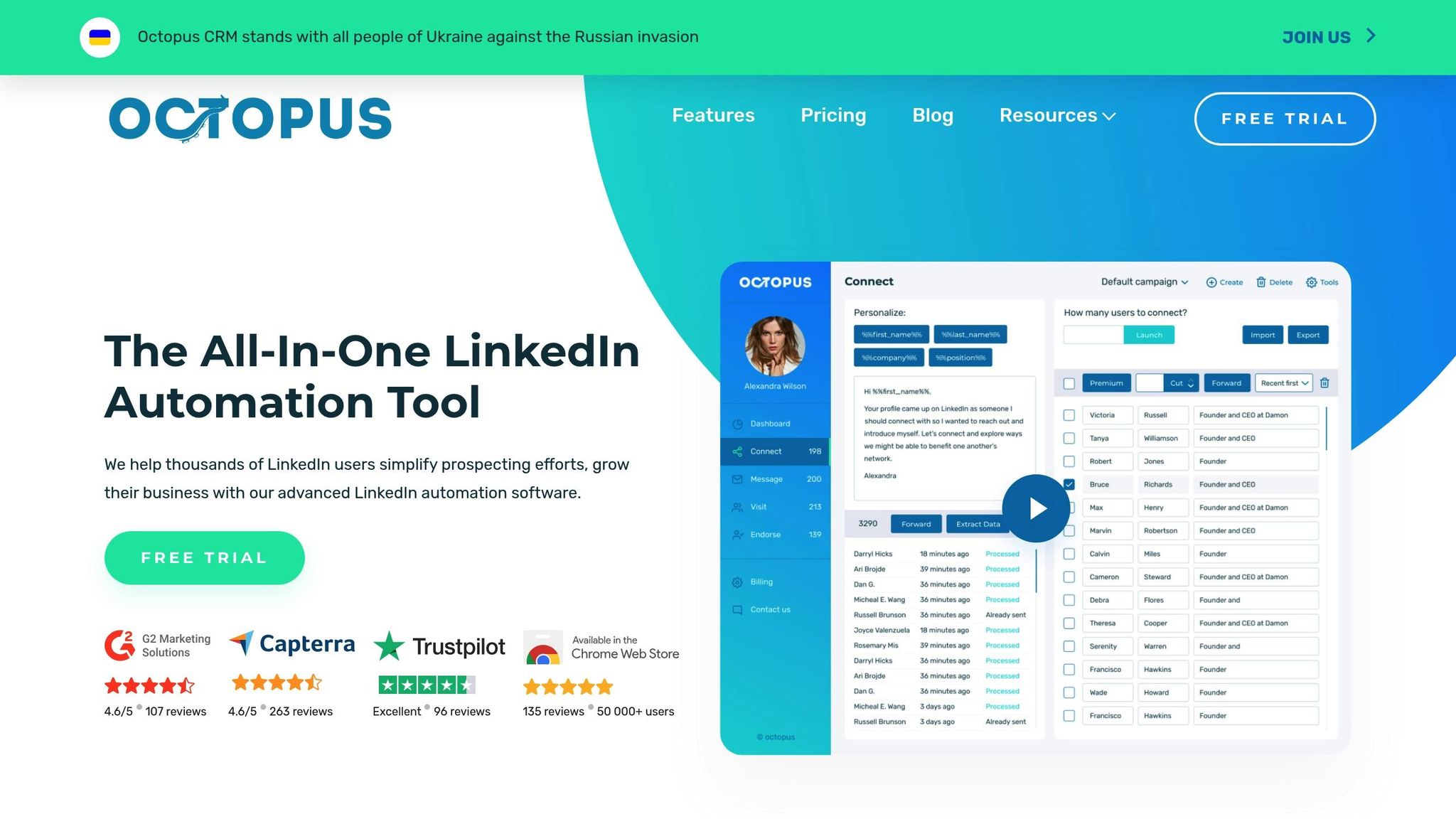
Octopus CRM uses Smart Delays and randomized timing to replicate human-like behavior on LinkedIn, helping to avoid account restrictions. Its activity control system keeps tabs on LinkedIn actions and notifies users if they exceed safe activity levels. The platform automates repetitive LinkedIn tasks, such as sending connection requests, bulk messaging first-level connections, visiting profiles, and endorsing skills. Users can also set up automated multi-step lead generation funnels. For instance, a funnel could include sending a connection request, following up with a thank-you message, endorsing skills, and delivering a sales pitch.
One standout feature is the Connect by Email tool, which allows users to bypass LinkedIn's weekly invitation cap of 100 connections - maintaining high outreach volumes while avoiding restrictions. Octopus CRM is trusted by over 50,000 users worldwide, saving sales teams an average of 10+ hours weekly on manual outreach. Personalized connection requests through the platform boast a 45% acceptance rate, compared to just 15% for generic messages. These tools make LinkedIn outreach faster and more efficient.
Sales Tools
Octopus CRM includes a LinkedIn marketing funnel builder, letting users create custom multi-step sequences by adding, removing, or rearranging steps with ease. Sales teams can import LinkedIn profile URLs via CSV files and export lead data for use in other systems. The tool works with all types of LinkedIn accounts.
As a Chrome extension, Octopus CRM requires an active Chrome session to run campaigns. For newer LinkedIn accounts, it's best to limit automated connection requests to 20–30 per day. More established accounts can handle 80–100 requests daily, and users can send between 100–150 messages per day.
Integration Options
Octopus CRM supports native integrations with HubSpot and Zapier, but these are only available on the Unlimited plan. Through Zapier, users can link LinkedIn data to countless other apps, including Zoho CRM, Asana, Google Sheets, and Google Docs. Additionally, CSV import/export ensures smooth lead data transfers across systems.
Cost
Octopus CRM offers a 7-day free trial without requiring a credit card and provides four pricing tiers. Annual plans come with a 30–35% discount.
| Plan | Monthly Price | Annual Price | Key Features |
|---|---|---|---|
| Starter | $9.99 | $6.99/month | Auto-invite, personal CRM, stats |
| Pro | $14.99 | $9.99/month | Bulk messaging, auto-view, auto-endorse |
| Advanced | $21.99 | $14.99/month | Funnel builder, campaign creation, data export |
| Unlimited | $39.99 | $24.99/month | HubSpot/Zapier integration, Activity Control, Connect by Email |
This pricing structure offers a cost-effective way to save time and boost LinkedIn networking efforts. Octopus CRM holds a 4.6/5 rating on G2 (from 107 reviews) and Capterra (from 263 reviews). Users often highlight its affordability and effectiveness in expanding LinkedIn networks. However, some mention the interface feels outdated and note the lack of advanced conditional logic in the funnel builder.
5. Dripify
AI Features
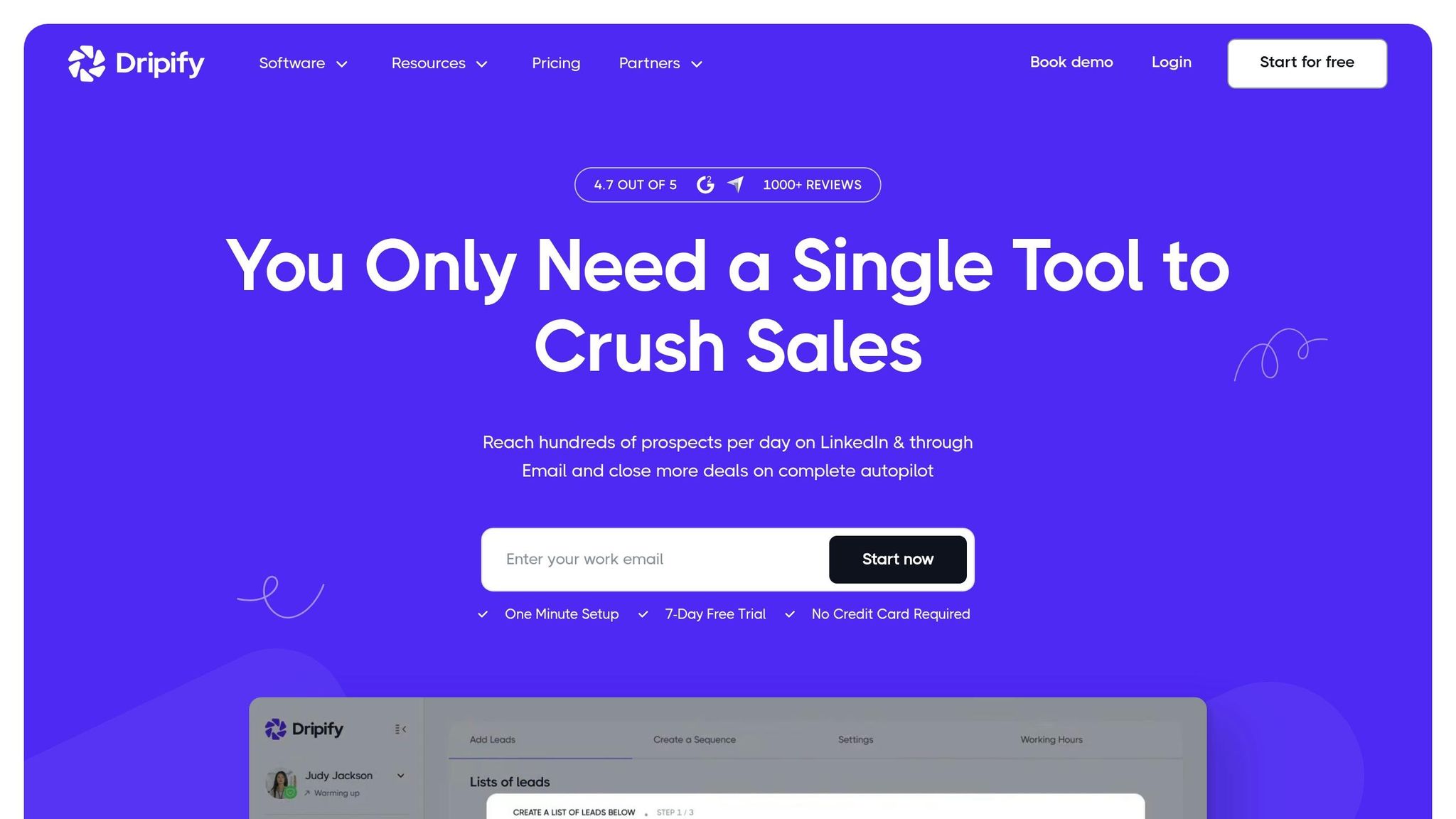
Dripify's AI Message Composer simplifies personalized LinkedIn outreach by automating smart drip campaigns. With branching logic and over 20 personalization variables, it tailors messages effectively. The Persona A/B Testing feature allows teams to test different message versions, which Dripify claims can boost ROI by up to 40%. Additionally, its lead enrichment tools verify business email addresses automatically, helping users achieve an average 182% increase in close rates and approximately 550 replies per month. Over 60,000 users worldwide rely on these features.
"Phenomenal tool that saves time and does lead generation on LinkedIn instead of you. The cost is minimal in comparison to the level of business it can generate."
- Christian Vermeulen, Head of Sales at HHS
These AI-powered tools integrate seamlessly into workflows, enhancing LinkedIn outreach and team management.
Sales Tools
Dripify equips teams with a unified inbox and supports unlimited drip campaigns, enabling managers to oversee conversations while helping teams target up to 9,000 leads per month. This automation delivers 10x the productivity compared to manual outreach. Compatible with all LinkedIn subscription types - Free, Premium Career, Premium Business, Sales Navigator, and Recruiter Lite - it operates as a cloud-based platform that adheres to LinkedIn's safety limits and GDPR regulations.
"Dripify has helped our team with LinkedIn lead generation solutions tremendously. It makes it simple to use and it is automated."
- Brian Hartman, Managing Partner at Pharus Global
Integration Options
Dripify connects effortlessly with major CRM platforms, including HubSpot, Salesforce, Zoho CRM, Pipedrive, and ActiveCampaign. Through Zapier and Make, it links with over 5,000 other apps, enabling workflow automation without coding. This integration syncs LinkedIn prospect data directly into CRM systems, triggering workflows and notifications while supporting two-way syncing. It also connects with Gmail or Google Workspace for automated emails and integrates with tools like Google Sheets, Asana, Intercom, and Zendesk.
These integrations ensure a smooth flow of data and enhance team productivity.
Cost
Dripify offers a 7-day free trial with no credit card required and has three pricing tiers with discounts for annual billing:
| Plan | Monthly Price | Annual Price | Key Features |
|---|---|---|---|
| Basic | $59 | $39/month | Unlimited campaigns, drip scheduling |
| Pro | $79 | $59/month | A/B testing, team inbox, lead export, Zapier |
| Advanced | $99 | $79/month | Team management, API access, priority support |
With a 4.5/5 rating on G2 based on over 280 reviews, users often highlight its intuitive design and time-saving automation. However, some mention that the pricing could be a hurdle for smaller budgets, and there are concerns about potential LinkedIn account restrictions when using automation tools.
5 Best AI CRM Software 2025 (Detailed Breakdown)
Pros and Cons
When choosing between platforms, it’s essential to weigh their unique strengths and limitations, especially when considering factors like team size, available resources, and budget. HubSpot stands out with a 95% user satisfaction rate for its ease of use and a unified AI system that integrates sales, marketing, and service functions seamlessly. This makes it a strong contender for small to mid-sized businesses (SMBs) and mid-market teams. That said, its advanced AI capabilities are only accessible through higher-tier plans, and its credit-based pricing model can lead to fluctuating monthly expenses.
Pipedrive, on the other hand, shines with its clear, visual pipeline and actionable next-step suggestions. It’s marketed as a sales-focused tool and is about 65% less expensive than HubSpot Professional. However, its AI capabilities are more limited, lacking features like autonomous agents, and it requires additional integrations to handle marketing and support functions effectively.
Interestingly, companies that use AI-enabled platforms like these report 30% higher win rates and 25% faster deal cycles. Below is a quick breakdown of the advantages and drawbacks of each platform:
| Platform | Key Advantages | Key Disadvantages |
|---|---|---|
| HubSpot | - 95% ease-of-use rating - Unified AI across departments - Over 2,000 integrations - Free tier available |
- Advanced AI features require high-tier plans - Credit-based pricing can be unpredictable |
| Pipedrive | - Clear visual pipeline - 65% cheaper than HubSpot Professional - Intuitive for small teams |
- Limited AI scope - Lacks native marketing and support tools - Requires additional integrations |
The data highlights the importance of leveraging AI to boost sales efficiency. For instance, 83% of sales teams using AI in 2025 reported revenue growth, compared to just 66% among those who didn’t adopt AI. If you’re new to AI, consider starting small - implementing a single workflow can help build trust and confidence before scaling up.
Which AI CRM Is The Best?
HubSpot has emerged as a top choice for businesses looking for an all-in-one, AI-powered solution. Its Smart CRM architecture ensures smooth data integration across marketing, sales, and service teams. The Breeze AI suite takes automation to the next level, with autonomous agents handling tasks like prospecting and customer support, streamlining workflows effortlessly.
The numbers speak volumes: 87% of users say HubSpot is easy to use, 93% use it daily, and 83% find it effective for consolidating company data. Businesses using HubSpot report a 69% increase in closed deals within six months. For companies burdened by disjointed tools, HubSpot's unified ecosystem offers a much-needed solution.
To get started, consider testing the free tier for 3–6 months to evaluate how it fits your needs. Begin by automating a high-impact workflow, such as lead qualification, to quickly see results. Before diving in, ensure your data is clean and accurate - AI amplifies existing processes, so a solid foundation is crucial. HubSpot’s built-in tools, like duplicate detection and data enrichment, can help you achieve this.
It’s worth noting that 83% of AI CRM users surpass their sales goals within six months, but success often depends on blending AI-driven insights with human expertise, especially for complex deals and nuanced customer interactions.
As sales teams evolve from relying on "suggestion AI" to embracing "agentic AI", HubSpot is leading the charge with tools that deliver tangible results from day one. This unified approach to AI-driven sales excellence highlights the transformative potential discussed throughout this article.
FAQs
Which AI CRM is best for small teams?
HubSpot stands out as the go-to CRM for small teams in 2026. Its AI-powered tools, combined with an intuitive design, help streamline sales workflows effortlessly. By focusing on boosting productivity while keeping things simple, it’s perfectly suited for smaller teams looking to stay efficient without feeling overwhelmed.
How do AI CRMs improve lead scoring and forecasting?
AI-powered CRMs like Hubspot improve lead scoring and sales forecasting by diving deep into customer interactions, such as website visits and email engagement. They assign dynamic scores to leads, making it easier for teams to focus on the most promising prospects. Using predictive algorithms, these tools analyze trends and historical data to create precise sales forecasts. The result? Teams save time, minimize errors, and make smarter, data-driven decisions - ultimately leading to better resource management and higher revenue.
What should I check before migrating my data to an AI CRM?
Before moving your data to an AI-powered CRM, take the time to plan thoroughly to ensure everything runs smoothly. Start by auditing your data - look for duplicates, inconsistencies, or missing details that could cause issues down the line. Next, confirm that your current system is compatible with the new CRM. This means checking data formats, integrations, and ensuring fields are mapped correctly to maintain smooth workflows.
Make sure your data is clean and organized so the AI can provide accurate insights. It's also a good idea to carefully review your migration plan, identifying potential risks like data loss or downtime, and addressing them beforehand. Finally, always back up your data as an extra layer of protection.
What are the best AI CRM tools in 2026?
Some of the best AI CRM tools in 2026 include HubSpot, Salesforce, Zoho CRM, ActiveCampaign, and Pipedrive. Each platform offers different strengths, from advanced AI insights and automation to affordability and ease of use, depending on your business needs.
What is HubSpot CRM best for?
HubSpot is best for businesses looking for an all-in-one platform that combines marketing, sales, and customer service tools. It’s particularly useful for teams that want a unified view of customer data and built-in AI features without relying heavily on third-party integrations.
How does HubSpot compare to Salesforce, Zoho, or ActiveCampaign?
HubSpot focuses on ease of use and an all-in-one ecosystem, making it ideal for growing businesses. Salesforce offers deep customization and enterprise-level capabilities, Zoho CRM provides a cost-effective solution with a wide range of features, and ActiveCampaign specializes in email marketing and automation.
When should you use HubSpot?
You should consider using HubSpot when your business is growing and needs better alignment between marketing, sales, and customer support. It’s especially helpful when you want to centralize data and automate processes without managing multiple tools.
What AI features should you look for in a CRM?
Key AI features to look for include predictive lead scoring, workflow automation, email personalization, chatbots, and data-driven insights. Platforms like Salesforce and HubSpot offer advanced AI capabilities, while tools like Zoho and ActiveCampaign provide strong automation at a lower cost.