Contact enrichment tools help sales teams save time by automatically appending accurate details like job titles, phone numbers, and company data to leads. This is crucial because outdated data can cost businesses millions annually and waste up to 40% of a sales rep's time. Choosing the right tool depends on your team’s workflow, data needs, and budget. Here’s what to focus on:
- Identify Workflow Needs: Pinpoint where missing data slows down processes (e.g., inbound leads or outbound prospecting).
- Define Required Data: Prioritize key details like verified emails, direct dials, and LinkedIn URLs over sheer database size. Tools like Leadfeeder offer LinkedIn integration to help verify these details.
- Estimate Data Volume: Choose pricing models (per-record or flat-rate) based on your lead volume and refresh frequency.
- Prioritize Features: Look for real-time accuracy, CRM integration, compliance with laws like GDPR, and regional data strengths.
- Test Vendors: Run trials with sample data to check metrics like email bounce rates and match rates.
The best tools fit seamlessly into your workflow, provide accurate data, and offer a solid return on investment. Start with a small pilot, evaluate performance, and scale based on your results.
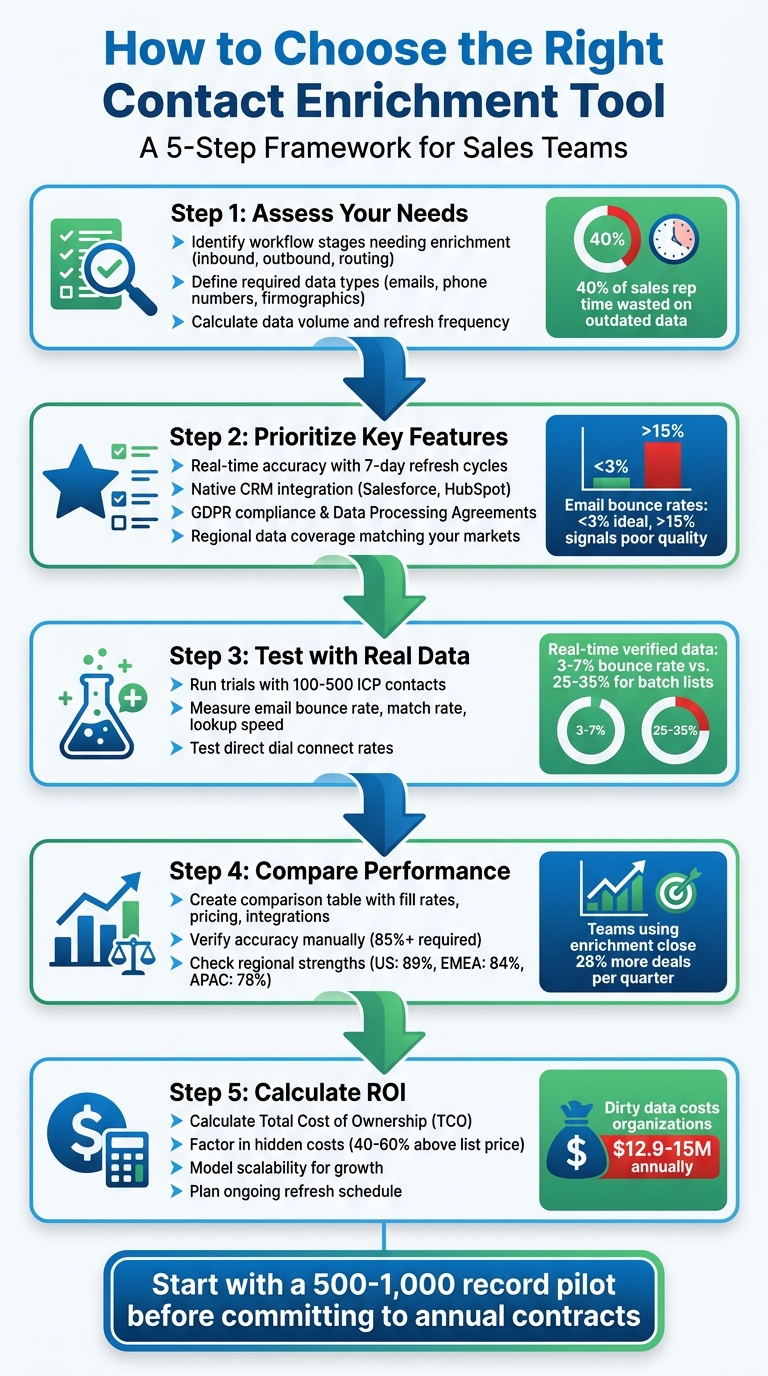
5-Step Process to Choose the Right Contact Enrichment Tool
7 Best Data Enrichment Tools in 2024 (Full Demo & Comparison)
sbb-itb-8aac02d
Assess Your Sales Team's Needs
To choose the right enrichment tool, start by aligning it with your team’s workflows. A tool’s features matter, but how well it fits your process matters more.
Identify Which Workflow Stages Need Enrichment
Pinpoint the stages in your workflow where missing data slows things down. For inbound leads, enrichment allows you to use shorter web forms - this can improve conversion rates by automatically filling in details like company size or industry once an email is submitted. For outbound prospecting, enrichment saves your sales development reps (SDRs) hours by instantly providing verified direct dials and LinkedIn profiles. When it comes to lead routing and handoffs, automated enrichment ensures leads are directed to the right rep with all the necessary context, smoothing transitions from marketing to sales.
To keep your CRM data accurate, schedule regular enrichment updates every 30 to 90 days. Use enrichment to map out full buying committees, which often include 6–10 stakeholders.
Once you’ve identified the stages that need improvement, specify the exact data your team requires to optimize these sales pipeline processes.
Determine What Data You Need
For a tool to truly add value, you need to know the specific data points your team relies on. Essential data includes verified emails, direct phone numbers, job titles, and LinkedIn URLs - these should align with your sales process. Firmographic data, like company size, revenue, and industry, as well as technographic data, such as a company’s tech stack, can improve lead scoring, territory planning, and competitive strategies. Intent signals, like hiring trends, leadership changes, or recent funding, help you time your outreach when prospects are likely to be in the market.
Instead of chasing the largest database, focus on data that aligns with your Ideal Customer Profile (ICP). Deep, targeted coverage in your niche will outperform broad but less relevant databases.
Once you’ve identified the data you need, estimate how much of it you’ll use and how often it needs to be refreshed to keep costs reasonable.
Calculate Your Data Volume and Frequency
Start by adding up your monthly inbound leads, outbound targets, and active CRM records. For fewer than 5,000 records, per-record pricing is usually best. For larger volumes, flat-rate API pricing can be up to 10 times more cost-effective. These estimates will help you choose the right pricing model when evaluating tools.
Decide between real-time and batch enrichment based on your urgency. Real-time enrichment is ideal for hot inbound leads that need immediate routing and scoring. Batch enrichment, which costs 30% to 50% less, is better for periodic tasks like list building or database cleanups.
Set a refresh schedule based on your needs: real-time for new leads, weekly for active contacts, monthly for high-priority segments, and quarterly for your entire database. If your email bounce rate exceeds 3%, it’s a clear sign your data is outdated and requires immediate re-enrichment.
Key Features to Look For
Once you've outlined your data needs, the next step is identifying the features that will ensure precision and smooth integration. These capabilities are what set effective tools apart from those that might drain your budget without delivering real value. The right features guarantee your team works with precise, compliant data that fits seamlessly into your workflows.
Data Accuracy and Freshness
Data accuracy goes beyond just being correct - it’s about staying up-to-date. B2B contact data can degrade quickly, so understanding how a tool handles this is key. For example, batch enrichment tools that update monthly or quarterly often leave you with partially outdated data. In contrast, tools with real-time enrichment pull directly from live sources - like LinkedIn profiles, company websites, or SMTP checks - at the moment you request it, ensuring the most current information.
For optimal results, prioritize tools that use real-time SMTP and MX record checks rather than relying on pattern-matching techniques. Studies have shown that batch-sourced lists can have bounce rates as high as 25–35%, despite vendor claims of over 90% accuracy. A great example comes from Snyk, a cybersecurity company that reduced email bounce rates from 35–40% to under 5% by switching to Prospeo’s 7-day refresh cycle and 5-step verification process. This change helped them generate 200+ new opportunities monthly across 50 Account Executives.
When evaluating vendors, look for those offering a 7-day refresh cycle instead of longer intervals like 30–90 days. Tools that pull from over 100 live sources - such as SEC filings, GitHub, podcasts, and news - can quickly reconcile discrepancies and capture recent job changes much faster than static databases. Before committing, test a list of 500 contacts and manually verify at least 50 entries. If accuracy drops below 85%, it’s time to reassess your provider mix.
Integration and Automation Options
A great enrichment tool should integrate directly with your CRM, eliminating the need for middleware or custom coding. Tools with native, two-way sync for platforms like Salesforce and HubSpot ensure data flows automatically in both directions. Some tools even offer Chrome extensions, allowing reps to enrich contacts directly from LinkedIn or company websites and sync them to the CRM with a single click.
"If your enrichment platform doesn't work inside your CRM, it's just another silo." - Chaviva Gordon-Bennett, monday.com
Real-time triggers are another must-have, enabling enrichment as soon as a lead fills out a form. This feature can reduce the time from form submission to a rep’s calendar to under 60 seconds. For businesses with complex data stacks, ensure the tool supports Reverse ETL, which syncs enriched data from centralized warehouses back into sales and marketing platforms in real time.
Waterfall enrichment workflows are an excellent feature to look for. These workflows query multiple data providers in sequence, boosting contact data coverage from a baseline of 30% to over 80% - all without requiring annual contracts with multiple vendors. Platforms that allow RevOps teams to design these workflows via drag-and-drop interfaces can reduce reliance on engineering resources, making adjustments more efficient.
Once integration and automation are sorted, it’s time to ensure your tool meets compliance standards and regional requirements.
Compliance and Regional Coverage
Compliance is non-negotiable - violating GDPR, for instance, can lead to fines of up to €20 million or 4% of global annual turnover. Make sure your vendor provides a Data Processing Agreement (DPA) and a clear list of subprocessors and their locations. By 2026, buyers will expect record-level provenance, including consent metadata and timestamps, to support Data Subject Access Requests (DSARs).
Check where data is stored and processed to meet local residency requirements. For AI-driven tools, confirm compliance with the EU AI Act, which includes model cards and impact assessments. Look for certifications like SOC 2 Type II and ISO 27001 as indicators of security and reliability. Additionally, ensure your contract allows you to opt out of having your customer data used to train the vendor’s AI models.
Regional data depth can vary widely. For instance, FullEnrich reports email find rates of 89% in the US, 84% in EMEA, and 78% in LATAM and APAC. Choose vendors based on their regional strengths - Cognism is known for EMEA mobile data, while ZoomInfo offers deeper insights into US firmographics. To test a vendor’s compliance capabilities, simulate a DSAR request during your pilot phase to see how quickly they can provide provenance and consent data.
Test and Compare Tools
After identifying your needs and the key features you require, the next step is to test tools in practical scenarios. It's important to remember that a larger database doesn't always mean better performance. For instance, a tool boasting 1 billion records might still underperform in finding senior EU finance contacts compared to a smaller, more specialized EMEA-focused tool. Real-world testing is the only way to truly evaluate a tool's capabilities.
Run Trials and Demos
Start by requesting demos from 2–3 vendors. Use a seed list of 100–500 Ideal Customer Profile (ICP) contacts and manually verify 100 randomly selected records by cross-checking them with live LinkedIn profiles. This is also a good time to ensure your team is using LinkedIn for sales effectively. This ensures the data is up-to-date and accurate. For example, if your target audience includes VP-level contacts in healthcare, test that specific segment rather than relying on sample data provided by the vendor.
Another crucial metric to test is lookup speed. If you're using real-time enrichment for web forms, the tool shouldn't add more than 1–2 seconds of latency. Studies show that higher delays can reduce form conversion rates by up to 8%. These trials and demos allow you to see how well the tools align with your specific use case.
Measure Performance Metrics
Key performance metrics to track include email bounce rate, direct dial connect rate, and match rate. Here's what to look for:
- Email Bounce Rate: A bounce rate below 3% is ideal, while rates exceeding 15% signal poor data quality. Independent tests have found that batch-sourced lists often have bounce rates between 25–35%, even when providers claim over 90% accuracy. On the other hand, real-time verified data typically maintains bounce rates in the 3–7% range.
- Direct Dial Connect Rate: Tools offering human-verified mobile numbers can boost connect rates by 20–30% compared to those relying on auto-scraped numbers.
- Cost Per Accurate Contact: Accuracy matters. For example, a tool delivering 10,000 contacts at 60% accuracy could create more work than one providing 5,000 contacts at 95% accuracy.
An excellent case study comes from March 2026, when Cotera enhanced their Attio CRM with a layered enrichment strategy. Starting with 3,214 records, 57% of their data was initially unusable. By combining third-party enrichment with AI to extract data from internal call notes and emails, they increased their usable contact rate from 43% to 88% in just 10 weeks. This saved them about 20 hours of manual research per week - an estimated $54,000 in annual operational cost savings.
Once you’ve collected these metrics, use them to make an informed decision.
Create a Comparison Table
A comparison table is a straightforward way to evaluate tools side by side. Focus on metrics like email fill rate, bounce rate, CRM strategies, pricing, and regional coverage. Here’s an example:
| Tool Name | Email Fill Rate (ICP) | Bounce Rate | CRM Integration | Pricing | Regional Strength |
|---|---|---|---|---|---|
| Tool A | 89% | 4% | Native Salesforce sync | $49/month | US, EMEA |
| Tool B | 71% | 12% | CSV export only | $15,000/year | US |
| Tool C | 84% | 6% | HubSpot, Salesforce | $99/month | EMEA, APAC |
This type of table helps you quickly identify which tool offers the best mix of accuracy, workflow compatibility, and cost-effectiveness. For more insights into sales and CRM tools, check out the curated resources at Sales, Leads & CRM.
Review Pricing and ROI
Once you've tested and compared tools, it's time to evaluate pricing models to ensure a solid return on investment (ROI). Hidden costs - like implementation, training, and credit overages - can inflate the listed price by 40–60%. Understanding the true cost of ownership (TCO) is key to avoiding budget surprises. Let’s break down the pricing structures and how to calculate the total cost of ownership.
Understand Pricing Structures
Contact enrichment tools generally follow three main pricing models:
- Credit-based systems: This is the most common model. Typically, 100 credits equal one enrichment. However, full profile enrichment often requires 3–5 credits per record. Be aware that many subscriptions operate on a "use-it-or-lose-it" basis, meaning unused credits vanish at the end of the billing cycle.
- Seat-based pricing: This model charges per user and works well for smaller teams. However, costs can escalate as teams grow. For example, Apollo.io charges $49 per user per month for 5,000 credits. Lusha follows a similar structure.
- Flat-fee or unlimited models: These are gaining traction, especially with AI-driven tools like Coffee and Lessie. They offer predictable monthly fees without penalties for per-record usage.
Enterprise-level tools often come with additional, less obvious costs. For instance:
- ZoomInfo: Starts at $15,000 annually, with prices sometimes reaching $35,000–$75,000+ depending on features and seats.
- Cognism: Has a base access fee of $15,000–$25,000, with additional per-seat charges.
Premium features like direct-dial numbers, intent data, and native CRM integrations are often locked behind higher-priced tiers or sold separately. Using third-party middleware like Zapier can further increase your costs by 10–20%. Additionally, watch out for platforms that charge for unsuccessful lookups - some deduct credits even if no data is found.
Calculate Scalability and ROI
To gauge a tool's value, focus on its impact on your business outcomes. Start by calculating the total cost of ownership (TCO), which includes subscription fees, integration maintenance, training, and potential credit overages. For example, while Apollo’s annual list price for a 10-user team might be $10,000, actual costs can climb to $15,000 when you include these factors.
The benefits of effective enrichment are clear:
- Conversion rates can increase by 20–30%.
- Sales cycles may shorten by 25%.
- Teams using enrichment tools close 28% more deals each quarter.
Take Cotera as an example. In March 2026, founder Ibby Syed shared that their $9,600 annual enrichment stack replaced manual research that previously cost $54,000 annually in operations time. It also boosted their usable contact rate from 43% to 88%.
Failing to enrich data comes with its own costs. B2B contact data decays at a rate of 2.1% per month, or about 30% annually. Dirty data costs organizations $12.9 million to $15 million each year. Sales reps waste about 27% of their time on manual data research instead of selling. High email bounce rates (above 10–15%) can also hurt sender reputation, limiting revenue potential from outbound campaigns.
To ensure scalability, choose tools that can grow with your needs without forcing costly upgrades mid-cycle. Carefully model your expected volume, as top-up credits often come with a 50% premium over base rates. Before committing to an annual plan, consider running a pilot with 500 contacts to assess bounce and match rates. Also, tier your enrichment efforts - use basic firmographics for top-of-funnel leads and reserve more detailed enrichment, like mobile numbers, for mid-funnel prospects.
For more guidance on optimizing your enrichment strategy, check out the resources at Sales, Leads & CRM.
Conclusion
Choose a contact enrichment tool that fits seamlessly into your team's workflow. If you're running fast-paced inbound campaigns, focus on real-time APIs that pull live data to minimize issues like data decay. For teams aiming to achieve higher fill rates, consider tools with waterfall enrichment, which use multiple providers to fill in missing information. And for those targeting complex B2B accounts, opt for tools that can map org charts and identify key stakeholders across the organization.
Before diving in, clean up your CRM. Start with a deduplication pass to eliminate conflicting records. Then, test the tool with a sample of 500–1,000 records from your actual database. This will give you a better sense of how well it performs in terms of match rates and accuracy. Keep in mind: a high match rate doesn’t always mean the data is reliable - focus on quality over quantity.
Successful teams don’t rely on just one tool. They often use a primary provider for core data, a secondary tool for filling gaps, and AI-powered solutions for deeper insights. Treat enrichment as an ongoing process, not a one-time task. Plan monthly or quarterly updates to keep up with changes like job transitions or company updates. Regular maintenance is key to keeping your sales data effective over time.
Once your strategy is in place, find the tools that will help you execute it. Visit Sales, Leads & CRM for a handpicked directory of contact enrichment and sales optimization tools. The platform provides recommendations tailored to your team size and workflow, making it easier to find the perfect match for your needs.
FAQs
How do I know if I need real-time or batch enrichment?
When choosing between real-time enrichment and batch enrichment, think about your sales processes and how quickly you need updated data.
- Real-time enrichment is perfect when you need instant, accurate information - for example, enriching inbound leads at the moment of conversion. This ensures your team has the most current data right when they need it.
- Batch enrichment, on the other hand, is better suited for scheduled updates, like refreshing your CRM data on a monthly basis. It’s a practical option for routine tasks where immediate precision isn’t as important.
In short, use real-time enrichment for fast-moving workflows and batch enrichment for regular data upkeep.
What’s the best way to test data accuracy before buying?
To ensure a contact enrichment tool meets your accuracy standards, start by requesting sample data or testing it with your own dataset. Focus on verifying critical fields like email addresses, phone numbers, and job titles against trusted information. Additionally, check if the data reflects recent updates, such as changes in roles or companies. This step ensures the tool provides accurate and up-to-date information before you make a purchase.
Which pricing model is cheapest at my lead volume?
The most affordable pricing model often depends on the tool's structure and your specific needs. Some tools, like Apollo and Lessie AI, offer free tiers, which can be a budget-friendly option if you're dealing with a small number of leads.
For moderate requirements, paid plans might be a better fit. For example, Apollo's plans start at $49 per month when billed annually. On the other hand, if you're managing higher lead volumes, expect costs to increase. Tools like Clay or Claygent AI come in at around $134 per month with annual billing.
If your lead volume is minimal, you might find free or pay-as-you-go models to be the most practical choice.