Common CRM Workflow Mistakes and Best Practices
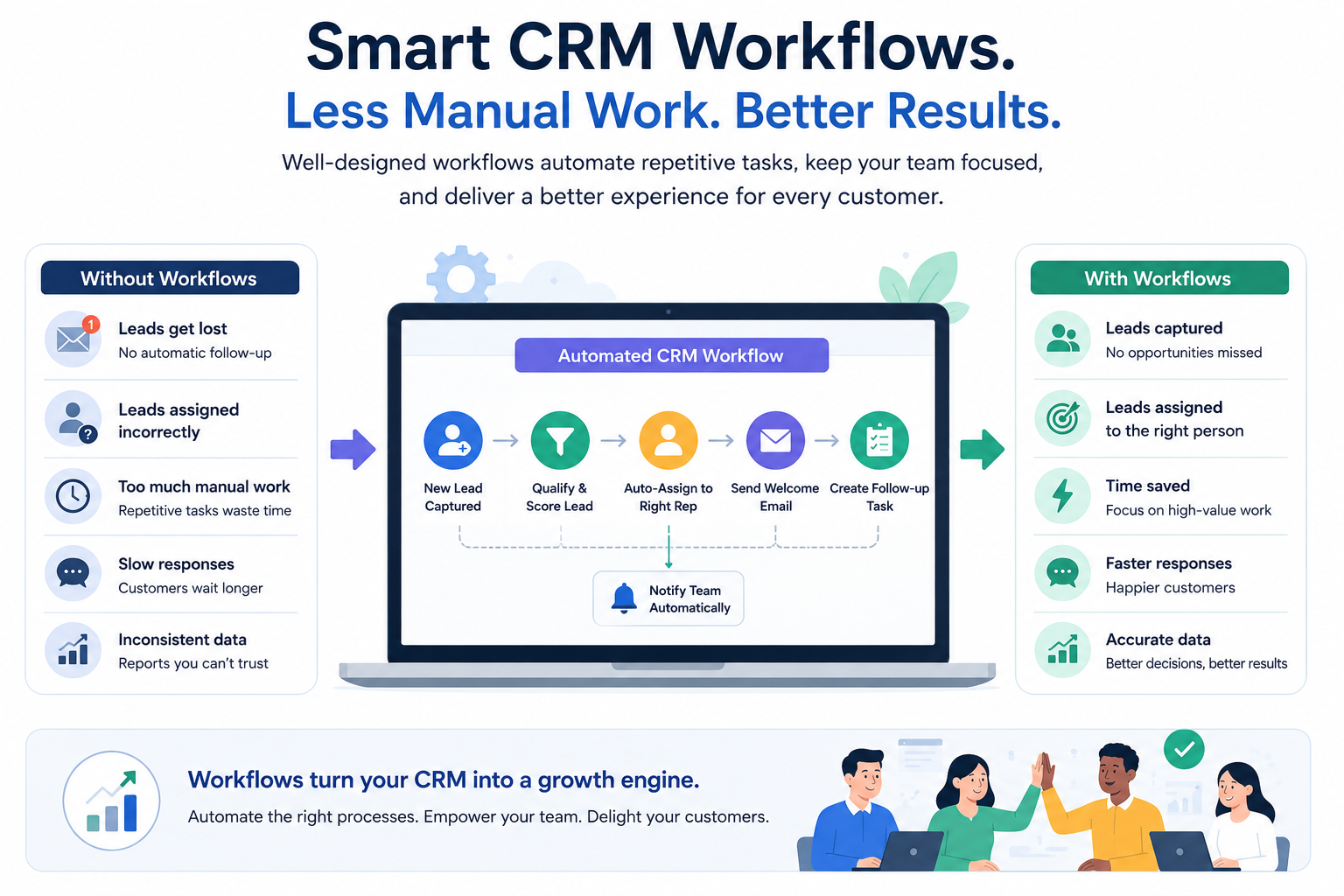
CRM workflows can save your team hours every week. They assign new leads automatically, remind salespeople to follow up, route support tickets to the right person, and keep customer information up to date without someone having to do everything manually.
When workflows are designed well, employees spend less time on repetitive tasks and more time helping customers.
Unfortunately, automation doesn’t always make a business more efficient.
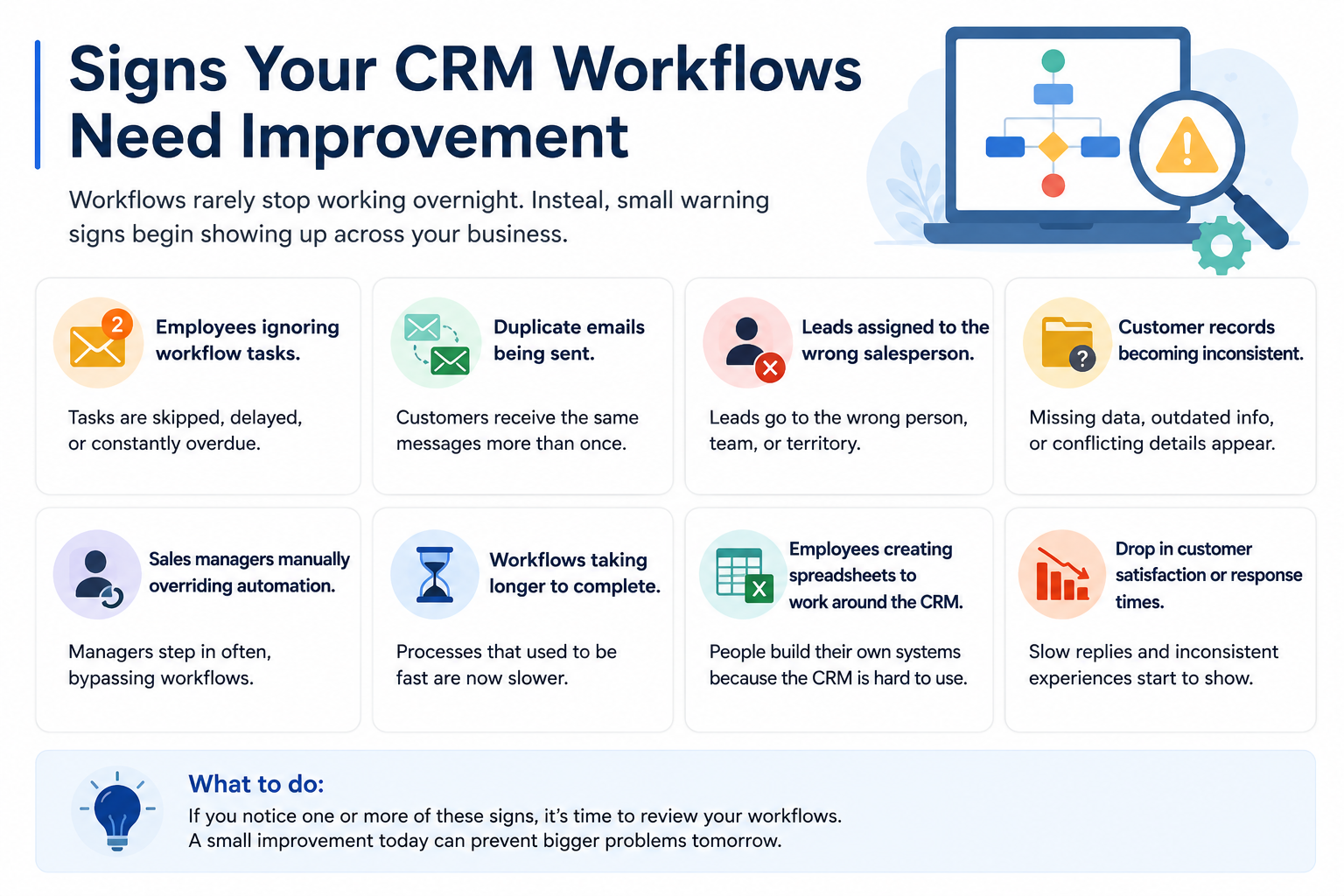
Many companies build dozens of workflows only to find themselves dealing with duplicate emails, incorrect lead assignments, confusing notifications, or outdated automations that nobody remembers creating. Instead of simplifying work, the CRM becomes another system employees have to work around.
The good news is that these problems are usually preventable.
Most workflow issues don’t happen because the CRM software is limited. They happen because the automation was built around a process that wasn’t working well in the first place or because nobody reviewed the workflow after it went live.
This guide explains the most common CRM workflow mistakes, why they happen, and the best practices that help businesses build automation people actually trust and use.
Quick Takeaways
• Automate good business processes—not broken ones.
• Keep workflows as simple as possible, especially when getting started.
• Review workflows regularly to make sure they still match how your business operates.
• Clean CRM data is essential for reliable workflow automation.
• AI can improve workflows, but people should still review important decisions.
Why CRM Workflow Automation Sometimes Fails
Many businesses start building workflows as soon as they implement a CRM.
It makes sense. Most modern CRM platforms make automation easy to set up, and seeing routine tasks happen automatically is exciting.
The problem is that automation only improves the process you’ve already created.
Imagine your sales team doesn’t have a consistent way of handling new leads.
One salesperson calls every inquiry immediately.
Another waits until the following morning.
Someone else only contacts prospects that “look promising.”
If you automate this process without fixing it first, you’ve simply automated inconsistency.
The CRM will perform exactly as instructed—but the underlying process still isn’t efficient.
Successful automation starts before anyone opens the workflow builder.
The first step is understanding how work should move through your business. Once everyone agrees on a consistent process, workflows can remove repetitive tasks while ensuring every customer receives the same experience.
Research supports this approach. Nucleus Research found that organizations implementing CRM systems continue to achieve strong returns through higher productivity and better operational performance. Likewise, Salesforce’s latest State of Sales report found that high-performing sales teams are significantly more likely to automate repetitive work than underperforming teams, allowing representatives to spend more time selling and less time on administration.
Think of workflows as assistants rather than decision-makers.
They’re excellent at handling repetitive work, but they still need clear instructions.
Common CRM Workflow Mistakes
1. Automating a Process That Doesn’t Work
This is probably the biggest mistake businesses make.
Sometimes teams hope automation will fix a process that’s already causing problems.
Unfortunately, automation rarely fixes bad processes.
It usually makes them happen faster.
Imagine your proposal approval process requires six different approvals before a quote reaches a customer.
Building a workflow won’t reduce those approvals.
It simply sends six notifications instead of asking someone to send six emails.
Before creating any workflow, step back and ask:
Is every step actually necessary?
Removing unnecessary work almost always produces bigger improvements than automating it.
2. Creating Too Many Workflows
Once businesses discover workflow automation, it’s easy to become enthusiastic.
Soon there are workflows for new leads, marketing campaigns, customer onboarding, support requests, proposal approvals, reminders, reports, internal notifications, and dozens of other situations.
At first this feels like progress.
Months later, nobody remembers what half of the workflows do.
Someone changes one workflow and another automation unexpectedly stops working.
Managers begin asking questions like:
“Why did this email send twice?”
“Why wasn’t this lead assigned?”
“Which workflow updated this customer record?”
More automation isn’t always better.
A handful of reliable workflows usually delivers far more value than dozens of complicated ones.
3. Making Workflows Too Complicated
Modern CRM platforms can build workflows with multiple conditions, approval paths, integrations, delays, AI recommendations, and branching logic.
Those capabilities are powerful—but they can also tempt businesses into creating workflows that are much more complicated than they need to be.
Imagine opening a workflow six months after you built it.
If it takes several minutes just to understand what’s happening, the automation is probably too complicated.
A better approach is to create several smaller workflows that each perform one clear task.
They’re easier to explain, easier to test, and much easier to modify when your business changes.
4. Ignoring CRM Data Quality
Even the smartest workflow depends on accurate customer information.
If customer records contain duplicate contacts, outdated information, missing fields, or inconsistent formatting, the workflow can only make decisions using incomplete data.
For example, a lead assignment workflow may send opportunities to the wrong salesperson because the customer’s location wasn’t entered correctly.
A renewal reminder might never trigger because the contract renewal date is missing.
Good workflow automation starts with good customer data.
If duplicate records are becoming a problem, our guide on CRM Deduplication: How to Clean Duplicate Customer Records explains practical ways to keep your CRM clean and reliable as it grows.
5. Forgetting About Exceptions
No business process works exactly the same way every time.
Customers cancel orders.
Sales territories change.
Large opportunities require additional approvals.
Some customers renew early while others extend contracts at the last minute.
Many workflows are designed around the ideal situation but ignore everything else.
That’s when employees begin creating manual workarounds because the automation no longer reflects reality.
When testing a workflow, don’t just ask whether it works when everything goes perfectly.
Ask what happens when something unexpected occurs.
Those situations often reveal the biggest weaknesses in a workflow.
6. Sending Too Many Notifications
Notifications are useful.
Too many notifications aren’t.
Imagine your sales manager receives forty workflow alerts every day.
Eventually they’ll stop reading most of them—including the important ones.
Every notification should have a purpose.
Before adding another alert, ask yourself:
Will someone take action because of this notification?
If the answer is no, it probably doesn’t need to exist.
Good workflows reduce distractions instead of creating them.
7. Building It Once and Forgetting About It
Business processes don’t stand still.
Products evolve.
Teams grow.
Customer expectations change.
Yet many workflows continue running exactly as they did years earlier.
Over time, they become disconnected from the way the business actually operates.
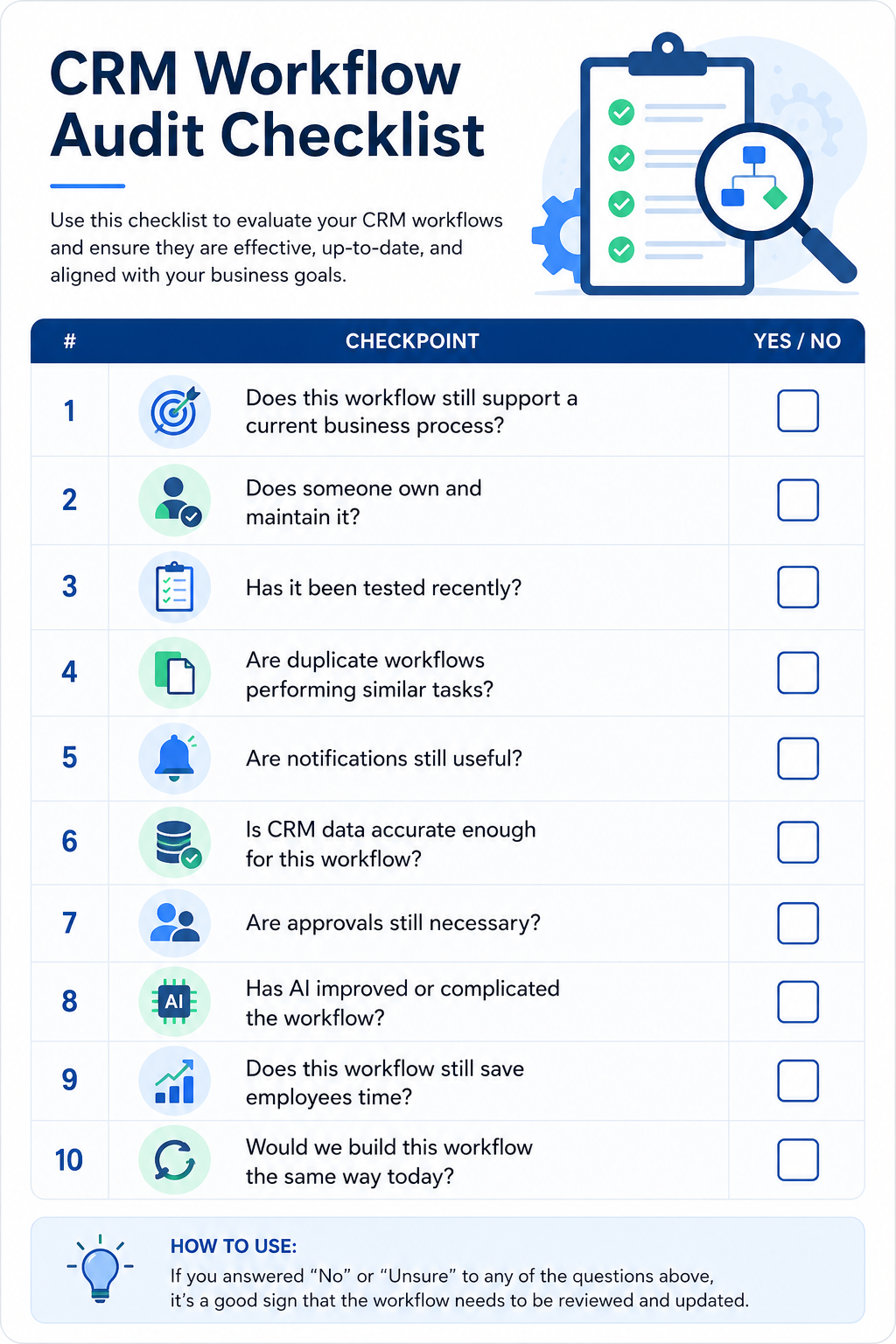
That’s why workflows should be reviewed regularly.
What made sense a year ago may now create unnecessary work or slow employees down.
If you’re also improving your sales process, our guide on Sales Pipeline Management: Stages, Metrics, Best Practices, and Examples explains how structured processes and workflow automation work together to improve consistency and forecasting.
8. Nobody Owns the Workflow
Here’s a surprisingly common situation.
A workflow is created by one employee who later changes roles or leaves the company.
Months later the workflow stops working correctly.
Nobody knows why it exists.
Nobody wants to modify it because they’re worried about breaking something else.
Every important workflow should have an owner.
That person doesn’t need to build every automation, but they should understand what it does, monitor its performance, approve changes, and make sure it continues supporting the business as processes evolve.
Organizations that combine workflow automation with effective lead prioritization usually see better results because automation supports the sales process instead of replacing it. If you haven’t already, our guide on Lead Scoring in CRM: How to Prioritize and Convert More Leads explains how lead scoring and workflow automation work together to improve sales efficiency.
CRM Workflow Best Practices
Avoiding mistakes is only half the equation. The businesses that get the most value from CRM workflows aren’t necessarily the ones with the most automation—they’re the ones with automation that employees understand, trust, and use every day.
Here are the practices that consistently lead to more reliable workflows.
1. Start With the Process, Not the Software
One of the easiest ways to build better workflows is to avoid opening the workflow builder immediately.
Instead, map out the business process first.
Ask questions such as:
• What starts the process?
• What needs to happen next?
• Which steps are repeated every day?
• Which decisions require human judgment?
• Where do delays usually occur?
Once the process makes sense on paper, automation becomes much easier.
If the process itself is confusing, adding automation will only make the confusion happen faster.
2. Start Small Before Expanding
Many businesses try to automate every department immediately after implementing CRM software.
A better approach is to begin with a few workflows that deliver obvious value.
Good starting points include:
• Lead assignment
• Follow-up reminders
• Customer onboarding
• Proposal approvals
• Contract renewals
Once these workflows are running smoothly, you can gradually automate more complex processes.
Building confidence is usually more valuable than building dozens of workflows.
3. Keep Every Workflow Easy to Understand
Imagine another administrator opening one of your workflows six months from now.
Would they understand it within a few minutes?
If not, it probably needs to be simplified.
Avoid creating one enormous workflow that handles dozens of different situations.
Instead, build smaller workflows that each have one clear purpose.
They are easier to test, maintain, and improve as your business evolves.
4. Document Your Workflows
Documentation often feels unnecessary until someone needs to troubleshoot a workflow.
Every important workflow should answer questions like:
• Why was it created?
• What triggers it?
• What conditions are used?
• What actions does it perform?
• Who is responsible for maintaining it?
Even simple documentation can save hours of investigation later.
5. Test Before Making It Live
Never assume a workflow will behave exactly as expected.
Before enabling automation across the business, test several situations.
For example:
• A qualified lead.
• An unqualified lead.
• A duplicate contact.
• A cancelled opportunity.
• A customer that renews early.
Testing different scenarios helps identify problems before customers or employees experience them.
6. Review Workflows Regularly
A workflow that worked perfectly last year may no longer match today’s business process.
Products change.
Sales territories change.
Approval procedures change.
Customer expectations change.
Schedule regular workflow reviews to identify automations that should be updated, simplified, or removed altogether.
Think of workflow maintenance as routine business housekeeping rather than emergency troubleshooting.
AI Best Practices for CRM Workflows
Artificial intelligence is becoming part of many CRM platforms, helping businesses automate even more activities.
AI can summarize customer meetings, recommend the next best sales activity, identify deals that may be at risk, draft follow-up emails, and prioritize opportunities.
These capabilities can save significant time, but they work best when combined with human oversight.
Review AI Recommendations
AI provides recommendations based on patterns and historical information.
That doesn’t automatically make every recommendation correct.
Sales representatives and managers should review important AI-generated decisions before acting on them.
Keep People Involved in High-Impact Decisions
Activities such as pricing approvals, contract negotiations, discount approvals, and strategic customer decisions should still involve experienced employees.
AI can support these decisions by providing recommendations, but accountability should remain with people.
Monitor AI Performance
Just like traditional workflows, AI should be reviewed regularly.
Monitor whether recommendations improve conversion rates, reduce response times, or create better customer experiences.
If AI suggestions are no longer producing useful outcomes, adjust the workflow or the underlying data.
Protect Customer Data
AI workflows often analyze large amounts of customer information.
Businesses should ensure sensitive customer data is handled appropriately and that employees understand how AI features use customer information.
Guidance from the National Institute of Standards and Technology on trustworthy AI can help organizations adopt AI responsibly.
Workflow Metrics Worth Monitoring
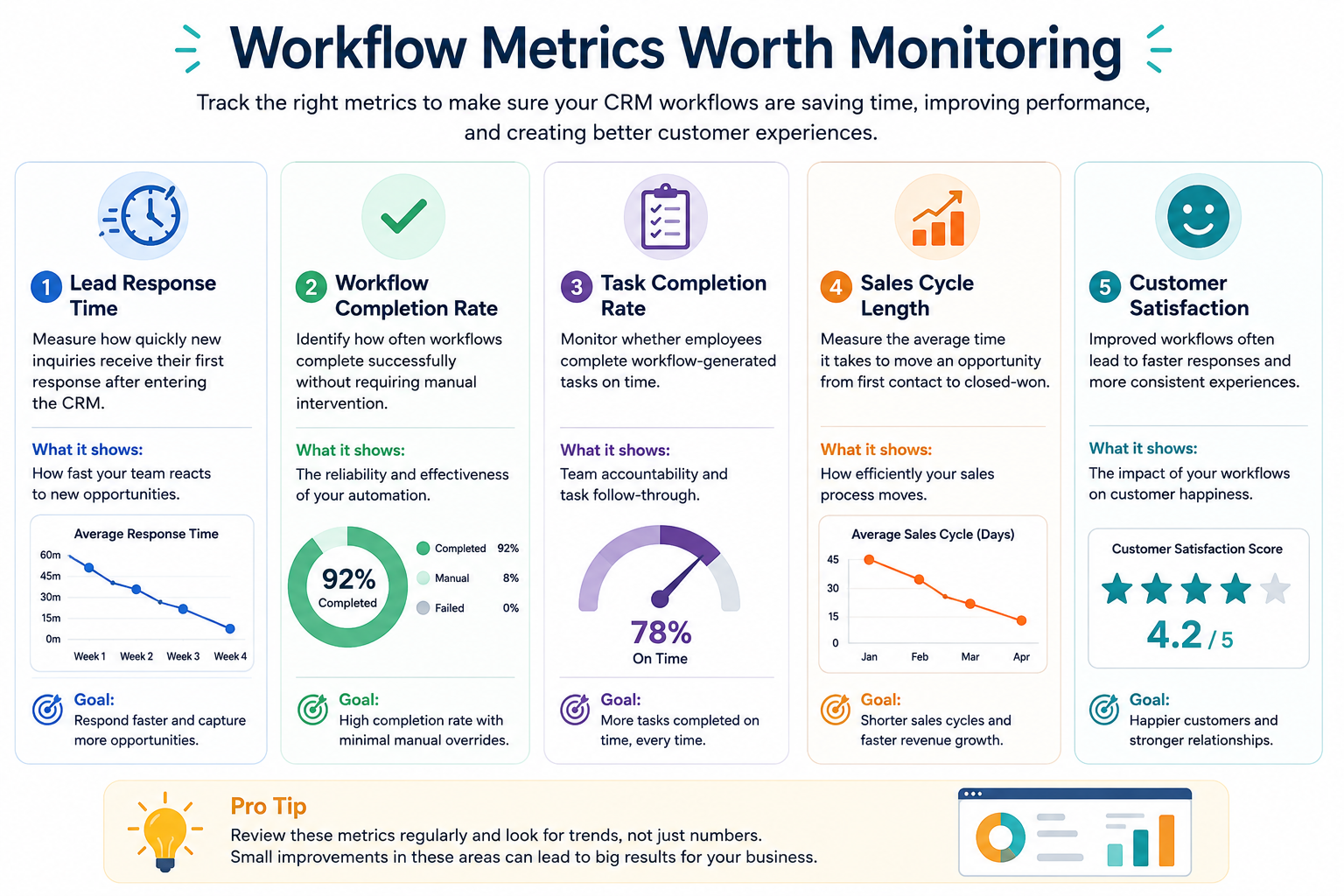
Good workflows should produce measurable improvements.
Some of the most useful metrics include:
Lead Response Time
Measure how quickly new inquiries receive their first response after entering the CRM.
Workflow Completion Rate
Identify how often workflows complete successfully without requiring manual intervention.
Task Completion Rate
Monitor whether employees complete workflow-generated tasks on time.
Sales Cycle Length
Effective workflows often shorten the time required to move opportunities from first contact to a closed sale.
Businesses interested in measuring broader sales performance can also explore our guide on Why Your Sales Team Needs a CRM: Benefits and ROI Explained.
Customer Satisfaction
Improved workflows often lead to faster responses and more consistent customer experiences.
Tracking customer satisfaction scores before and after workflow improvements can help demonstrate the value of automation.
Research from Gartner continues to show that organizations are increasingly investing in automation and AI to improve operational efficiency and customer experience.
Frequently Asked Questions
How often should CRM workflows be reviewed?
Most businesses benefit from reviewing important workflows at least once every quarter or whenever significant changes are made to products, services, or business processes.
Who should manage CRM workflows?
Workflow ownership usually belongs to a CRM administrator, sales operations manager, revenue operations team, or another employee responsible for maintaining business processes.
Can CRM workflows become too complicated?
Yes.
As workflows grow, they become harder to understand and maintain. Smaller, focused workflows are usually easier to troubleshoot and improve.
Should small businesses automate everything?
No.
It’s generally better to automate repetitive, high-impact activities first and gradually expand automation as the business grows.
Can AI replace CRM workflows?
No.
AI enhances workflows by providing recommendations, predictions, and automation assistance, but businesses still need clearly defined processes and human oversight.
How many workflows does a typical business need?
There isn’t a fixed number.
Some organizations operate successfully with fewer than ten workflows, while larger businesses may use hundreds. The goal is to build workflows that solve real business problems—not simply increase the amount of automation.
Final Thoughts
CRM workflows should make work easier—not more complicated.
The most successful businesses don’t build the largest number of workflows or use every automation feature available. Instead, they focus on creating simple, reliable processes that employees understand and customers benefit from.
Automation works best when it supports a well-designed business process, not when it’s expected to fix a broken one.
As your business grows, your workflows should grow with it. Review them regularly, remove automations that no longer add value, and look for opportunities where AI and automation can eliminate repetitive work without replacing the human judgment that customers still expect.
When treated as an ongoing process rather than a one-time project, CRM workflows become one of the most valuable features of modern CRM software, helping teams work more efficiently while delivering a better experience at every stage of the customer journey.