Duplicate CRM records can cost your business time, money, and opportunities. Here’s what you need to know to fix the problem:
- Why it matters: Duplicate data disrupts sales, skews reporting, and wastes marketing budgets. U.S. businesses lose over $600 billion annually due to poor data quality, with 12% of revenue lost to inaccuracies.
- Key challenges: Duplicates arise from manual errors, mismatched integrations, and flawed automation. They confuse teams, delay responses, and can even violate compliance rules like GDPR or CCPA.
- How to solve it: Start by auditing your CRM, define clear deduplication rules, and leverage tools like AI-powered matching to detect duplicates. Tools like HubSpot, Insycle, and Dedupely offer effective solutions.
- Prevention tips: Standardize data entry, enforce validation rules, and run regular audits to maintain clean data and avoid recurring issues.
Quick takeaway: Clean CRM data ensures accurate reporting, better customer experiences, and improved team efficiency. Deduplication isn’t just a cleanup task - it’s a business priority.
How to Deduplicate Your HubSpot Contacts and Companies (this App is amazing!)

Why Duplicate Records Cause Problems
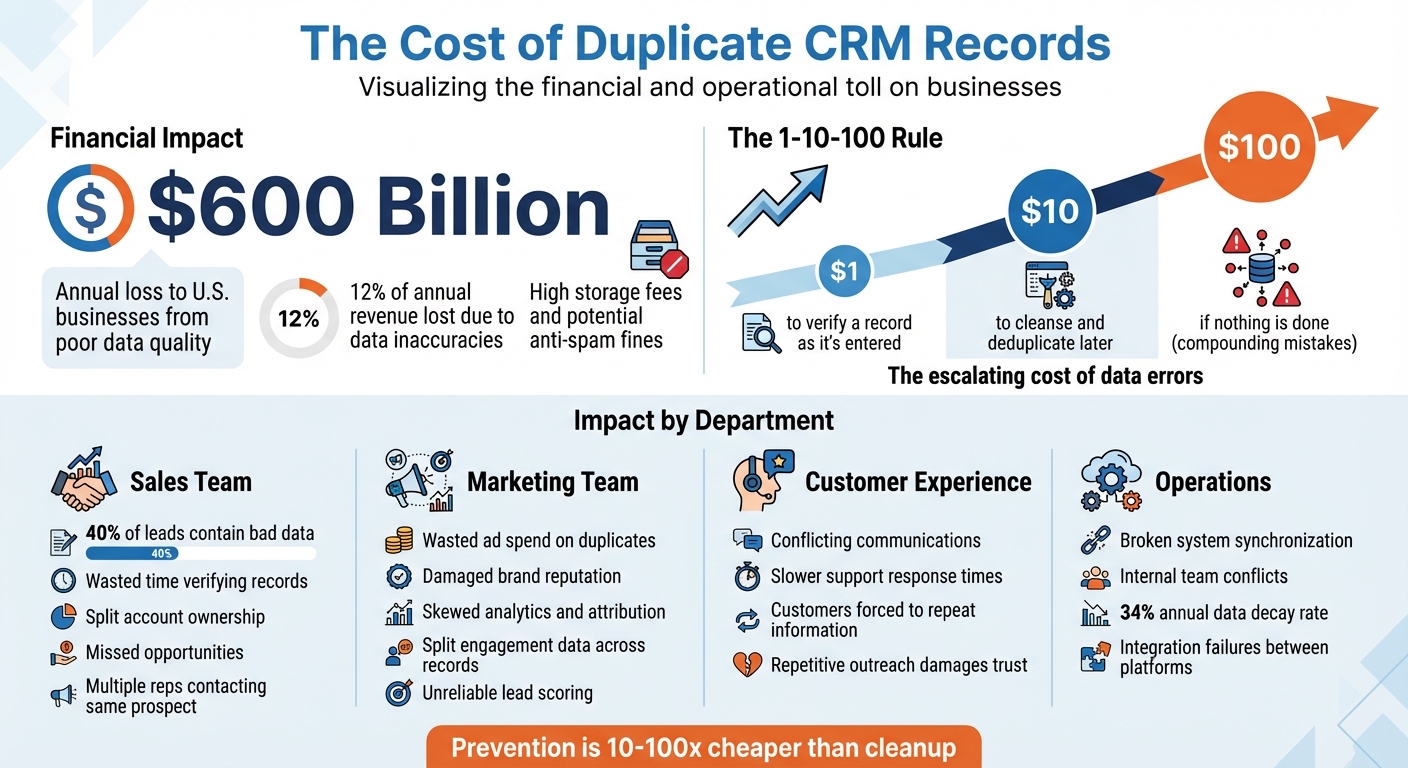
The True Cost of Duplicate CRM Records: Financial Impact Breakdown 2025
Duplicate records create a host of operational headaches. When customer information is scattered across multiple entries, it becomes impossible to view a complete interaction history in one place. This fragmented data disrupts reporting pipelines and obscures the full customer journey, making it difficult to draw accurate insights. For sales teams, duplicates inflate lead and opportunity counts, turning pipeline forecasting into a guessing game. These problems don’t stay isolated - they ripple across all areas of the business.
The financial toll is staggering. U.S. businesses lose billions every year due to data quality issues, driven by the compounding costs of cleaning up messy databases. And it’s not just about the cost of storage - though platforms like Salesforce can rack up expenses quickly. The real damage comes from errors that grow worse over time.
"Duplicate records quietly wreck reporting accuracy, slow workflows, and make your customer experience look sloppy." - Tate Stone, RevBlack
Marketing teams face unique challenges when duplicates creep into their systems. Engagement data gets split across multiple records, making it nearly impossible to track the full buying journey or measure the success of strategies like Account-Based Marketing (ABM). Lead scoring becomes unreliable because the scattered data never consolidates correctly, leading to poor qualifying inbound leads. Automation tools may even send duplicate emails or rely on outdated information, creating a disjointed customer experience that can harm your brand.
Compliance risks add yet another layer of complexity. Merging duplicate records without proper safeguards can overwrite critical data, such as "Opt-Out" or "Do Not Call" preferences, potentially leading to hefty fines under regulations like GDPR, CCPA, or CASL. On top of that, customer service teams often struggle to locate the right information when profiles are duplicated, which slows down issue resolution and frustrates customers.
How Duplicates Hurt Sales and Marketing Teams
Sales teams lose valuable time manually hunting for duplicates before reaching out to prospects. This not only disrupts their workflow but also slows down response times. Worse, when different sales reps unknowingly contact the same prospect, your company appears disorganized and unprofessional, eroding trust from the very start.
The damage doesn’t stop there. Roughly 40% of all leads contain bad data, and duplicates make it harder to assess true performance. Marketing budgets take a hit as redundant campaigns and poorly targeted messaging waste resources. A great example of tackling this issue is Huber Engineered, where CRM Business Analyst Angie Swenson implemented a deduplication strategy that brought their duplicate rate down to less than 2%, with a goal of reaching 1% for better data accuracy.
Attribution also suffers. When customer touchpoints are scattered across multiple records, it’s nearly impossible to calculate campaign ROI or determine which channels are driving conversions. Sales forecasting becomes equally unreliable, as inflated deal counts skew revenue projections. This lack of trust in CRM data often pushes teams to rely on shadow spreadsheets, creating even more data silos.
How Duplicates Block Business Growth
Beyond undermining team efficiency, duplicates can stall business growth by harming customer relationships and disrupting system integrations. When customer histories are incomplete, teams struggle to deliver seamless interactions. Customers are often forced to repeat themselves, which signals that their needs aren’t being fully understood. This not only frustrates individual clients but also complicates efforts to scale relationships across larger accounts.
"Clean data is more than IT hygiene - it's business intelligence accuracy, campaign precision, and customer trust." - Inogic
System integration issues add another layer of difficulty. Duplicate records can wreak havoc when syncing CRMs with marketing automation platforms, ERPs, or other tools. Data flows break down, creating conflicts that require manual fixes and prevent your systems from running smoothly. For example, MGT Consulting tackled this challenge using WinPure, reducing their deduplication process from 1–2 weeks of manual effort to just 15 minutes.
Impact Summary
| Impact Area | Specific Cost/Problem |
|---|---|
| Financial | 12% annual revenue loss; high storage fees; anti-spam fines |
| Sales | Wasted time verifying records; split account ownership; missed opportunities |
| Marketing | Wasted ad spend; damaged brand reputation; skewed analytics |
| Customer Experience | Conflicting communications; slower support response; repetitive outreach |
| Operations | Broken sync between systems; internal team conflicts |
How to Deduplicate Your CRM: Step-by-Step
Getting rid of duplicate records in your CRM doesn’t have to feel like an impossible task. By breaking it down into clear steps, you can protect your data, streamline processes, and eliminate redundancies without the headache.
Step 1: Audit Your CRM Data
Start by consolidating all your CRM data - this includes external lists, CSV files, and Excel sheets - into one system for a complete scan. Focus on columns that uniquely identify records, such as Company Domain, Email, LinkedIn Profile URLs, or External System IDs. These identifiers are essential for accurately spotting duplicates.
Run automated scans using details like names, emails, phone numbers, and company names. But don’t just rely on exact matches - hidden duplicates can sneak in due to non-standardized data. For example, "Microsoft Inc." and "Microsoft Incorporated" may look like two separate entities to your system. Fuzzy matching can help here, as it measures the similarity between records by analyzing slight differences like typos or nicknames (e.g., "Jon" vs. "Jonathan").
"It takes $1 to verify a record as it's entered - $10 to cleanse & dedupe it and $100 if nothing is done - as the ramifications of the mistakes are felt over and over again." - Traction Complete
Be sure to keep original Record IDs (like Contact ID or Account ID) intact during the audit. These IDs are critical for mapping cleaned records back into your CRM. Configure your audit rules to ignore blanks so that empty fields don’t falsely flag records as duplicates. Finally, review your scan results carefully to gauge the scope of your cleanup effort.
| Matching Method | Best Used For | Example |
|---|---|---|
| Exact Match | Emails, phone numbers, IDs | habib@datablist.com = habib@datablist.com |
| Fuzzy Match | Phonetic variations, typos | "John Smith" vs. "Jon Smyth" |
| Partial Match | Departmental or subsidiary data | "University of Washington" vs. "UW School of Business" |
| First/Last N Characters | Nicknames or short names | "Jon" vs. "Jonathan" |
Once you’ve identified potential duplicates, it’s time to set up clear deduplication rules.
Step 2: Define Your Deduplication Rules
Use a mix of matching methods to catch duplicates that a single rule might miss. For instance, exact matching works well for identifiers like email addresses or phone numbers, while fuzzy matching (using AI or phonetic algorithms) can spot variations like "Jon Smyth" versus "John Smith." If your primary rule (e.g., Name + Email) doesn’t work, set up a fallback rule (e.g., Name + Phone) to widen the net.
Next, establish survivorship rules to decide which record will become the master when duplicates are merged. You might prioritize the record with the most recent activity, the most complete information, or the highest engagement. For individual fields, set specific merging rules - like appending text fields, adding up numerical values, or selecting the most frequently occurring value for categories.
Before running the deduplication process, standardize formats for fields like phone numbers and addresses. This step ensures that exact matches are more accurate. Also, configure your rules to ignore suffixes like "Inc.", "Corp.", or "Ltd." so these don’t interfere with matching core company names. It’s a good idea to test your rules in a sandbox environment before applying them to your live database.
Step 3: Merge Duplicates and Check Results
Before merging records, always create a full backup of your data. For records with conflicting attributes - like differing notes - use rules to either combine the information or prioritize the record with the latest updates or the most activities logged.
Keep an eye on merge logs to track detection rates, success percentages, and records flagged for manual review. Ensure that external system IDs remain intact to avoid any disruptions in integrations with platforms like Salesforce or HubSpot. (Properly integrating HubSpot sales tools ensures data flows correctly without creating duplicates.) Also, double-check that merged records still link correctly to associated companies, deals, and timelines.
Afterward, do a secondary review to confirm email deliverability and verify the current status of contacts. Lastly, check for any unnecessary fields that may have been added during the process to prevent your database from becoming cluttered.
Deduplication Methods and Technologies
Once you've laid the groundwork for deduplication, choosing the right tools becomes crucial for keeping your CRM data clean and organized. In 2025, two main methods stand out: rule-based matching and AI-powered deduplication. Each has its own strengths, and knowing when to apply them can save both time and resources. These methods align with the step-by-step process discussed earlier.
Rule-Based Matching
Rule-based matching relies on manually created rules. It's particularly effective for standardized fields like email addresses and phone numbers. The logic is simple: if two records meet the conditions you've set, they’re flagged as duplicates. However, this method struggles with variations - take "Microsoft Inc." and "Microsoft Incorporated", for example. Without tweaking the rules to account for suffixes, these would be treated as separate entities.
For smaller teams, especially those using built-in CRM tools, rule-based systems are often a more affordable and accessible option. The downside? They demand regular updates to your rules to keep up with evolving data patterns, making ongoing maintenance a necessity.
Now, let’s look at how AI steps in to solve challenges that manual rules can’t fully address.
AI and Machine Learning for Finding Duplicates
AI-powered deduplication takes a more advanced approach, using fuzzy matching and probabilistic scoring to detect duplicates. Unlike rule-based systems that require exact matches, AI algorithms calculate "edit distance" to measure how similar two records are.
What sets AI apart is its ability to evaluate multiple data points simultaneously - such as names, emails, phone numbers, zip codes, and even IP-derived locations - to assess the likelihood of a duplicate. It also learns as it goes. By analyzing your feedback (e.g., when you confirm or reject suggested duplicates), the system refines its predictions over time.
"Duplicate data stinks. Finding dupes manually is hard. So we built a tool that uses AI to find duplicate contacts and companies for you; this tool makes merging them easy, too." - Ari Plaut, HubSpot
AI shines when dealing with messy, human-entered data where typos, nicknames, and inconsistent formatting are common. It can even detect phonetic similarities and ignore generic business terms. While AI-powered solutions often come with a higher price tag - typically part of premium software packages - their ability to handle large-scale, complex data issues can make the investment worthwhile. This is especially true when you consider that poor data quality costs U.S. businesses over $600 billion annually.
Here’s a quick comparison of the two methods:
| Feature | Rule-Based Matching | AI & Machine Learning |
|---|---|---|
| Logic Type | Deterministic (Exact Match) | Probabilistic (Similarity Score) |
| Best For | Unique IDs, Emails, Phone Numbers | Names, Company Names, Messy Data |
| Handling Typos | Limited (requires specific coding) | High accuracy with fuzzy logic |
| Learning | Static; manual updates needed | Dynamic; improves with feedback |
| Cost | Generally lower | Higher; often part of premium suites |
Many platforms now combine the strengths of both methods. A hybrid approach - using AI for automated scanning and rule-based tools for manual adjustments - offers a balance of precision and flexibility. For critical records, AI can flag potential duplicates for human review, reducing the chances of merging distinct leads by mistake.
sbb-itb-8aac02d
Best CRM Deduplication Tools for 2025
When choosing a deduplication tool, consider your CRM platform, database size, and the quality of your data. In 2025, these tools are more advanced than ever, handling everything from exact matches to fuzzy logic. Some are built directly into CRM platforms, while others work across multiple systems.
HubSpot users with Operations Hub Professional or Enterprise can use the built-in "Manage Duplicates" tool. This feature leverages AI to identify duplicate contacts and companies based on criteria like name, email, phone number, and even IP-derived country data. While it's a solid option, it does have limits - Professional users can view up to 5,000 potential duplicates, and Enterprise users up to 10,000. For larger or more complex databases, third-party tools might be a better fit.
Insycle is a versatile data management solution compatible with HubSpot, Salesforce, Pipedrive, and Intercom. Its "Magical Import" feature prevents duplicates during CSV uploads and manages cross-CRM synchronization, such as between HubSpot and Salesforce. Pricing starts at $30/month for 30,000 records.
Dedupely offers a flexible matching engine that goes beyond basic duplication checks. It supports phonetic matching (e.g., "Jon" vs. "John"), nickname recognition, and "Any Order" matching for entries like "Smith, John" vs. "John Smith". This tool works with HubSpot, Salesforce, and Pipedrive, with plans starting at $25/month for 30,000 records.
Koalify integrates directly into the HubSpot interface, allowing users to trigger deduplication steps without leaving the CRM. This tool is free for databases under 10,000 records, with paid plans starting at $10/month for 20,000 records when billed annually.
For Microsoft Dynamics 365 users, Inogic DeDupeD is designed specifically for the Microsoft ecosystem. It uses "Master Deciding Rules" to automatically determine which record to keep based on activity history or field completeness. This tool is available on Microsoft AppSource with a 15-day free trial.
Tool Comparison Table
| Tool | Supported CRMs | Key Matching Methods | Unique Feature | Starting Price |
|---|---|---|---|---|
| HubSpot Native | HubSpot | Exact match, AI-based suggestions | Built-in for Operations Hub Pro/Enterprise | Included with Ops Hub Pro/Enterprise |
| Insycle | HubSpot, Salesforce, Pipedrive, Intercom | Fuzzy matching, External IDs, URL variations | Blocks duplicates during import; cross-CRM sync | $30/mo for 30,000 records |
| Dedupely | HubSpot, Salesforce, Pipedrive | Phonetic, Nickname, Domain Root, Any Order matching | Flexible matching for human entry errors | $25/mo for 30,000 records |
| Koalify | HubSpot | Standard & custom properties, workflow-based | Deep integration with HubSpot UI via CRM cards | Free under 10,000 records; $10/mo for 20,000 |
| DeDupeD | Dynamics 365 | Exact, fuzzy, first/last N characters | Integration with Dynamics 365 business logic | 15-day free trial |
Next, let’s look at strategies to prevent duplicates from creeping back into your CRM.
Using Sales, Leads & CRM Resources for Deduplication
The tools listed on Sales, Leads & CRM integrate with advanced deduplication solutions to keep your sales pipeline clean. Lead generation platforms and sales lead generation solutions like Dripify or Apollo can inadvertently create duplicate records. Pairing these platforms with deduplication tools like Insycle or Dedupely ensures your automated outreach remains efficient and prevents wasted resources on duplicate prospects.
"Duplicate records quietly sabotage your go-to-market efforts."
– Ryan Gunn, Founder and Chief Education Officer, Attribution Academy
The "1-10-100" rule highlights the importance of addressing duplicates early: preventing one costs $1, fixing it costs $10, and ignoring it can cost $100. By using these tools and strategies, you can maintain clean and reliable CRM data, ensuring your sales and marketing efforts stay on track.
How to Prevent Duplicate CRM Records
Stopping duplicates at the source is the best way to avoid the headache (and expense) of cleaning them up later. The "1-10-100 Rule" illustrates this perfectly: verifying a record costs $1, cleaning it up later costs $10, and ignoring it altogether can cost $100. Clearly, prevention is the smarter, more cost-effective tactic. Here’s how to keep your CRM data clean from the start.
Create Standard Data Entry Rules
Consistency is key when entering data. Without clear guidelines, your team might enter the same information in different ways - think "St." versus "Street" or "Inc." versus "Incorporated." Even phone numbers formatted inconsistently (with or without dashes) can create duplicates that your system’s matching algorithms won’t catch. It’s worth noting that CRM data tends to degrade by about 34% annually, and inconsistent entry only speeds up the process.
To combat this, set clear data entry standards:
- Make certain fields mandatory - such as email addresses for contacts or primary domains for companies.
- Enforce consistent formatting for capitalization, abbreviations, and numbers.
- Define approved abbreviations (e.g., "CEO" instead of "Chief Executive Officer") and stick to them.
"Data quality is directly linked to the quality of decision making. Good quality data provides better leads, better understanding of customers and better customer relationships. Data quality is a competitive advantage."
– Melody Chien, Senior Director Analyst, Gartner
Use real-time validation tools to check the format of entries and match them against existing records before they’re saved. On website lead forms, prompt users to double-check critical details like email addresses and phone numbers before submission. Replace open-text fields with picklists for industries, job titles, and lead sources to eliminate unnecessary variations. For data imports, always include a "Record ID" column to match records to existing ones, avoiding duplicate creation.
To minimize human error, automate data entry where possible. Tools that sync with email and calendar systems can help reduce mistakes. Considering that human error rates in data entry average around 1%, and poor data quality costs businesses about $15 million annually - accounting for 10% to 25% of total revenue - automation is worth the investment.
Run Regular Data Audits
Even with strict preventive measures, data naturally decays over time. People change jobs, move, or update their contact details, making ongoing audits essential. In fact, about 22.5% of B2B contact data becomes outdated each year.
Modern CRM tools equipped with AI can perform daily or real-time duplicate scans as new records are added. Set recurring workflows - weekly or monthly - to flag and merge duplicates that slip through initial filters. For duplicates flagged as "likely" by AI but not auto-merged, schedule manual reviews on a weekly or monthly basis to resolve conflicts.
Every three to six months, conduct a property audit to eliminate unused data categories and reduce clutter. This helps keep your CRM system streamlined and easier for your team to navigate. Additionally, perform a comprehensive data hygiene review annually or bi-annually to address the 30-70% annual data decay rate. Review customer-facing forms during these audits to ensure they aren’t contributing to "dirty data" through unclear instructions or excessive open-text fields.
"Every few months, do an audit of your HubSpot properties. If you're storing meaningful data and using the property for other things... keep the property. If not, export it to save your historical data, and delete it."
– Ari Plaut, HubSpot
To maintain data integrity, restrict editing and deletion rights to trained users. This prevents unauthorized changes that could fragment your data. Combining preventive measures with regular audits ensures a clean and efficient CRM, keeping your data reliable and your processes smooth.
Conclusion
CRM deduplication plays a key role in maintaining accurate customer data in 2025. Without a reliable, unified source of information, sales teams risk duplicating their efforts, marketing campaigns can send mixed messages, and decisions may be based on unreliable data. In fact, poor data quality costs U.S. businesses over $600 billion annually, and nearly half of CRM users believe their companies lose more than 10% of their annual revenue due to bad data.
Start by auditing your data to understand the scope of duplicate records. Establish clear matching rules and survivorship criteria so your team knows which records to retain during merges. Use tools that combine rule-based approaches with AI-powered fuzzy matching to detect duplicates that exact matching might miss - such as "Jon" versus "Jonathan" or "Inc." versus "Incorporated". While merging duplicates improves your data quality, preventing them in the first place saves even more time and resources.
To maximize efficiency, pair deduplication with preventive strategies. The 1-10-100 principle is a helpful guide: verifying a record when it’s entered costs $1, cleaning it up later costs $10, and ignoring it altogether can lead to $100 in lost revenue. Implement preventive measures like standardized data entry rules, picklists, and real-time validation to stop duplicates before they even enter your system.
"The most important growth drivers for any business simply can't succeed without a core infrastructure of high-quality, trustworthy data."
– Jaime Muirhead, Vice President of Sales, ZoomInfo
Maintaining clean data requires ongoing effort. With CRM data decaying at a rate of 34% annually, regular audits and automated workflows are critical as your business grows. By combining consistent maintenance with strong preventive practices, you can build a CRM strategy that supports efficient sales processes and drives business growth. For more tools and resources to enhance your deduplication efforts, check out Sales, Leads & CRM, where you’ll find platforms designed to keep your CRM data accurate and reliable.
FAQs
What are the best ways to prevent duplicate records in my CRM?
Preventing duplicate records in your CRM takes a combination of smart setup and consistent upkeep. Start by setting up standardized formats for key fields like emails, phone numbers, and ZIP codes. This ensures all data is entered in a consistent way, reducing the chances of errors or incomplete entries slipping through.
Leverage real-time verification tools to cross-check new entries against existing data before saving them. Most CRMs come with built-in duplicate management features - turn these on and fine-tune the matching rules to flag or block duplicates as they arise. If your CRM integrates with other systems, make sure those connections are configured to avoid creating duplicate records during data syncs.
To stay on top of things, schedule regular automated scans to find and merge any duplicates that might have slipped through. And don’t forget to train your team on why clean data matters - when everyone’s on the same page, your CRM stays accurate and efficient, leading to better insights and a seamless experience for your customers.
What are the top CRM deduplication tools to use in 2025?
In 2025, some standout tools for handling CRM deduplication include DataGroomr, which leverages AI for efficient data cleaning, and HubSpot, offering built-in deduplication features. Add-ons like Koalify, Dedupely, and Insycle are also popular for tackling duplicate records. For more specialized tasks, Breakcold is a solid choice, while the LeadCRM Chrome extension provides a quick and user-friendly option for cleaning up your data.
These tools help keep your CRM data accurate and well-organized, which is crucial for building strong customer relationships and streamlining your sales processes.
How does AI improve CRM deduplication compared to traditional rule-based methods?
AI takes CRM deduplication to the next level by using fuzzy matching to spot patterns and handle variations in data like names and addresses. Unlike traditional rule-based systems, AI can adapt to changing data, making it much better at reducing errors like false matches or missed duplicates.
What’s more, AI keeps learning from new data over time. This ensures your CRM stays accurate and current, which not only saves time but also helps sales and marketing teams make smarter decisions.