Cross-platform data integration connects diverse systems like CRMs, ERPs, and marketing tools into a unified view. This process involves extracting data from sources, transforming it into a consistent format, and loading it into target systems. APIs, webhooks, and middleware are key technologies enabling seamless communication between platforms.
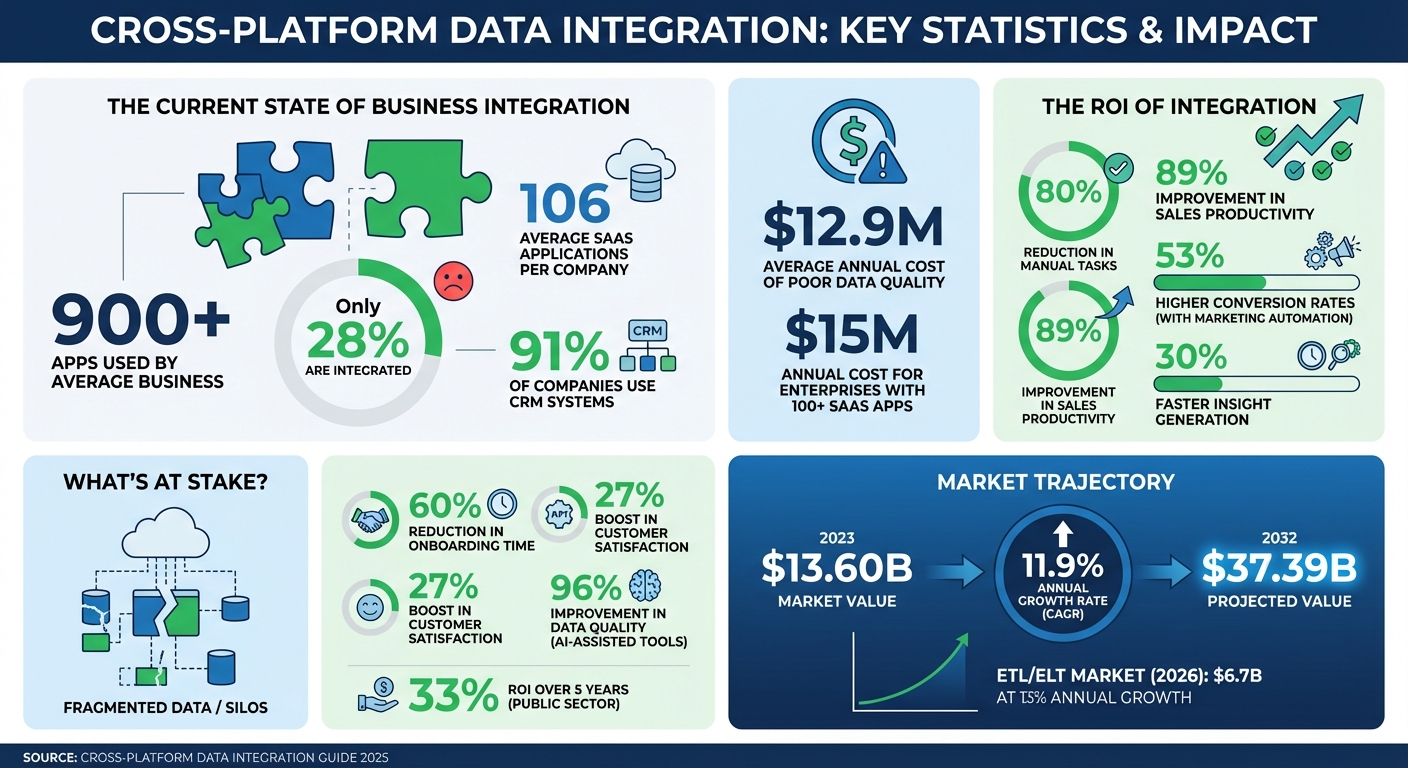
Why does this matter? Businesses often use over 900 apps, but only 28% are integrated, leading to fragmented data and inefficiencies. Integration solves this by creating a single source of truth, improving decision-making and operational efficiency. For example, automating CRM workflows can reduce manual tasks by up to 80%, freeing teams to focus on revenue-driving activities.
Key challenges include data silos, inconsistent formats, API limitations, and compliance with regulations like GDPR. Techniques like ETL/ELT, API-driven methods, and Change Data Capture (CDC) are commonly used to address these issues, ensuring real-time updates and high data quality.
Top tools like Apollo, HubSpot, and Zapier simplify integration, while best practices such as strong governance, scalability, and continuous monitoring ensure reliable systems. By prioritizing integration, companies can reduce errors, save time, and unlock the potential of AI and analytics.
Cross-Platform Data Integration Statistics and ROI Impact 2023-2032
Core Techniques for Data Integration
ETL vs. ELT: Choosing the Right Approach
ETL (Extract, Transform, Load) and ELT (Extract, Load, Transform) serve different purposes in data integration, and selecting the right one depends on your specific needs. ETL processes data in a separate staging area before loading it into the target system. This makes it ideal for scenarios where strict compliance is essential. For instance, sensitive information like personally identifiable information (PII) or protected health information (PHI) can be masked, encrypted, or scrubbed before it reaches the data warehouse.
On the other hand, ELT takes a different route by loading raw data directly into a cloud-based warehouse and transforming it later, as needed. This approach supports a "schema-on-read" method, enabling raw data to be stored once and reused for various purposes. With storage costs as low as $0.02 per GB per month on platforms like BigQuery, ELT is a cost-efficient solution for handling large-scale data.
Take the example of Omnicom Media Group Hong Kong in 2025. They shifted from manual ETL scripts to automated ELT pipelines using Windsor.ai. This transition allowed them to consolidate data from 11 media platforms and 1,900 ad accounts into Google BigQuery with a latency of less than two hours. The result? Full adoption of naming taxonomy across all media teams in just eight weeks and a savings of over 40 hours of manual work every week.
By 2026, many organizations embraced a hybrid approach: ETL for compliance-sensitive data ingestion and ELT for high-volume analytics tasks. That year, the ETL/ELT market reached $6.7 billion, with a growth rate of 13% annually. Some companies even reported a 96% improvement in data quality by using AI-assisted integration tools. These methods also serve as a foundation for other techniques like API-driven integration.
API-Driven Integration
APIs (Application Programming Interfaces) are essential for enabling real-time or near-real-time data synchronization between applications. For example, in CRM and sales tools, APIs manage key data types like contacts, deals, and pipelines, allowing systems to programmatically exchange customer-related information. Engineers typically use JSON for these data transactions.
APIs deliver updates through two main methods: native webhooks, which automatically push updates, or virtual webhooks created by polling for changes. However, certain data objects, such as CRM activity records (e.g., calls, emails, notes), may not support webhooks and instead require scheduled polling. By automating API integrations, organizations have reported saving 10–20 hours per week for each data analyst, eliminating the need for manual data exports.
The data integration market was valued at $13.60 billion in 2023 and is expected to grow to $37.39 billion by 2032, with an annual growth rate of 11.9%. Modern integration platforms can now be set up in as little as 1–7 days, compared to the months it takes to build custom solutions. To effectively manage API rate limits, strategies like exponential back-off, batching, and periodic reconciliation jobs (e.g., daily incremental snapshots) are crucial. These steps help avoid errors like "429 Too Many Requests" and ensure no events are missed during outages. For real-time change tracking, however, Change Data Capture (CDC) takes the lead.
Change Data Capture (CDC)
Change Data Capture (CDC) is a real-time integration method that tracks and records changes - such as inserts, updates, and deletions - in source databases. It automatically syncs these changes with target systems by leveraging the database's write-ahead transaction log (WAL). This ensures minimal impact on database performance while keeping the data up-to-date.
sbb-itb-8aac02d
Key Components of Integration Architecture
Source Systems and Connectors
Connectors are the bridge between your data sources and the integration platform. They handle tasks like authentication, managing API limits, and schema mapping, saving you the hassle of creating custom scripts for every system. Considering that the average enterprise now relies on over 300 SaaS applications, it's crucial to have connectors that can work seamlessly with everything from relational databases like MySQL to CRM platforms such as Salesforce and HubSpot.
When evaluating connectors, look for platforms offering 300–500+ pre-built options. This can drastically cut development time and costs. A key feature to watch for is the ability to detect "schema drift" - when a source system modifies fields or renames columns. Connectors that automatically adjust to these changes can prevent pipeline failures and ensure uninterrupted data flow.
To maintain clean and duplicate-free data, use stable identifiers like email addresses or LinkedIn URLs. Initial synchronization between major platforms usually takes about 24 to 48 hours. These connectors form the backbone of efficient pipelines, transforming raw data into insights that drive decisions.
Pipelines for Data Transformation
Once data is extracted, transformation pipelines take over, preparing it for analysis. These pipelines clean and standardize raw data, tackling tasks like removing duplicates, filling in missing values, and converting formats. Many modern architectures favor the ELT model - loading raw data first and then transforming it within the destination warehouse using its computing power.
Orchestration tools, such as Apache Airflow or AWS Step Functions, help manage dependencies and scheduling, ensuring reliable delivery of data. Scalability is essential from the start. Serverless options like AWS Lambda allow pipelines to scale automatically, eliminating the need for manual infrastructure management. By establishing a single source of truth through integrated systems, businesses can cut the time it takes for their intelligence teams to generate insights by over 30%.
Governance and Monitoring
Governance ensures data integrity and compliance. It tackles issues like data quality and system integration by implementing Role-Based Access Control (RBAC), data masking for sensitive information (like PII), and automated lineage tracking to comply with regulations such as GDPR or HIPAA. For better control, apply RBAC not only at the data warehouse level but also within the integration tools themselves.
Monitoring is equally important, as it tracks pipeline health, data volume, and latency metrics. Catching issues early can prevent them from snowballing into larger problems. Poor data quality can have a serious financial impact, which is why continuous observability is critical.
"An organization operating on siloed data is incoherent. Cloud data integration imposes order, creating the synchronized data foundation required for meaningful analysis." - DataEngineeringCompanies.com
Automated quality checks should be embedded into the ingestion and transformation stages. These checks can identify null values, duplicates, and referential integrity issues before the data reaches production. Treat integration logic like application code - use version control, conduct peer reviews, and ensure quick rollbacks when needed. This approach helps avoid "silent failures", where pipelines seem to work but deliver incomplete or incorrect data.
Top Tools and Platforms for Data Integration
Sales, Leads & CRM Directory Overview
The Sales, Leads & CRM directory highlights some of the best tools for CRM, lead generation, and sales automation. It features solutions like Apollo, known for its all-in-one prospecting and engagement capabilities, HubSpot for its well-rounded CRM workflows, and Pipedrive for managing sales pipelines. Automation tools such as Instantly, Octopus CRM, and Dripify also play a key role in streamlining processes like syncing LinkedIn activity and automating email campaign data. Considering that poor data quality costs businesses an average of $12.9 million annually, investing in reliable integration tools is crucial for safeguarding revenue. This directory offers a range of tools designed to tackle data challenges head-on, from CRM integration to lead generation automation.
CRM and Sales Integration Tools
These tools are designed to simplify data entry and create a unified data environment, enabling smarter decision-making. Apollo.io is a standout platform, combining prospecting, engagement, and data enrichment in one workspace. With access to a database of over 275 million contacts, Apollo offers native, bi-directional syncing with both Salesforce and HubSpot, cutting out the need for manual data entry. Users have reported impressive results, including a 70% increase in sales leads and a fourfold improvement in SDR efficiency. It’s also a cost-effective option, potentially reducing tech stack expenses by up to 64%.
"Every rep is more productive with Apollo. We booked 75% more meetings while cutting manual work in half." - Andrew Froning, BDR Leader
HubSpot stands out with its extensive CRM capabilities, featuring over 1,900 native integrations and a robust workflow builder for automating lead classification and routing. Its modular "Hubs" for sales, marketing, and service create a centralized data system, reducing errors by up to 30% with real-time updates. Meanwhile, Pipedrive focuses on visual sales pipeline management, offering customizable stages that integrate seamlessly with outreach tools. These platforms also emphasize activity write-back, ensuring all emails, calls, and meetings are automatically logged in the CRM, giving sales teams complete visibility. Together, these tools enhance CRM efficiency while paving the way for smoother lead generation.
Lead Generation Automation Tools
Automating lead activity syncing strengthens the overall data integration process, ensuring consistency across systems. Instantly provides two-way activity syncing with Salesforce and HubSpot through its OutboundSync feature. This ensures that every send, reply, and bounce is automatically logged in the CRM timeline, eliminating manual updates. Between April and October 2025, user Dustin Geissinger Gromicho leveraged Instantly to automate outreach, successfully booking over 100 meetings. The tool’s centralized inbox also allows teams to tag leads before syncing, preventing unnecessary data clutter.
For LinkedIn-specific tasks, Octopus CRM and Dripify excel in automating connection requests, InMails, and profile visits, syncing this activity directly into CRM records. This closes the gap between LinkedIn engagement and sales data, providing a more complete view of prospect interactions. Additionally, Zapier connects over 7,000 apps with its no-code "Zaps", enabling AI-driven lead routing and data enrichment. With marketing analysts at mid-market companies often spending 15–20 hours per week on manual data tasks, tools like these help redirect that time toward more strategic efforts.
When evaluating lead generation tools, it’s important to check for native connectors to minimize integration issues. Tools equipped with validation rules can also catch errors - like missing UTM parameters or broken tracking pixels - before they impact reporting accuracy or sender reputation.
Best Practices for Data Integration
Establish Data Governance Policies
Creating strong governance policies is essential for keeping your data accurate, secure, and consistent. Start with standardization - use consistent formats and business rules across all connected systems. For instance, ensure phone numbers follow the same format, whether they're pulled from your CRM, email platform, or LinkedIn tools. A metadata catalog can help by clearly defining what each field means and where it originates.
Use Master Data Management (MDM) to maintain a single, reliable source of truth for key data points. Without MDM, you might encounter conflicting records - like one system showing a lead as "VP of Sales" while another lists them as "Sales Director". Security is another critical piece. Protect data in transit with TLS encryption and secure it at rest using AES-256. Implement role-based access control (RBAC) to restrict access to sensitive information. For industries with strict regulations, such as healthcare or finance, consider data masking or pseudonymization to meet GDPR or HIPAA compliance requirements.
Be prepared for schema drift, where changes in source systems can disrupt your data pipelines. Automate alerts for things like field additions or deletions so your team can address issues before they escalate. Deduplication, using unique identifiers, is another must to avoid conflicting records. Organizations leveraging AI-driven integration and automated quality checks have seen measurable results, including a 60% reduction in onboarding time and a 27% boost in customer satisfaction.
With these governance measures in place, you'll be better equipped to handle growth and adapt to new challenges.
Focus on Scalability and Flexibility
To ensure your integrations can grow with your business, avoid rigid, hardcoded solutions. Instead, use a configuration-driven architecture that relies on declarative JSON configurations rather than custom code. This approach simplifies the process of adding new tools, turning it into a data task rather than a full-scale software deployment.
A canonical data model can also make a big difference. By standardizing core entities like Accounts, Contacts, and Opportunities into a single schema, your system only needs to interpret one format, whether the source is Salesforce, HubSpot, or Pipedrive. Abstracting API behaviors - such as pagination styles, authentication methods, and rate limits - further ensures that new vendors can be integrated without requiring code changes. Use multi-layered overrides to set global defaults while allowing for custom fields tailored to specific customers.
Poor data quality can be costly - up to $15 million annually for some enterprises managing over 100 SaaS applications. Pre-built connectors and integration platforms can significantly reduce implementation time. By storing mapping configurations as JSON objects, you enable "hot-swapping" without the need to restart servers. It’s also smart to build support for custom fields early on, particularly for platforms like Salesforce, where custom data often uses the __c suffix.
These strategies lay the groundwork for reliable and scalable integrations across your systems.
Test and Monitor Integration Regularly
Even with scalable and flexible integrations, regular testing and monitoring are crucial. Start by testing with small data samples to quickly identify and fix issues. Use reconciliation metrics, like row counts and checksums, alongside manual checks after joins to confirm data accuracy.
Data contracts can help prevent silent failures by setting clear agreements between data producers and consumers about schema structure, data freshness, and reliability. Treat your integration code like application code by running automated tests with every commit. Observability tools are invaluable for tracking data lineage, allowing you to monitor data freshness and update frequency from source to destination.
Set up automated alerts to notify your team immediately when errors occur, such as bounce rates exceeding 2% or sync delays breaching SLAs. Make error logs accessible not only to IT teams but also to business stakeholders who need visibility into what went wrong. Temporarily store results in cloud storage (e.g., Amazon S3) to isolate and troubleshoot data logic errors. Public-sector organizations have seen a 33% return on investment over five years by adopting modern integration systems with robust monitoring tools.
Cross-Platform Data Lineage with OpenLineage
Conclusion
Cross-platform data integration has the power to reshape how businesses operate. By unifying fragmented data from tools like CRMs, marketing platforms, and support systems into a single source of truth, teams across the board can access consistent, reliable information. This eliminates the headaches caused by conflicting records and the inefficiencies of manual data handling.
The financial benefits are hard to ignore. Poor data quality is expensive, but automated data pipelines - using methods like ETL, ELT, and Change Data Capture - can streamline processes by up to 80% and enhance sales productivity by 89%. These numbers highlight how automation can lead to faster, smarter decision-making.
To make the most of these strategies, it’s crucial to adopt automated and well-governed systems. Define clear ownership of data, rely on configuration-driven architectures to avoid rigid integrations, and use continuous monitoring to address issues early. For instance, companies that integrate marketing automation with their CRM systems experience 53% higher conversion rates, showing how integration directly impacts revenue.
Start by setting clear KPIs, such as cutting down report preparation time or improving data accuracy. Focus on connecting your most essential tools first. The Sales, Leads & CRM directory (https://sales-leads-crm.com) provides a curated list of integration-ready solutions like Apollo, HubSpot, Pipedrive, and automation tools like Octopus CRM and Dripify, making it easier to build a connected ecosystem without starting from scratch.
With 91% of companies now using CRM systems and businesses managing an average of 106 SaaS applications, the real challenge isn’t deciding whether to integrate - it’s about how quickly you can implement a scalable, governed system. By leveraging ETL/ELT processes, API-driven integrations, and strong governance, you’ll transform scattered data into actionable insights, giving your organization a clear competitive edge.
FAQs
How do I choose ETL vs. ELT for my data?
ETL is ideal when working with smaller, structured datasets. Here, data is transformed before being loaded into the target system, which helps maintain high data quality and ensures proper governance. Plus, it keeps the processing load off your data warehouse.
ELT, on the other hand, shines with large, raw datasets, especially in modern cloud environments. In this approach, data is loaded first, and transformations happen afterward, making it a flexible and scalable choice for iterative data analysis. The right option depends on factors like your dataset size, infrastructure, and transformation requirements.
When should I use APIs vs. CDC for syncing?
APIs shine when you need real-time or near-real-time updates. For example, you can use them to instantly sync customer data, update deal stages, or track engagement metrics. APIs are perfect for event-driven, transactional processes where speed and immediacy are key.
On the other hand, Change Data Capture (CDC) is better suited for handling large datasets. It efficiently syncs data by capturing only the changes, reducing system load. CDC is ideal for tasks like maintaining data warehouses or analytics platforms, especially when consistency over time and batch or continuous replication are priorities.
What should I monitor to catch “silent” data failures?
To catch "silent" data failures, keep an eye out for incomplete, duplicated, or missing data in your CRM. Watch for issues like failed or unsynced integrations, especially in areas like form-to-CRM connections or API interactions. Performing regular checks at these critical points can help you spot and fix problems before they escalate.