Deal tracking software simplifies how businesses manage sales opportunities. It consolidates contact details, communication history, deal values, and milestones into one platform, replacing scattered spreadsheets and emails. With visual pipelines, streamlining sales processes through automation, and real-time analytics, it helps small teams stay organized, prioritize deals, and make smarter decisions. Tools like Pipedrive, HubSpot, and Zoho CRM offer features such as pipeline visualization, automated updates, and AI-powered insights, making them ideal for small businesses aiming to improve sales efficiency and revenue forecasting.
Key Features of Deal Tracking Software
Pipeline Visualization and Management
A visual pipeline lays out every sales opportunity and its current stage in a clear, easy-to-understand format. Most deal tracking tools use drag-and-drop functionality, allowing you to move deals through custom stages - from the first contact to a closed deal. This helps ensure no deal slips through the cracks and keeps everyone on the team informed.
The visual layout also makes it easier to prioritize deals based on their value. If you notice deals getting stuck at a particular stage, like the proposal stage, you can quickly step in to address the issue. Research shows that nurtured leads are 47% more likely to make a purchase than those left unattended , emphasizing the importance of qualifying inbound leads, highlighting the need for small businesses to closely monitor and act on pipeline data.
"A visual sales pipeline helps you closely monitor your sales opportunities and how fast they convert. It gives a 360° view of all prospects and their stage in the sales cycle so you can analyze your efforts, identify roadblocks, and take appropriate action." - webdew
Additionally, automation within the pipeline ensures updates and follow-ups happen on time, keeping the process smooth and efficient.
Automated Updates and Notifications
Automation takes over repetitive tasks, saving time and reducing human error. Instead of manually updating deal statuses or setting reminders, the software does it for you. For instance, when a prospect takes action, the system can automatically update their status and notify the right team member. If a deal lingers too long in a specific stage, you'll get an alert to follow up before the opportunity goes cold.
Some platforms even offer no-code automation tools, making it easy to set up workflows without needing technical skills. For example, when a sales rep marks a deal as "Closed-Won", the system can instantly notify the account manager to kick off onboarding. This ensures a seamless handoff and keeps the process moving without delays.
Reporting and Analytics
On top of automation, deal tracking software comes with built-in analytics to turn raw sales data into actionable insights. From a single dashboard, you can track key metrics like win rates, average deal size, sales velocity, and customer lifetime value. These insights help you forecast revenue more accurately and decide where to focus your efforts for maximum impact.
Some platforms even leverage AI to predict which deals are most likely to close, helping you prioritize your time effectively. For example, Zoho CRM's AI assistant, "Zia", analyzes deal patterns to estimate conversion likelihood, giving small teams a smarter way to manage their workload. With real-time reporting, you'll always have the data you need to back up your decisions.
Top Deal Tracking Tools for Small Businesses
Pipedrive: Simple Sales Pipeline Management
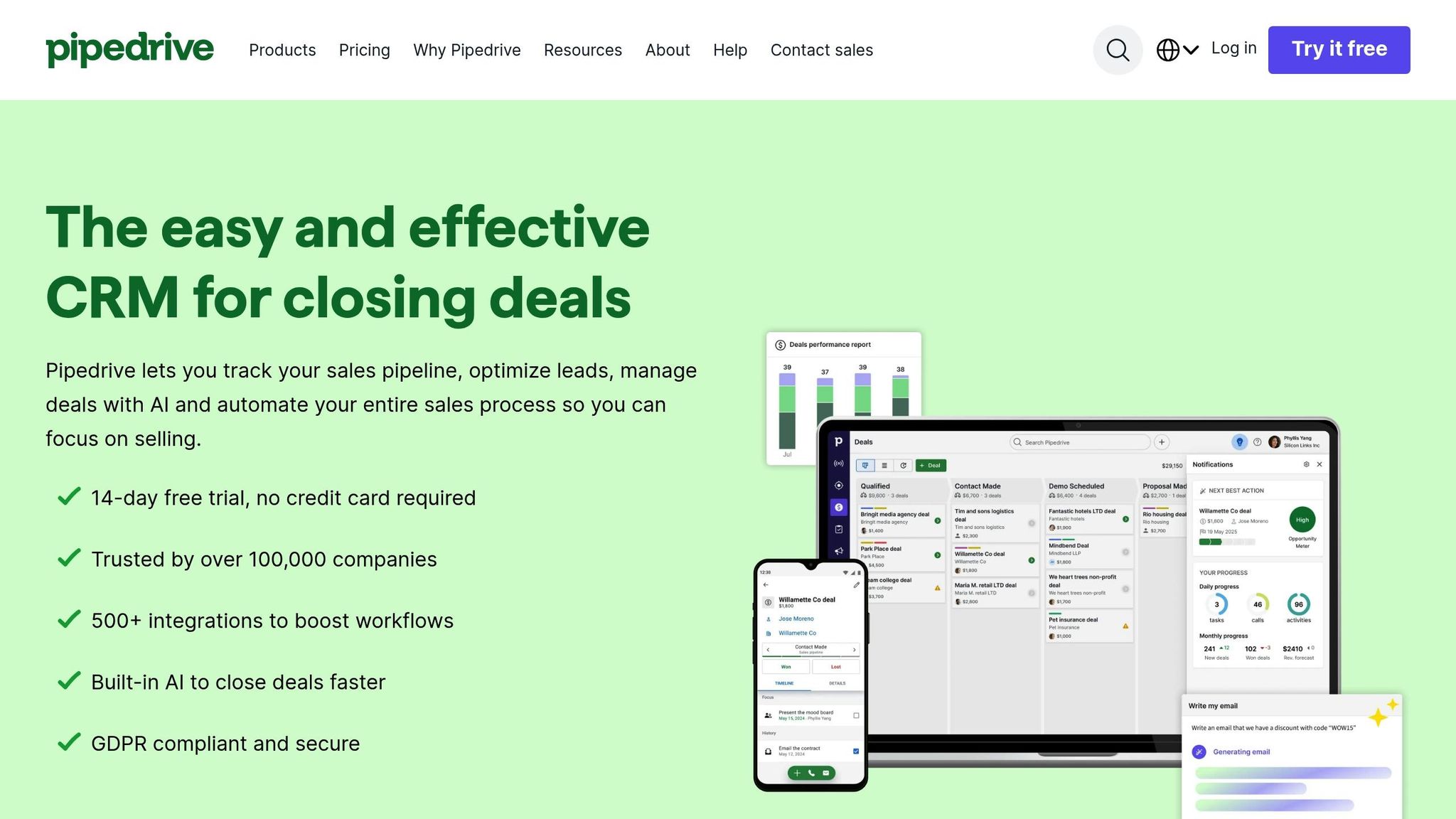
Pipedrive stands out with its visually intuitive Kanban-style interface, allowing users to easily drag and drop deals through custom stages that mirror their unique sales processes. Trusted by over 100,000 companies across 179 countries, Pipedrive has helped businesses cut administrative tasks by as much as 40%. Its AI Sales Assistant takes things further by predicting the likelihood of winning or losing deals and offering lead recommendations. Plus, with over 500 integrations available on its Marketplace, it works seamlessly with your existing tools.
For instance, the recruitment firm Reintech successfully used Pipedrive’s automation features to handle 1,500 applicants in a year - with just a four-person team. If you're curious, Pipedrive offers a 14-day free trial, and you don’t even need to provide a credit card to get started.
HubSpot: Free CRM with Deal Tracking
HubSpot takes the pressure off startups by offering a free CRM tier that includes deal tracking - perfect for businesses in their early stages. The platform automatically creates deals when contacts take specific actions, cutting down on tedious manual data entry. To make life even easier, HubSpot’s automated playbooks guide your sales team through each stage of the process, sending alerts when prospects interact with your content.
As your business grows, HubSpot scales with you. It offers a suite of tools for marketing automation, customer service, and advanced analytics - all integrated within the same platform. This makes it a flexible option for businesses looking to expand without switching systems.
Zoho CRM: Affordable Multi-Channel Tracking
Zoho CRM is tailored for small businesses juggling multi-channel sales processes. It lets you create separate pipelines for different products or services while keeping everything organized on a centralized dashboard for quick updates. One of its standout features is Zia, Zoho’s AI-powered assistant, which analyzes deal trends to predict the likelihood of conversions. This helps teams focus their efforts on the most promising opportunities - a game-changer for businesses with limited resources.
Zoho CRM is positioned as an affordable solution for small businesses that need to manage complex sales workflows without breaking the bank.
For more deal tracking solutions, check out Sales, Leads & CRM.
How to Implement Deal Tracking Software in Your Small Business
Assessing Your Business Needs
Start by pinpointing where your sales process struggles - whether it’s missed follow-ups, time-consuming manual data entry, or a lack of pipeline visibility. These specific challenges should guide your choice of software.
Then, take the time to map out your entire sales cycle - from the moment a lead enters your system to the post-sale follow-up. Documenting every stage will help you configure a pipeline that aligns with your workflow. For example, a video production agency transitioned from spreadsheets to Pipedrive by carefully mapping their process. This approach not only identified key success factors but also helped them quadruple their revenue.
Set clear parameters for deals, such as pricing, delivery timelines, and payment terms, to avoid misunderstandings during negotiations. Create a roadmap with simple, actionable steps so every team member understands their responsibilities at each stage.
Training Your Team for Effective Use
Once your sales process is outlined, it’s time to prepare your team to adopt the new system. The key to success isn’t in using every advanced feature but in building consistent daily habits. Start by setting clear expectations for data entry and use the dashboard during weekly meetings to review pipeline updates.
Metrics are a powerful motivator. Clear, measurable goals can double employee motivation. Train everyone on a standardized process so the entire team follows the same steps, leading to more predictable outcomes. Companies with aligned departments have reported up to 38% higher sales win rates.
Before onboarding, clean up your existing data. Remove duplicates and standardize formats. When importing data, focus on active deals and recent contacts first to avoid overwhelming your team. Historical data can be added later once everyone is comfortable with the system. Begin with basic tracking features and, as your team grows confident, introduce advanced lead generation solutions like AI-powered lead scoring or automated follow-ups.
Monitoring and Optimizing Your Workflow
Regular monitoring is essential. Review daily activities, track pipeline movement weekly, and analyze strategic metrics monthly. Pay attention to key indicators like pipeline velocity, stage conversion rates, average deal size, and win rates. These metrics can reveal where deals are stalling.
"In the forecast view, we look at what deals are due to close this month, next month just to make sure everyone is really honest about what they should be working on." - Carolyn Pearson, Founder, Maiden Voyage
Leverage automation to streamline your workflow. For instance, set up alerts to notify reps when a prospect opens a proposal multiple times or automate task assignments when a deal moves to a new stage. Regularly clean your data to ensure accuracy - bad data can lead to unreliable insights. Customize dashboards based on roles: sales reps may need activity-focused views, while executives benefit from high-level revenue forecasts and trend analysis.
sbb-itb-8aac02d
Zoho CRM Tutorial: How to Set Up Lead Stages and Deal Pipelines (Step-by-Step Guide)
Choosing the Right Deal Tracking Software
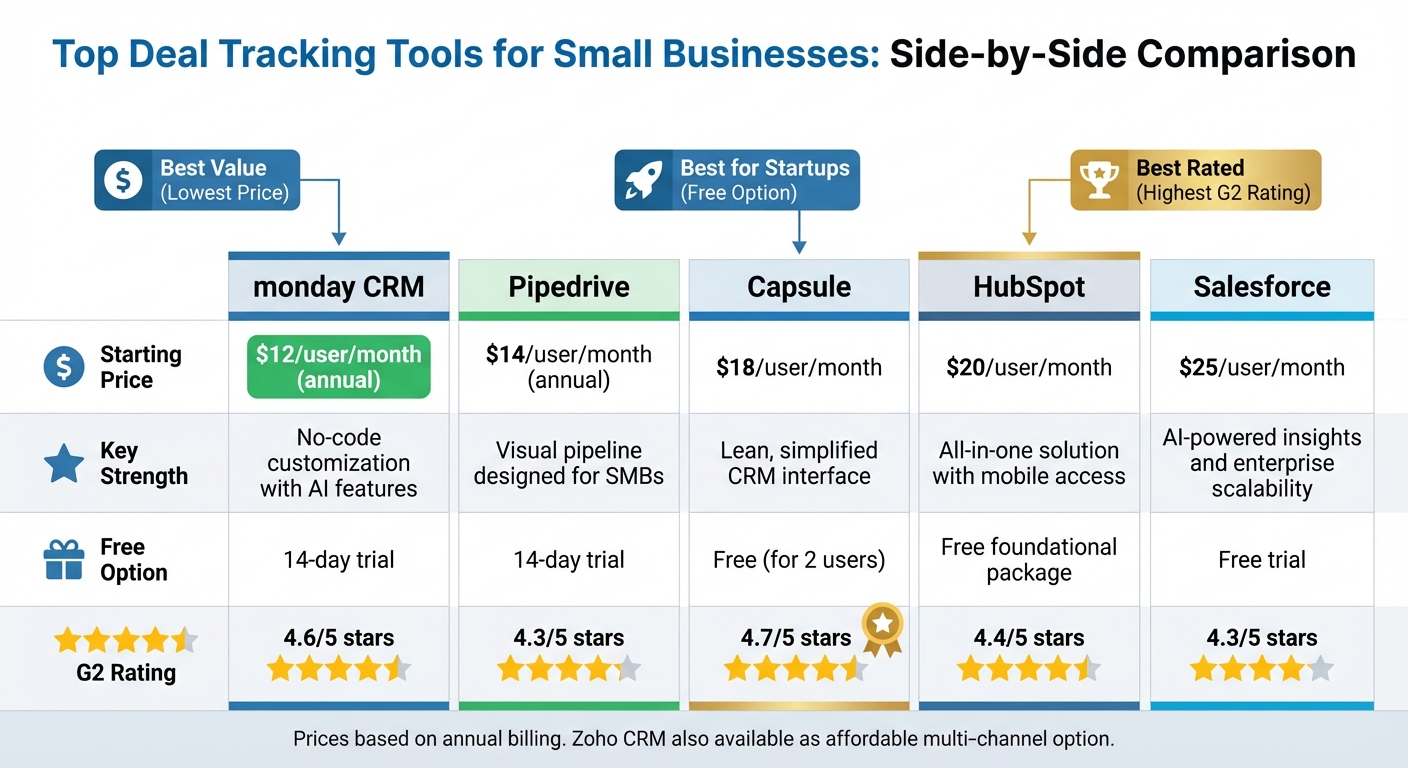
Deal Tracking Software Comparison for Small Businesses
Once you’ve grasped the implementation process, the next step is finding the software that fits your team like a glove.
Key Factors to Consider
Focus on tools that cater to your team’s specific needs instead of getting swept up by an endless list of features. For example, ease of use should be a top priority. A straightforward interface means your team will adopt the tool faster and spend less time figuring it out. On G2, Pipedrive scores 8.9/10 for ease of use, while Salesforce comes in at 8.0/10.
Integration capabilities are another must-have. Your software should work seamlessly with tools like Gmail, Outlook, Slack, or Zoom, and provide API access for custom connections. It’s also essential that the pipelines align with your sales process. Features like task automation can handle repetitive tasks such as follow-ups, saving your team time. Additionally, robust reporting features should offer real-time insights into metrics like customer lifetime value and deal forecasting. Don’t overlook mobile accessibility - your sales team should be able to update deals from anywhere.
Think about scalability as well. Choosing a platform that grows with your business can save you from costly and disruptive changes down the road. Involve your sales team in the decision-making process, and take advantage of free trials to test the waters. Also, keep an eye out for hidden fees, such as charges for setup, training, or ongoing support.
Comparison of Popular Tools
Here’s a quick breakdown of some popular deal tracking tools to help you weigh your options:
| Tool | Starting Price | Key Strength | Free Option | G2 Rating |
|---|---|---|---|---|
| monday CRM | $12/user/month (annual) | No-code customization with AI features | 14-day trial | 4.6/5 |
| Pipedrive | $14/user/month (annual) | Visual pipeline designed for SMBs | 14-day trial | 4.3/5 |
| Capsule | $18/user/month | Lean, simplified CRM interface | Free (for 2 users) | 4.7/5 |
| HubSpot | $20/user/month | All-in-one solution with mobile access | Free foundational package | 4.4/5 |
| Salesforce | $25/user/month | AI-powered insights and enterprise scalability | Free trial | 4.3/5 |
If you’re a startup, HubSpot’s free version is a solid choice, offering a comprehensive foundation. For teams that value simplicity, Capsule delivers a streamlined experience. Pipedrive stands out for small businesses looking to optimize pipeline management, while Salesforce provides enterprise-level customization and functionality. Another contender, Zoho CRM, is an affordable option for multi-channel tracking, and opting for annual billing can save you up to 34% compared to monthly plans.
These insights and comparisons can help narrow down your options. For more detailed advice on sales and CRM solutions tailored to small businesses, check out Sales, Leads & CRM.
Conclusion
Deal tracking software revolutionizes how small businesses handle their sales processes by consolidating everything into one centralized platform. With all deal, contact, and activity details accessible in a single source of truth, your team gains the clarity needed to avoid missed opportunities and stay focused on what truly matters.
Automation takes efficiency to the next level. According to Keap, automating workflows can save small business users up to 10 hours per week. That’s 10 hours you can reinvest in building relationships and closing deals. By automating repetitive tasks, your sales team can dedicate more time to what they do best - sealing the deal. Visual pipelines further enhance productivity by providing a clear snapshot of deal statuses, helping you identify bottlenecks and prioritize high-value opportunities. Pair this with real-time analytics, and you’ll be able to forecast revenue with greater accuracy and make smarter, data-driven decisions. Lisa Coyle, CEO of 360 Payments, highlights this benefit:
"As a business owner, my favorite feature in Pipedrive is the statistics and being able to look at the dashboard and use those metrics to help each individual on the team".
These tools don’t just streamline your operations - they can deliver measurable growth. One video production agency, for instance, saw their revenue quadruple after transitioning from spreadsheets to deal management software. It’s no surprise that over 100,000 companies in 179 countries rely on platforms like Pipedrive. For small businesses aiming to stay competitive, deal tracking software has become a must-have.
This isn’t just another tool for your business - it’s a strategic asset designed to propel your growth. For more insights into choosing the right sales and CRM solutions for your business, check out Sales, Leads & CRM.
FAQs
How can deal tracking software help small businesses boost sales efficiency?
Deal tracking software simplifies sales processes for small businesses by bringing all prospect and deal information into a single, cloud-based platform. Instead of juggling scattered spreadsheets or manually updating records, this software keeps contact details, activity logs, and deal stages updated in real time. The result? Sales teams can focus more on building relationships with potential customers and less on hunting for data.
With features like automated follow-up reminders, workflow triggers, and AI-powered deal scoring, the software helps teams work smarter. It highlights high-priority opportunities, improves revenue forecasting, and ensures no deal slips through the cracks. Collaboration tools, such as shared notes and task assignments, also play a big role in keeping the team on the same page, which helps move deals along faster. For small businesses in the U.S., this means better resource management and quicker deal closures.
What are the advantages of using visual pipelines in deal tracking software?
Visual pipelines turn a list of deals into a clear, easy-to-follow board that shows each deal’s stage, value, and priority - all in a single view. This big-picture layout helps sales teams quickly see which deals are moving forward, which ones are stuck, and where they should focus their energy. With this visual setup, managers can spot risks, predict revenue, and make smart decisions without digging through complicated spreadsheets.
The drag-and-drop feature makes managing deals straightforward. Sales reps can shift deals between stages effortlessly, with the system automatically updating and notifying the team. This not only cuts down on manual errors but also keeps information accurate and ensures everyone stays on the same page about priorities and next steps.
The simple design also speeds up onboarding for new team members and helps with revenue forecasting. By gathering all deal data in one place, businesses can create revenue projections quickly and identify potential gaps. This leads to shorter deal cycles and more reliable sales results.
How does automation in deal tracking software help reduce errors?
Automation in deal tracking software takes the hassle out of manual data entry and repetitive tasks, reducing the likelihood of errors. As deals move forward, the system takes care of updating relevant fields, recording timestamps, and adjusting forecasts automatically. This ensures your records stay accurate and current without the need for constant manual updates. Plus, automated reminders and task triggers help ensure follow-ups and deadlines don’t slip through the cracks.
Other handy features, like automatically converting high-priority leads into opportunities or syncing data across integrated tools, cut down on duplicate entries and mismatched details. By streamlining routine tasks and standardizing workflows, deal tracking software frees up small business teams to focus on what truly matters - building strong relationships and closing more deals - while keeping errors to a minimum.