LinkedIn niche prospecting is all about targeting specific, high-value segments within specialized markets. Instead of broad outreach, the focus is on precision - connecting with the right decision-makers using detailed filters like location, industry, and tools they use (e.g., Salesforce or HubSpot). Why does this matter? LinkedIn generates 80% of B2B leads from social media and has 3x higher lead conversion rates compared to other platforms.
In 2025, LinkedIn introduced tools like "Message Assist" for AI-crafted outreach and "Account IQ" for instant company insights, making prospecting more efficient. However, tighter limits on activity (100 connection requests/week, 70 messages/day) mean quality matters more than quantity. Success now depends on intent-based strategies, CRM integration, and leveraging tools like Sales Navigator, Apollo, and Dripify.
Key takeaways:
- Build a clear Ideal Customer Profile (ICP) and buyer personas to target niche markets effectively.
- Use LinkedIn Sales Navigator to refine searches with filters like technographics and Boolean operators.
- Engage with prospects strategically - LinkedIn Groups, profile viewers, and event attendees are great starting points.
- Combine LinkedIn with CRM tools and lead enrichment platforms for accurate data and multichannel outreach.
- Personalize outreach and focus on building relationships over time for better results.
The bottom line: LinkedIn niche prospecting in 2025 is about precision, personalization, and leveraging the right tools to connect with decision-makers in specialized markets.
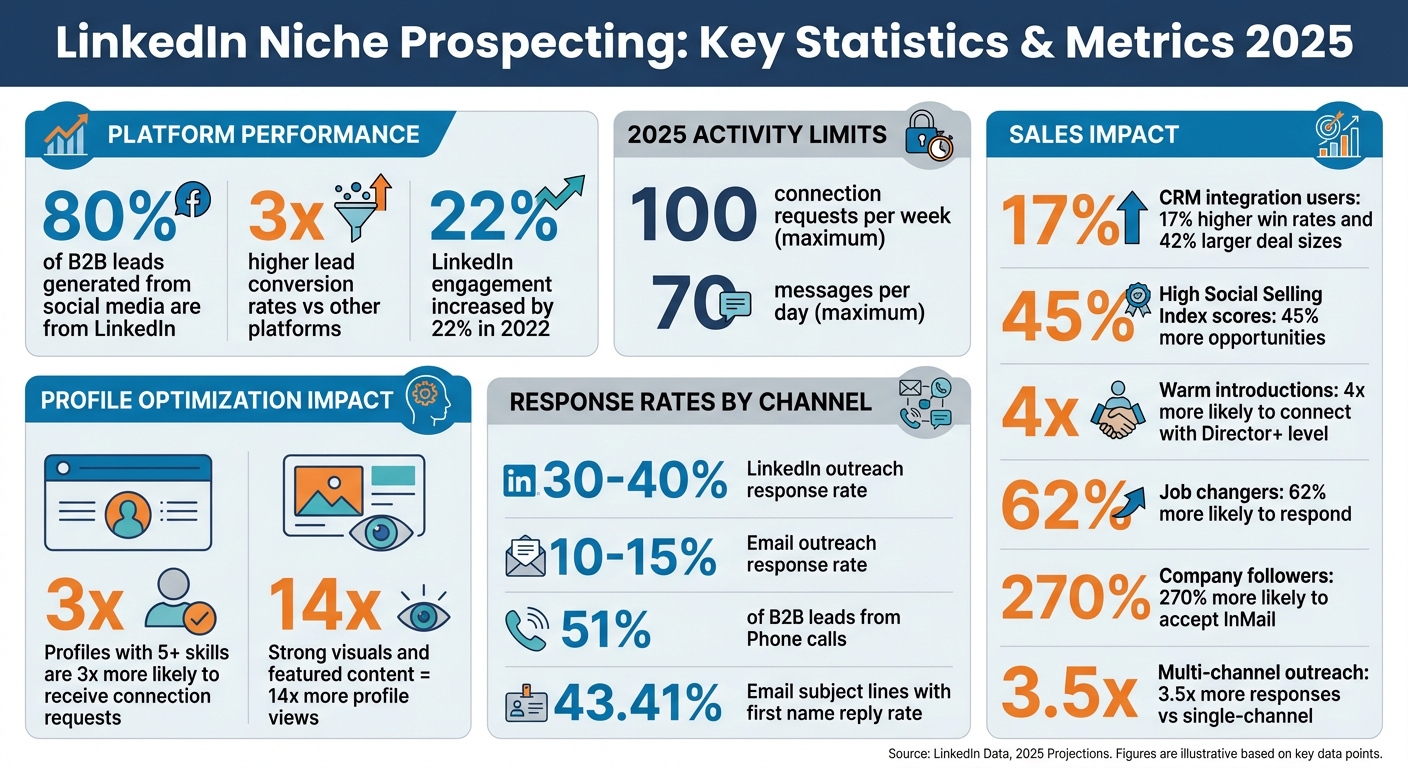
LinkedIn Niche Prospecting Statistics and Key Metrics 2025
LinkedIn & Sales Navigator: The 2 Tips that Amplify Your Prospecting Results
Setting Up Your Targeting: ICPs and Buyer Personas
To succeed with LinkedIn prospecting, you need a clear strategy. That starts with defining your Ideal Customer Profile (ICP) and building detailed buyer personas.
Defining Your LinkedIn Niche
Your niche is the specific market segment you're aiming to reach. For instance, you might target fintech startups with 50–200 employees in the Northeast that use Salesforce. LinkedIn Sales Navigator helps you narrow this down with filters like Industry, Company Size, Seniority Level, and Geography.
For more specialized targeting, you can add technographic data - focusing on the tools and software your prospects use. The "Technology Used" filter in Sales Navigator is great for this. Let’s say you’re selling a CRM integration tool; you can target companies already using platforms like HubSpot or Pipedrive. You can also refine searches further using Boolean search. For example, entering "project manager" AND "machine learning" will surface profiles that combine both criteria.
Stay alert for buying signals like new job postings, funding announcements, or hiring surges. These often indicate companies investing in growth, making them prime targets. Tools like Apollo and Dripify, available through Sales, Leads & CRM, can help you track these signals and enrich your lead data.
Once you’ve nailed down your niche, the next step is to outline the ideal companies you want to work with by creating a solid ICP.
Creating an Ideal Customer Profile (ICP)
An ICP focuses on the companies you want to target - not individual buyers. Andrei Zinkevich, Co-Founder of FullFunnel.io, explains:
"ICP is a list of attributes that your BEST customers from a SPECIFIC market segment have in common".
The Pareto Principle is a useful guide here: focus on the 20% of customers that generate 80% of your revenue. Zinkevich also emphasizes that the higher your Annual Contract Value (ACV), the more precise your ICP needs to be.
A strong B2B ICP includes these five core pillars:
- Firmographics: Details like industry, sub-industry, company size, annual revenue, and location.
- Buying Committee: Identify key roles - Champions, Decision-makers, Influencers, and Blockers.
- Account Qualification/Disqualification: Define what makes a company a good or poor fit. For example, a fintech provider might avoid companies where the CFO has been in their role for less than a year (still onboarding) or more than five years (unlikely to make changes).
- Account Segmentation: Group prospects into Tier 1, 2, and 3 based on revenue potential.
- Account Enrichment: Learn about buying triggers by interviewing current customers to understand what led them to seek your solution.
If you serve multiple market segments, avoid a "one-size-fits-all" approach. Instead, create separate ICPs for each segment. For instance, a healthcare SaaS company might need distinct ICPs for hospitals, private practices, and insurance providers.
Understanding Buyer Personas in Niche Markets
While your ICP defines the companies, buyer personas focus on the individuals within those companies. Use LinkedIn to identify multiple stakeholders. A good rule of thumb is the 5/2 Rule: aim to connect with five people in a target company, including at least two decision-makers.
Map personas based on their roles in the buying process:
- Decision-makers: Senior executives who approve purchases.
- Evaluators: Managers who assess and compare solutions.
- Influencers: Peers or consultants whose recommendations carry weight.
Anticipate potential blockers - individuals who may view your product as a threat to their budget or authority - and prepare counterarguments.
For niche markets, technographic data can also enhance your persona profiles. If your prospects use specific software, include that in your targeting. Sales Navigator’s Relationship Map is another helpful tool, visually showing connections between decision-makers and influencers. This can reveal warm introductions into an account.
Judy Wang, Sales Effectiveness Sr. Manager at Canada Post, shared a success story:
"The team struggled to break into an account until an AE used TeamLink to get a warm intro - leading to a deal worth over 2x the initial investment".
Keep an eye on job changes too. When someone moves to a new company, they’re often looking to rebuild their tech stack, making them a high-intent prospect. J.D. Veldsman, Pacific Corporate & Commercial Head at Marsh, highlights the value of staying updated:
"If the person you've been working with is moving from one business to another, having Sales Navigator connected to our CRM keeps us updated immediately".
With a well-defined ICP and detailed buyer personas, you’re ready to create prospecting workflows that drive results.
LinkedIn Prospecting Workflows for Niche Audiences
Once you’ve defined your Ideal Customer Profile (ICP) and buyer personas, the next step is creating workflows that consistently connect you with well-qualified prospects.
Optimizing Your LinkedIn Profile for Niche Authority
Think of your LinkedIn profile as a specialized landing page that instantly communicates your expertise in solving specific problems.
Start with your headline. With 220 characters, make every word count. Instead of generic titles like "Sales Manager", go for something more specific, such as: "Helping B2B SaaS Companies Increase Revenue with Predictable Outbound Systems." Include keywords relevant to your niche, like "Growth Strategist" or "Fintech Sales Consultant" - terms your target audience might search for.
Your About section is your chance to tell a compelling story in 2,600 characters. Skip the dry job history and focus on the challenges you solve for your audience. For instance, Sophie Miller, founder of Pretty Little Marketer, uses her headline to highlight keywords like "speaker", "strategist", and "creator." She also leverages her Featured section to guide traffic to her newsletter and membership community, effectively turning her profile into a lead-generation tool.
The Featured section is your showcase. Pin case studies, client testimonials, or other content that highlights your expertise. Profiles with strong visuals and featured content often see up to 14x more profile views. Jane Deehan, an award-winning B2B marketer, underscores the importance of first impressions:
"Your profile picture is your calling card on LinkedIn – it's how people are introduced to you and (visual beings that we are) it governs their impressions from the start".
Boost your credibility by listing certifications and at least five niche-relevant skills. Did you know profiles with five or more skills are nearly three times more likely to receive connection requests? Pin your top three skills to make them immediately visible.
When your profile is optimized for niche authority, it becomes easier to attract and convert the right prospects.
Building Targeted Lists with LinkedIn Search
Creating precise prospect lists requires a structured approach. Use a three-step filtering process to refine your search:
- Start with an Account List, narrowing down companies that fit your ICP.
- Apply Personas, filtering by roles, functions, and seniority.
- Add Warm Paths In, identifying prospects with shared connections or recent activity.
Use Boolean operators for more targeted searches. For example:
- AND ensures all terms appear in the results.
- OR includes profiles with at least one term.
- NOT excludes specific terms.
- Wrap exact phrases in quotes and group complex queries with parentheses for better accuracy.
Trigger-based workflows help you catch prospects at high-intent moments. Filter for activities like job changes in the past 90 days, recent LinkedIn posts, or mentions in the news. Decision-makers who’ve changed roles recently are 62% more likely to respond to outreach. Sean Murray, LinkedIn Strategic Account Manager, emphasizes:
"Capture the low-hanging opportunities! Data shows that buyers are four-times more likely to make a purchase if they are introduced to a sales rep by a common connection".
Save your searches in Sales Navigator to automate updates. It will notify you when new profiles match your criteria, helping you grow your prospect list without extra effort. Sales Navigator users also make four times more connections with Director-level and above leaders compared to non-users.
Once you’ve built your list, focus on personalized outreach strategies to engage your prospects effectively.
Niche-Specific Prospecting Tactics
Generic outreach doesn’t work in niche markets. To stand out, you need to demonstrate a deep understanding of your prospects’ unique challenges.
LinkedIn Groups are a treasure trove for niche targeting. Instead of posting in groups, use Sales Navigator’s "Groups" filter to find relevant prospects. For example, in August 2025, SalesRobot client Jack Zuvelek generated over $20,000 in new business by targeting niche LinkedIn groups and launching personalized outreach sequences.
Event attendees are another goldmine. By clicking "Attend" on niche webinars or LinkedIn Events, you can access attendee lists. Use these events as conversation starters. For example: "I saw you’re attending the FinTech Innovation Summit next week - are there any sessions you’re particularly interested in?".
Profile viewers are warm leads waiting for engagement. Check who’s viewed your profile daily and reach out within 24 hours. People already curious about you are more likely to respond. Daryl Clark, LinkedIn Global Account Director, shares his strategy:
"To get my searches more focused, I see who is following my company, thereby signaling interest to engage – people who already follow my company are 270% more likely to accept my InMail".
Finally, build relationships over time with a soft touchpoint calendar:
- Day 1: View their profile.
- Day 2: Send a personalized connection request.
- Day 5: Engage with one of their posts.
- Day 18: Share a resource via direct message.
- Day 30: Introduce a soft pitch.
This approach works because it prioritizes building trust and rapport - critical in niche markets where relationships matter more than sheer volume.
sbb-itb-8aac02d
Tools and Technology for Niche Prospecting
Having the right tools can turn LinkedIn prospecting from a tedious task into a streamlined, scalable process. By 2025, the best tools won’t just automate repetitive tasks - they’ll help you find high-intent prospects, keep your data accurate, and personalize outreach at scale, all while staying within LinkedIn’s safety guidelines. These tools work hand-in-hand with the strategic workflows we’ve already discussed.
Integrating LinkedIn and CRM for Better Tracking
Linking LinkedIn to your CRM is a game-changer. It eliminates manual data entry and ensures your records stay up to date. For instance, integrating LinkedIn Sales Navigator with systems like HubSpot, Salesforce, or Pipedrive allows you to transfer contact details directly from LinkedIn profiles into your CRM with a single click. Businesses using this setup report 17% higher win rates and 42% larger deal sizes compared to those relying on manual data management. Plus, automation tools can save sales reps over four hours daily by cutting out manual updates.
Tools like Surfe (formerly Leadjet) excel in syncing LinkedIn profiles to CRMs, automatically filling in fields like name, job title, and company. For niche markets, where tracking relationship history is crucial, these integrations can flag outdated contacts when prospects change roles or companies. To get the most out of these tools, test integrations in a sandbox environment and set clear data hygiene rules, such as syncing only with connected leads. Using Sales Navigator’s "People in CRM" filter can also help you focus on new prospects rather than duplicating existing ones.
While CRM integrations simplify tracking, lead enrichment tools fill in the gaps by providing missing or incomplete data.
Using Lead Enrichment Tools
LinkedIn profiles often leave out key details, like direct contact information. That’s where lead enrichment tools step in, offering verified contact data and insights from various sources. For example, Kaspr provides access to over 500 million email addresses and phone numbers, while UpLead offers a database with a 95% accuracy rate for more than 108 million contacts.
A growing trend is waterfall enrichment, where AI systems check multiple data providers in sequence to verify contact details in real time. Tools like Evaboot can filter out non-decision makers from Sales Navigator exports before you add them to your outreach sequences. Similarly, platforms like PhantomBuster allow you to scrape niche-specific data - such as members of targeted LinkedIn Groups - to create more relevant lead lists.
For individual sales reps, Chrome extensions like Kaspr (starting at $49/month) are a solid choice. Larger teams handling higher volumes may prefer platforms like Apollo.io (starting at $49 per user/month), which combine enrichment features with seamless CRM integration.
Once you’ve enriched your data, AI-powered automation can elevate your prospecting efforts even further.
AI and Automation Trends for Niche Audiences
AI is revolutionizing prospecting by identifying high-intent leads based on signals like job changes and hiring trends. For example, tools like Crystal analyze LinkedIn profiles to predict personality traits and suggest an effective outreach tone. Other AI-powered platforms can craft hyper-personalized icebreakers by analyzing a prospect’s company goals and challenges.
For agencies or teams managing multiple accounts, tools like HeyReach ($79 per seat/month) and Expandi ($99 per seat/month) are invaluable. These platforms automate multiple LinkedIn accounts while mimicking human behavior with randomized delays and activity limits to avoid detection by LinkedIn’s algorithms.
The concept of a "Unibox", which centralizes conversations from LinkedIn, email, and other channels into one interface, is gaining traction. Tools like Waalaxy (around $65/month) and Skylead integrate LinkedIn with email and Twitter, allowing you to reach niche prospects through multiple channels. Multi-channel outreach has been shown to generate up to 3.5 times more responses compared to single-channel approaches.
To avoid overwhelming LinkedIn’s limits, use "auto warm-up" features to gradually increase activity and build your account’s credibility before launching large-scale campaigns. Ruth Danielson, Founder of Mulberry Street Marketing, offers this advice:
"Use your marketing automation tool to connect to your strategic targets. Initiate a genuine conversation. Start by asking questions about them."
For a detailed guide on LinkedIn automation tools and CRM platforms tailored for sales teams, check out the resources available at Sales, Leads & CRM.
Advanced Strategies and Optimization
Using a Multichannel Approach for Niche Markets
When targeting niche markets, combining LinkedIn, email, and phone outreach can create multiple touchpoints that increase your credibility and response rates. For instance, LinkedIn outreach typically garners a 30–40% response rate, compared to 10–15% for email, while phone calls account for 51% of B2B leads. By using these platforms together, you can elevate your visibility and trustworthiness.
The most effective strategy is to coordinate these channels in a sequence over 10–14 business days. Start with LinkedIn by engaging subtly - view their profile, like a post, or leave a thoughtful comment. After 1–2 days, send a connection request. Once accepted, follow up with a personalized message, and then send an email referencing your LinkedIn interaction. If there’s still no response, follow up with a phone call and leave a voicemail, saying something like, “Just wanted to put a face to the name here on LinkedIn”. Including the recipient’s first name in your email subject line can increase reply rates to 43.41%. Tools like those offered at Sales, Leads & CRM can help automate these sequences for better management.
This multichannel approach doesn’t just open doors - it sets the stage for more meaningful, content-driven engagement with prospects.
Content-Driven Prospecting for Niche Engagement
Once you’ve established contact, the next step is to use high-quality content to deepen your relationship with prospects. Sharing niche-specific content on LinkedIn can warm up your audience before you even send a direct message. When your name becomes familiar through valuable posts, your connection requests are more likely to be accepted. In fact, LinkedIn engagement increased by 22% in 2022, and content tailored to buyer personas can boost engagement rates by six times.
To make an impact, focus on the first three lines of your LinkedIn post - this is all that appears in users’ feeds. As LinkedIn expert Jasmin Alić explains:
"If you fail there, no one's even going to be able to read the rest of the post".
Start by addressing a broad problem before narrowing it down to your specific solution - this is known as the “Anti-Niche” hook. For example, instead of saying, “SaaS CFOs struggle with revenue recognition,” you could start with, “Most finance leaders lose sleep over one spreadsheet,” then transition to your niche offering. Additionally, following the 4-1-1 Rule - sharing four pieces of industry news, one original thought piece, and one promotional post for every six posts - can help you maintain credibility without coming across as overly self-promotional. Interestingly, text-only posts are outperforming image and video content in 2025 because they encourage longer dwell times.
Measuring and Optimizing Prospecting Efforts
To ensure your outreach and content strategies are effective, it’s crucial to measure and refine your efforts. Metrics like connection acceptance rates and reply rates provide valuable insights into how well your messaging and targeting are working. If your numbers are falling short, it’s a sign that adjustments may be needed.
LinkedIn’s lead conversion rates are three times higher than those of other major social platforms. Additionally, professionals with higher Social Selling Index (SSI) scores generate 45% more opportunities than their peers. By tracking these metrics, you can build a stronger sales pipeline.
Here’s a quick breakdown of key metrics to monitor:
| Metric Category | Key Metrics | What It Tells You |
|---|---|---|
| Engagement | Reach, Dwell Time, Profile Views | How authoritative and relevant your content is |
| Conversion | Meetings Booked, Cost Per Lead, ROI | The direct business impact of your efforts |
| Account Health | Weekly Connection Requests, Daily Messages | Whether you’re staying within LinkedIn’s limits |
For example, Zackary McKibbon achieved a 37% reply rate on his LinkedIn outreach campaigns in 2025 by using SalesRobot to automate personalized sequences.
To refine your approach further, run A/B tests on your connection requests and follow-up messages. Change one element at a time - such as the opening line, call-to-action, or degree of personalization - to see what resonates best. Also, stay within LinkedIn’s safety thresholds by limiting yourself to around 100 connection requests per week and 70 messages per day to avoid account restrictions.
Conclusion
Success in LinkedIn niche prospecting in 2025 hinges on meaningful, targeted interactions rather than sheer volume. As Vlad Oleksiienko from Reply.io aptly states:
"Prospecting is a game of quality and personalization rather than quantity and aggressive 10-step email sequences with no personalization".
Start with a crystal-clear Ideal Customer Profile (ICP) and use tools like Sales Navigator to pinpoint decision-makers who align with your goals. Instead of jumping straight into outreach, take the time to engage with prospects' content. When you do reach out, craft messages grounded in genuine research, avoiding over-reliance on generic templates.
Technology plays a pivotal role here. Automation and integration tools - such as those available at Sales, Leads & CRM - can handle repetitive tasks, freeing you to focus on building authentic relationships. However, staying within LinkedIn's safety guidelines is crucial: stick to around 100 connection requests per week and 70 messages per day.
The numbers back this approach. Professionals with higher Social Selling Index scores generate 45% more opportunities than their peers. By adopting a multichannel strategy - blending LinkedIn outreach with email and phone - you’re not just contacting prospects; you’re building trust across different platforms.
The bottom line? Quality always trumps quantity. Prioritize the right prospects, personalize your outreach, use the best tools available, and track your progress. These strategies can help you reshape your LinkedIn prospecting game in 2025.
FAQs
How do I create an Ideal Customer Profile (ICP) for niche markets on LinkedIn?
To create an effective Ideal Customer Profile (ICP) for niche markets on LinkedIn, start by pinpointing the key characteristics of your perfect customer. These typically include firmographics - like company size, location, and industry - and demographics, such as job titles, seniority levels, and years of experience. For instance, if you're targeting mid-sized tech companies in the U.S., you might focus on decision-makers like Sales Managers with over five years of experience.
Take it a step further by incorporating technographics, which detail the software or tools your prospects use, and behavioral patterns, such as their LinkedIn activity or engagement with content relevant to your industry. Once you’ve gathered this data, organize it into a shareable document to keep your team aligned and on the same page.
With your ICP finalized, LinkedIn Sales Navigator becomes your go-to tool. Use it to set up saved searches that match your criteria. Continuously refine these searches based on how prospects respond and the results you’re seeing. Export your leads into a CRM or outreach tool to simplify follow-ups. By fine-tuning your ICP and making the most of LinkedIn’s advanced filters, you’ll consistently uncover high-quality prospects that fit your niche perfectly.
What are the best ways to personalize LinkedIn outreach for niche industries?
Making your LinkedIn outreach stand out starts with doing your homework. Take the time to explore your prospect's profile, recent activity, or shared content. Whether it's a post they authored or a thoughtful comment they left, referencing something specific in your connection request or first message can instantly make your outreach feel genuine and relevant. For instance, you might mention their recent achievement or share your thoughts on a niche topic they’ve discussed.
If you’re looking to maintain that personal touch while managing multiple connections, tools can be a lifesaver. Many platforms let you use dynamic tags - like the recipient’s name or company - to create messages that feel tailored without starting from scratch every time. AI-powered tools can take it a step further by identifying industry pain points or suggesting conversation starters, helping you save time without losing the personal touch. Even something as simple as leaving a thoughtful comment on their post before reaching out can help establish a connection.
When crafting your message, keep the tone light and conversational. Focus on offering value rather than jumping straight into a hard pitch. For teams in the U.S., platforms highlighted on Sales, Leads & CRM can simplify the process, enabling you to design outreach campaigns that feel personal and resonate with your audience.
How can I use LinkedIn with CRM tools to streamline my prospecting?
Integrating LinkedIn with your CRM can make managing leads much simpler, saving you time and keeping your sales pipeline up to date. Start by using LinkedIn’s filtering features - like industry, role, or location - to zero in on the right prospects. Tools such as LinkedIn Sales Navigator or integrations like Surfe let you transfer important details - like a prospect’s name, job title, company, and profile link - straight into your CRM with just one click.
Once the data is in your CRM, you can take it further by adding contact details like email addresses or phone numbers, assigning tasks, and setting up automated follow-ups or drip campaigns. Many CRMs, including HubSpot and Pipedrive, offer built-in LinkedIn integrations to keep your records updated with changes like new connections or job transitions, ensuring you never miss a chance to engage.
For those who want an even more hands-off approach, tools like Octopus CRM can automate tasks such as scraping LinkedIn profiles, sending connection requests, and managing follow-ups - all while syncing the data directly to your CRM. By consolidating this information in one place, you can track outreach performance, organize leads into segments, and evaluate the ROI of your LinkedIn efforts with ease.