Pipeline integration tools connect your CRM with other apps to automate processes like lead assignments and data updates using sales pipeline management best practices. Choosing between on-premise and cloud options depends on your business needs. Here’s a quick breakdown:
- On-Premise: Offers full control over data and security but requires significant upfront costs ($50,000–$500,000+) and a dedicated IT team. Ideal for industries with strict data regulations or unreliable internet access.
- Cloud-Based: Easier to set up, scale instantly, and maintain with lower upfront costs (monthly fees: $25–$150 per user). Best for growing businesses, remote teams, and those prioritizing flexibility.
- Hybrid: Combines both, keeping sensitive data on-premise while leveraging the cloud for automation and scalability.
Quick Comparison
| Feature | On-Premise | Cloud-Based |
|---|---|---|
| Setup Time | Weeks to months | Hours to days |
| Cost Model | High upfront costs | Monthly subscription |
| Scalability | Slow, hardware-dependent | Instant, license-based |
| Security | Full in-house control | Shared responsibility |
| Access | Local or VPN required | Internet-enabled devices |
For businesses with strict security needs, on-premise works well. For those prioritizing ease and scalability, cloud solutions are the way forward. Hybrid setups can balance both. Your choice should align with your budget, security requirements, and operational priorities.
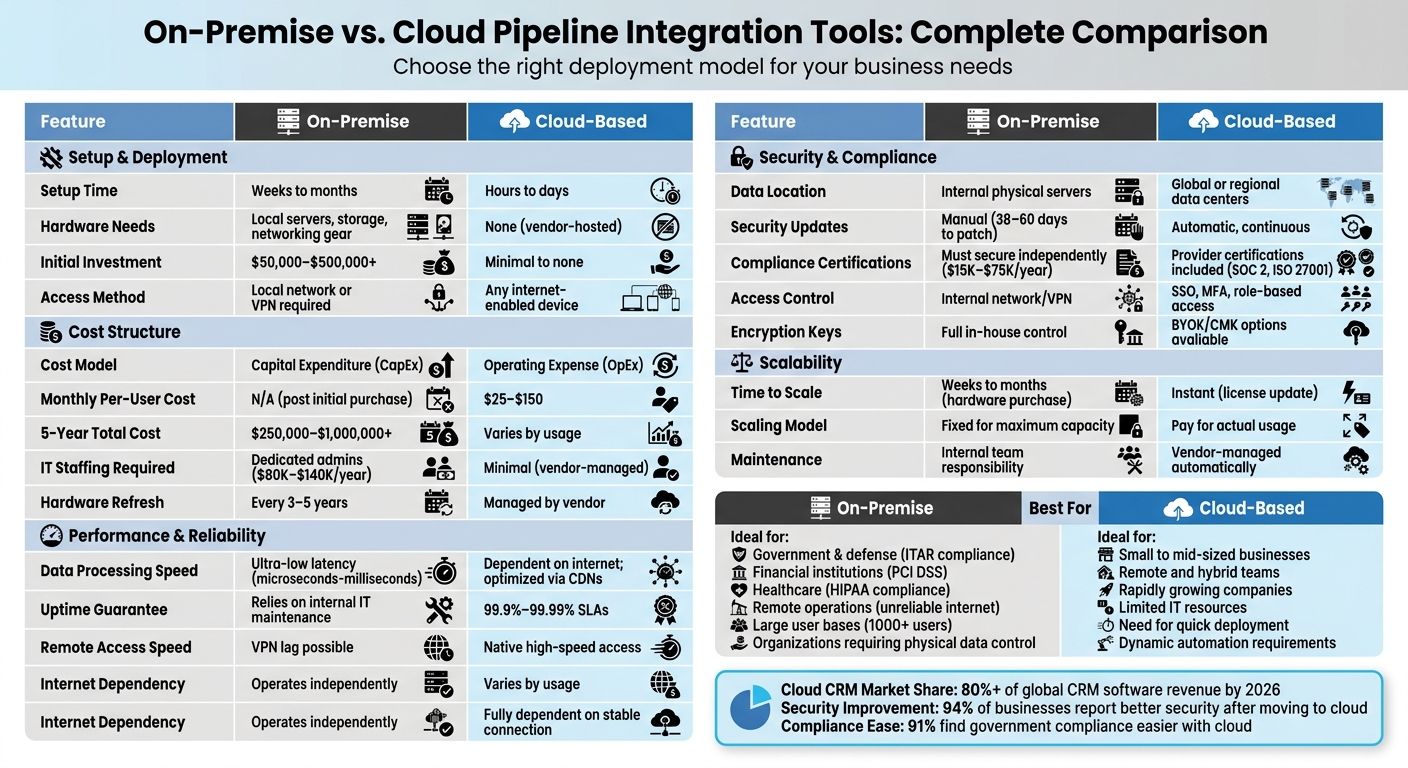
On-Premise vs Cloud Pipeline Integration Tools Comparison
Deployment and Infrastructure
On-Premise Deployment
On-premise deployment relies on your organization's own servers and IT resources. This setup involves purchasing server hardware, creating climate-controlled server rooms, installing uninterruptible power supplies (UPS), and implementing physical security measures. The software must then be installed manually on these local servers, which calls for a skilled internal IT team.
This team often includes roles like database administrators (earning between $80,000 and $130,000 annually), security administrators ($90,000–$140,000 annually), and network engineers ($85,000–$135,000 annually). The initial costs for hardware and permanent software licenses can range from $50,000 to over $500,000, and the setup process can stretch from several weeks to months. Remote access requires either a VPN or a direct internal network connection. These infrastructure needs can slow down the deployment of pipeline automation and make it less flexible, particularly for teams spread across different locations.
By contrast, cloud deployment eliminates the need for these physical and logistical demands.
Cloud Deployment
Cloud deployment shifts the responsibility for infrastructure to the vendor. Everything is hosted in the vendor's remote data centers, meaning all your team needs is a stable internet connection and access via a web browser or mobile app. There's no need to invest in hardware, set up server rooms, or hire specialized IT staff to manage installations.
This type of deployment is much faster, typically taking just hours to days. Instead of a large upfront investment, you pay a recurring monthly fee, generally ranging from $25 to $150 per user. Updates are handled by the vendor, and remote access is readily available from any internet-enabled device. This streamlined approach speeds up pipeline integration and allows teams to achieve automation benefits more quickly.
These contrasting approaches highlight the key differences in performance, security, and costs, which will be explored further in the next sections.
Comparison Table: Deployment and Infrastructure
Here’s a quick look at how on-premise and cloud deployment stack up against one another:
| Aspect | On-Premise Deployment | Cloud Deployment |
|---|---|---|
| Setup Time | Weeks to months | Hours to days |
| Hardware Needs | Local servers, storage, networking gear | None (vendor-hosted) |
| Access Method | Local network or VPN | Any device with internet |
| Maintenance | Internal IT team responsibility | Vendor-managed automatically |
| Scalability | Slow; requires purchasing new hardware | Instant; add licenses as needed |
sbb-itb-8aac02d
Performance: Speed and Reliability
When evaluating performance, speed and reliability are key factors that often influence the choice between on-premise and cloud-based tools, often requiring sales pipeline best practices for optimal setup. Let’s break down how each option performs under different conditions.
On-Premise Performance
On-premise tools excel in environments where ultra-low latency is critical. Operating on local networks, they can deliver response times ranging from microseconds to milliseconds. This makes them ideal for real-time operations that demand immediate data processing and rapid query responses.
Because these tools work independently of external networks, they ensure steady performance for in-office teams. However, maintaining uptime hinges on the effectiveness of the internal IT team and the hardware's condition. Remote access, often facilitated through VPNs, can be a drawback, as it introduces delays that may slow down updates for field representatives.
Cloud Performance
Cloud tools, on the other hand, are designed for consistent performance across multiple locations. By utilizing CDNs (Content Delivery Networks) and distributed data centers, cloud platforms enable real-time data processing and seamless updates, accessible from any device connected to the internet.
Cloud providers typically offer Service Level Agreements (SLAs) guaranteeing 99.9% to 99.99% uptime, thanks to their globally redundant infrastructure. This setup allows for quick updates and minimizes downtime. However, cloud performance can be influenced by external factors like internet quality. Network congestion and the "noisy neighbor effect" - where multiple users share the same server resources - can occasionally impact responsiveness.
Comparison Table: Performance Metrics
| Metric | On-Premise Model | Cloud Model |
|---|---|---|
| Data Processing Speed | Ultra-low latency on local networks. | Dependent on internet quality; optimized via CDNs. |
| Uptime & Reliability | Relies on internal IT maintenance and hardware. | 99.9%–99.99% SLAs with global redundancy. |
| Remote Access Speed | Often requires VPN, which can introduce lag. | Native high-speed access via browser or mobile app. |
| Consistency | Predictable in office; may vary for remote users. | Consistent performance across global locations. |
| Internet Dependency | Operates independently of internet connectivity. | Fully dependent on a stable internet connection. |
Security and Compliance
After evaluating performance, the next critical area to consider is security and compliance. The approach to these aspects differs significantly between on-premise and cloud-based pipeline integration tools.
On-Premise Security
With on-premise tools, your data stays on local servers, giving you complete control over security protocols. This setup is often favored by industries like defense, banking, or healthcare, which have strict data residency rules. However, full control comes with full responsibility. Your team must handle everything - from applying security patches to monitoring threats and ensuring compliance certifications are up to date.
Here’s the challenge: IT teams typically take 38 to 60 days to address vulnerabilities, and 60% of data breaches stem from unpatched issues where fixes were already available. Additionally, managing compliance certifications such as SOC 2 or ISO 27001 can be costly and time-consuming. For example, a SOC 2 audit can cost between $15,000 and $50,000 annually, while initial ISO 27001 certification expenses range from $20,000 to $75,000, with ongoing maintenance fees of $10,000 to $30,000 per year.
Cloud solutions, on the other hand, distribute these responsibilities through a shared model.
Cloud Security
Cloud providers use a shared responsibility model: they secure the infrastructure, while you handle application access and data configurations. Major cloud platforms come with advanced certifications like SOC 2 Type II and ISO 27001, which would be costly to achieve independently.
The benefits are clear: 94% of businesses report improved security after adopting cloud models, and 91% find it easier to meet government compliance requirements with cloud solutions. Automatic security updates and continuous monitoring significantly reduce the time it takes to address vulnerabilities. Modern cloud platforms also offer features like Bring Your Own Key (BYOK) and Customer-Managed Keys (CMK), giving you control over encryption without requiring you to manage the entire security stack.
For organizations with data sovereignty concerns, cloud providers offer regional data centers and sovereign cloud options, ensuring data remains within specified jurisdictions.
"Most security concerns about cloud are outdated: modern cloud platforms often provide stronger security than most companies can build themselves." - Ben Kazinik, Senior SEO Manager, monday.com
Comparison Table: Security Features
| Feature | On-Premise Security | Cloud Security |
|---|---|---|
| Data Location | Hosted on internal physical servers | Hosted in global or regional data centers |
| Management | Fully managed in-house | Shared responsibilities between provider and user |
| Security Updates | Manual updates; may take 38–60 days | Automatic, continuous updates |
| Access Control | Requires internal network/VPN | Utilizes SSO, MFA, and role-based access |
| Encryption Keys | Full in-house control | Options include vendor-managed keys or BYOK/CMK |
| Compliance Certifications | Must secure independently | Leverages provider certifications (e.g., SOC 2, ISO 27001) |
| Audit Trails | Manually maintained logs | Automated, immutable audit trails |
These factors are essential in determining which pipeline integration tool best suits your operational and security needs.
Scalability and Cost
When it comes to scalability and cost, the choice between on-premise and cloud solutions goes beyond just where your data resides. It’s about how easily you can expand and how much that growth will cost.
Scalability for Growing Businesses
Cloud solutions make scaling effortless. Need to onboard 50 new users next week? Just update your subscription plan. Preparing for a seasonal surge in activity? You can scale up during busy periods and scale back down when things slow - all within minutes through an online dashboard. No hardware purchases, no delays.
On the other hand, scaling an on-premise system is a much slower process. It involves purchasing, shipping, and setting up new hardware, which can take weeks or even months. Plus, you’ll need to invest in enough hardware to handle your peak demand, even if you only need a fraction of that capacity during quieter times. For example, if your busiest month requires 100 servers, you’ll be stuck paying for all 100 year-round, even when only 30 are needed. In contrast, cloud platforms let you pay only for what you actually use.
Cost Comparison: Initial and Ongoing Expenses
On-premise systems come with hefty upfront costs. These include hardware, perpetual software licenses, and the infrastructure to house everything, often totaling tens to hundreds of thousands of dollars. Then there are ongoing costs: electricity, cooling, physical space, hardware upgrades every 3–5 years, and compliance audits that can cost between $15,000 and $50,000 annually.
Over a five-year period, the total cost of ownership for an on-premise setup typically ranges from $250,000 to over $1,000,000. In contrast, cloud solutions operate on a subscription model, shifting costs from capital expenditure (CapEx) to operating expenses (OpEx). These subscriptions, which usually range from $25 to $150 per user per month, eliminate the need for large upfront investments and dedicated IT staff. Vendors handle updates, security patches, and hardware maintenance automatically.
"With monday CRM, we're finally able to adapt the platform to our needs - not the other way around. It gives us the flexibility to work smarter, cut costs, save time, and scale with confidence." - Samuel Lobao, Contract Administrator & Special Projects, Strategix
Looking at market trends, cloud CRM is expected to account for over 80% of global CRM software revenue by 2026. This shift underscores the growing preference for cloud solutions, which offer a balance of flexibility and growth potential. On-premise systems, meanwhile, are better suited for stable, high-volume environments where the upfront investment can be justified.
Comparison Table: Scalability and Cost
| Feature | On-Premise | Cloud |
|---|---|---|
| Cost Model | Capital Expenditure (CapEx) | Operating Expense (OpEx) |
| Initial Investment | $50,000–$500,000+ | Minimal to none |
| Monthly Per-User Cost | N/A (post initial purchase) | $25–$150 |
| Time to Scale | Weeks to months (hardware) | Instant (license update) |
| IT Staffing Required | Dedicated admins and engineers | Minimal (vendor-managed) |
| Hardware Refresh Cycle | Every 3–5 years | Managed by vendor |
| 5-Year Total Cost | $250,000–$1,000,000+ | Varies by usage |
| Scaling for Peak Demand | Fixed for maximum capacity | Pay for actual usage |
Ultimately, cloud solutions dominate when it comes to speed and adaptability. On-premise systems only make sense for businesses with large, stable workloads and the resources to handle significant upfront and ongoing expenses. These differences in scalability and cost are crucial factors in deciding which option aligns best with your business goals.
Use Cases and Recommendations
When it comes to deciding between on-premise, cloud, or hybrid deployment models, understanding how each fits specific business needs is key. Let’s break down the scenarios where each option excels.
When to Choose On-Premise Tools
On-premise tools are a go-to solution for industries that prioritize data control and stringent security. For example, government and defense agencies often require secure systems that adhere to ITAR regulations, ensuring classified information stays within clearance-specific networks. Similarly, financial institutions like banks and insurance companies opt for on-premise setups to maintain direct control over sensitive data, such as cardholder information under PCI DSS guidelines.
Healthcare systems also lean toward on-premise solutions, especially large hospital networks. These tools integrate seamlessly with Electronic Health Record (EHR) systems while meeting HIPAA compliance requirements. Beyond these industries, remote or offshore operations - like oil and gas exploration - benefit from on-premise tools due to unreliable or nonexistent internet access.
Cost is another factor. Organizations with large user bases often find on-premise solutions more economical in the long run. While initial investments can range between $250,000 and $1,000,000 over five years, avoiding per-user monthly fees can offset these costs.
"On-premise CRM provides absolute control over data location. You know exactly which server holds customer information, who has physical access to that hardware, and how backups are stored." – monday.com
However, committing to an on-premise model requires a capable internal IT team to manage and maintain the system effectively.
When to Choose Cloud Tools
Cloud-based tools are ideal for businesses seeking flexibility, speed, and lower upfront costs. For small and mid-sized companies without dedicated IT departments, cloud solutions eliminate the need to manage servers, perform security updates, or maintain complex infrastructure.
These tools are particularly effective for businesses experiencing rapid growth. Scaling up is as simple as upgrading a subscription, which can be done in minutes - far quicker than the extensive timelines required for scaling on-premise systems. Cloud tools also support remote and hybrid teams, enabling seamless access to pipeline data from any device without the hassle of VPNs.
Dynamic teams benefit significantly from the cloud’s ability to quickly adapt automation rules. Additionally, cloud platforms often come with robust integration ecosystems, offering pre-built marketplaces and APIs that make connecting with third-party apps straightforward. With cloud CRM now accounting for over 80% of global CRM software revenue, the preference for predictable monthly subscriptions (typically $25–$150 per user) over large capital investments is clear.
"With monday CRM, we're finally able to adapt the platform to our needs - not the other way around. It gives us the flexibility to work smarter, cut costs, save time, and scale with confidence." – Samuel Lobao, Contract Administrator, Strategix
For businesses that need to combine agility with strict data controls, a hybrid model may offer the best of both worlds.
Hybrid Models and Sales, Leads & CRM Tools
A hybrid approach blends the strengths of on-premise and cloud solutions, making it a practical choice for situations where neither option alone is sufficient. This model is particularly appealing to large enterprises with existing legacy infrastructure that need a gradual transition to the cloud. For instance, hospitals often use hybrid setups to comply with HIPAA for patient data while enabling multi-site coordination and patient engagement tools.
Platforms like Pipedrive and HubSpot, highlighted on Sales, Leads & CRM, offer APIs that connect on-premise databases with cloud-based tools for pipeline management and automation.
"The system we've created takes CRM to the next level... By combining Pipedrive and ActiveDEMAND, we believe we've created the perfect system." – Jason Rainbird, Founder of Flowbird
Building a hybrid model requires budgeting for specialized IT support to manage connections between on-premise hardware and cloud APIs. Use cloud tools for customer-facing tasks like lead nurturing and pipeline tracking to take advantage of 24/7 support and automatic updates, while keeping sensitive or classified information securely on-site. This balanced approach ensures compliance without sacrificing the agility needed for modern sales operations.
Conclusion
Deciding between on-premise and cloud-based pipeline integration tools comes down to aligning the solution with your strategy for streamlining sales processes. On-premise tools offer control over data location and predictable long-term costs for high-volume operations. However, they demand a significant upfront investment and dedicated IT resources. On the other hand, cloud tools shine with their instant scalability, ease of setup, and automatic updates, making them a great fit for growing businesses and remote teams. That said, each option comes with its own security considerations.
To put this into perspective, cloud CRM now accounts for over 80% of global CRM software revenue, a jump from just 13% in 2008. Additionally, more than 56% of large businesses with revenues exceeding $500 million now adopt hybrid cloud strategies.
When making your choice, consider these key questions: Do regulations require you to maintain physical control of your data? Does your team need access across multiple locations? Can your budget handle the upfront costs of an on-premise system, which can range from $50,000 to $500,000 or more? For businesses operating under strict mandates like ITAR or in areas with unreliable internet, on-premise solutions might be the better fit. However, if flexibility and growth are your priorities, a cloud-based option could be the way forward.
For many, a hybrid approach strikes the perfect balance. This setup allows sensitive data to remain on-premise while leveraging cloud tools for tasks like lead nurturing and pipeline tracking. Platforms like Pipedrive and HubSpot, featured on Sales, Leads & CRM, provide integration options that connect on-premise systems with cloud-based automation.
Ultimately, your decision should align with both your immediate needs and long-term goals. When evaluating your total cost of ownership over 3–5 years, factor in hidden costs like electricity, cooling, and IT staff for on-premise setups, as well as potential inefficiencies in cloud usage, which amount to an estimated $44.5 billion annually. The key is to ensure your infrastructure supports your business goals - not the other way around.
FAQs
How do I calculate 3–5 year total cost for on-prem vs cloud?
To estimate the total cost over 3 to 5 years, you’ll need to consider both upfront and recurring expenses.
For on-premise setups, include costs for hardware, regular maintenance, support, upgrades, and staffing. When it comes to cloud solutions, focus on usage-based costs such as compute power, storage, and data transfer.
It’s smart to create a financial model that projects these costs over time. Don’t forget to account for hidden expenses, like data egress fees or unused resources that might inflate your budget. Tools like TCO calculators or even a detailed spreadsheet can make these comparisons more precise and manageable.
What security tasks remain my responsibility in the cloud?
When using the cloud, your responsibility lies in managing security configurations, access controls, and monitoring your data. Meanwhile, the cloud provider takes care of tasks such as infrastructure security, patching, and backups. Your priority should be protecting your users and data while taking advantage of the provider's built-in safeguards for the underlying systems.
When does a hybrid setup make the most sense?
A hybrid setup works well for blending the strengths of on-premise and cloud deployments, especially for organizations focused on security, compliance, or handling sensitive data. This model is particularly fitting for industries such as banking or government, where critical data remains on-premise, while the cloud offers the scalability and flexibility needed for other operations. It also helps improve IT efficiency, cut costs, and address specific regulatory demands.
