Sales analytics integration is about connecting your CRM to tools like email, calendars, LinkedIn, and billing systems to create one unified system. This lets you track the entire customer journey and make smarter decisions using data. Unlike basic reporting, analytics digs deeper, offering insights into what happened, why, and what’s next using AI.
Here’s what you need to know:
- Analytics Drives Results: Companies using data are 23x more likely to gain customers and see a $8.71 ROI for every $1 spent. Sales teams with analytics tools close 28% more deals.
- AI Saves Time: AI can cut prospecting and meeting prep time by over 50%, saving reps hours daily.
- Better Lead Management: Predictive tools prioritize high-potential leads, boosting win rates by up to 25%.
- Automation Speeds Sales: Automating tasks like data entry saves 2+ hours a day per rep.
- Integration Challenges: Data silos, sync delays, and poor adoption can hurt results, but clear ownership and gradual rollouts help.
The key to success? Start with clean data, pick tools that align with your needs, and focus on continuous improvement. Sales analytics integration isn’t just about tracking - it’s about smarter, faster decisions that drive growth.
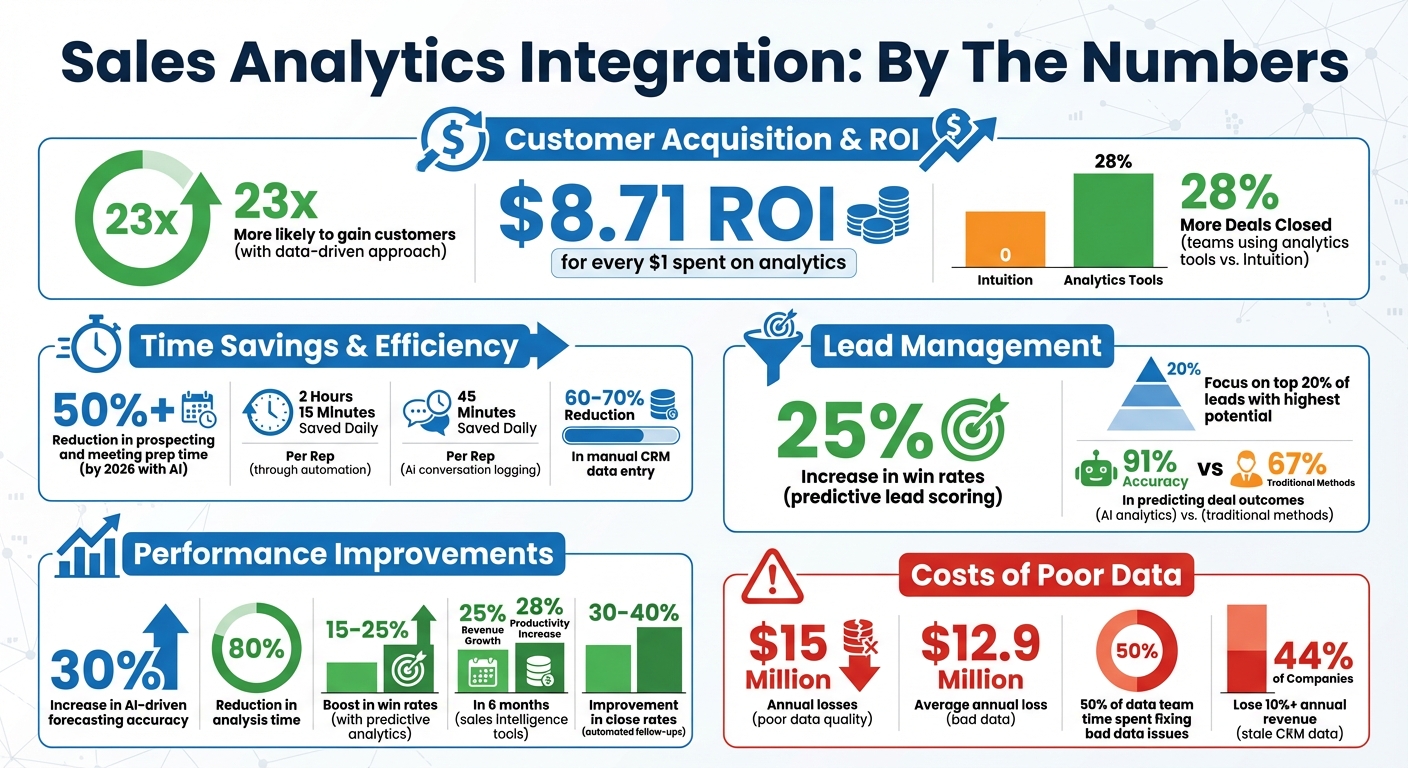
Sales Analytics Integration ROI and Performance Statistics
Benefits of Sales Analytics Integration
Better Data Access and Insights
Integrating analytics with your CRM transforms it into a powerful decision-making hub. As Christopher Croner, Ph.D., Founder of SalesDrive, LLC, puts it:
"A good predictive tool is going to take your CRM from a data cemetery to a strategy machine."
The numbers back this up: sales teams using analytics tools close 28% more deals compared to those relying purely on intuition. Predictive analytics enhances reporting and accuracy, with AI-driven forecasting increasing precision by 30% while slashing analysis time by 80%. Businesses that excel in customer analytics are 1.5 times more likely to experience rapid growth, seeing earnings rise by 15% to 25%. On the flip side, companies that overlook integrated analytics face potential losses of $15 million annually due to poor data quality.
Improved Lead Management and Conversion
Analytics integration doesn’t just improve data - it makes lead management smarter. Predictive lead scoring ranks prospects based on their likelihood to close, enabling sales reps to focus on the top 20% of leads with the highest potential. Tools like Apollo and HubSpot keep outreach sharp by automatically updating job titles and company details. For instance, one SaaS company doubled its pipeline coverage without increasing headcount by using predictive scoring to prioritize the top 30% of leads.
Teams that prioritize deals using analytics have reported a 15% to 25% boost in win rates, while sales organizations leveraging intelligence tools have seen revenue grow by 25% in just six months. Features like prescriptive CRM guidance - such as suggesting timely follow-ups or involving key decision-makers - help prevent deals from stalling. Automated activity tracking, including logging calls and emails as CRM tasks, gives leaders real-time insights into what outreach methods are working best.
Faster Sales Processes
Automation is a game-changer for speeding up sales cycles. Sales professionals save an average of 2 hours and 15 minutes daily thanks to automation. AI conversation logging adds another 45 minutes of daily savings per rep - translating to 75 hours saved weekly for a 10-person team. These efficiencies come from features like automated data entry, which records action items and objections directly into the CRM after calls, and signal-driven workflows that trigger immediate actions when buyers engage with pricing pages or mention competitors in emails.
Looking ahead, B2B sales teams using generative AI are expected to cut prospecting and meeting prep time by over 50% by 2026. Tools like Forecastio and HubSpot AI also streamline forecasting by providing instant insights into revenue pacing and pipeline health, eliminating the need for manual spreadsheet updates. Companies that adopt sales intelligence tools report a 28% increase in productivity within six months.
Next, we’ll explore how you can seamlessly integrate these analytics tools into your workflow.
sbb-itb-8aac02d
How to Integrate Sales Analytics into Your Workflow
Choosing the Right Tools
The first step is deciding between CRM-native analytics and standalone platforms. Tools like HubSpot Sales Hub are built directly into your CRM, making them easier to adopt and quicker to set up. On the other hand, standalone platforms like Clari are better suited for pulling data from multiple sources - such as ERP systems, billing platforms, and various CRMs - but they require more upkeep and dedicated data pipelines.
Take a close look at your API architecture. For example:
- HubSpot's REST API v3 is user-friendly and well-documented, with basic integrations taking about 2–4 days.
- Salesforce offers more advanced options for handling complex enterprise permissions, typically requiring 1–2 weeks to implement.
- Pipedrive's REST API is a simpler option, making it ideal for teams new to AI integrations.
- For budget-conscious teams, Zoho CRM includes its AI assistant "Zia", which offers a more affordable option.
Another key feature to consider is "glass-box" AI, which explains the reasoning behind lead scores. This transparency builds trust among sales reps. As Christopher Croner, Ph.D., Founder of SalesDrive, LLC, explains:
"The ability to rank your deals by probability of win, at over 80% accuracy is the differentiator here. Suddenly you stop guessing which deals to prioritize and double down".
Once you've chosen your tools, the next step is preparing your data and workflows for integration.
Setting Up Your Tools
Start by cleaning your data. Archive inactive contacts (those older than two years) and eliminate duplicate records. As John V. Akgul, Founder & CEO of PxlPeak, warns:
"Garbage-in-garbage-out is not a cliche - it's the primary failure mode for AI CRM integrations".
Data cleanup can account for up to 40% of the total ROI in CRM integration projects.
Define a "source of truth" for each type of data. For instance, use HubSpot for Marketing Qualified Leads (MQLs) and Pipedrive for Sales Qualified Leads (SQLs) and deal management. Set up two-way sync for core details like email and phone numbers, while using one-way sync for authoritative data. This ensures lead scores flow from Marketing to Sales, while deal stages flow in the opposite direction.
To avoid sync errors, ensure field types match exactly (e.g., dropdowns to dropdowns) and use email addresses as the primary matching key. For secure authentication, implement OAuth 2.0 and assign one primary sync user to prevent conflicts [21, 19].
When building your integration, include rate-limit handling with exponential backoff and queuing. For example, HubSpot allows 100 requests per 10 seconds, while Pipedrive supports 80 requests every 2 seconds. For real-time integrations, consider using an event queue like Redis or SQS to prevent dropped events during traffic spikes. Integration costs vary, ranging from $1,000–$3,000 for basic setups to $8,000–$15,000 for enterprise solutions.
Once everything is configured, it's time to validate and fine-tune your setup.
Testing and Optimizing
Run a pilot program to confirm that your setup delivers the expected results. For instance, create a new contact in your marketing tool and verify that it syncs correctly with your CRM, complete with scoring and assignment. Check that updates to deal stages in Pipedrive trigger the right workflows in HubSpot. During the first two weeks, monitor error logs daily to catch any mapping issues early.
Use 12–24 months of historical data to establish a baseline for performance improvements. AI analytics users often report 91% accuracy in predicting deal outcomes, compared to 67% with traditional methods. A systematic rollout can boost performance by 34% within 60 days.
To handle sync conflicts, apply a "last write wins" strategy or use optimistic concurrency with version checks. Nearly 23% of CRM integration bugs stem from unhandled sync issues. Schedule quarterly data integrity checks to prevent "data drift", where sync issues develop over time. Teams using CRM-connected AI agents often see lead response times improve by 2.8x.
For tools like Mails AI or Dripify, start small - automate just one manual task per week to gradually ease your team into the new workflow. Ensure compliance with GDPR by signing Data Processing Agreements (DPAs) with your AI and analytics providers when syncing personal data. Plan to spend $200–$500 per month on maintenance to manage API updates and optimize performance.
How Seamless CRM & Analytics Integration Drives Sales Performance
Best Practices for Sales Analytics Integration
Once your tools are integrated, sticking to proven methods ensures smooth operations and gets you the best return on investment.
Setting Up Data Governance Policies
Start by defining a shared data vocabulary. Everyone on the team should be clear on terms like "lead" versus "opportunity" to avoid confusion.
Next, classify your data based on sensitivity - categories like public, internal, confidential, or restricted. For example, customer payment details require stricter controls than general contact information. Implement role-based access controls (RBAC) so only authorized personnel can access sensitive data.
Assign data stewards from your sales team to maintain consistency and catch issues like duplicate entries or mistakes in real-time. Establish a cross-functional governance committee with members from IT, legal, and sales to oversee policy enforcement and resolve disputes. As Dave Wells from Eckerson Group explains:
"We don't govern data. We govern what people do when working with data".
The cost of poor data quality is staggering - companies lose an average of $12.9 million annually due to bad data, and data teams spend about 50% of their time fixing these issues. Use automation tools for tagging, classification, and access controls to minimize human error. Regular audits - ideally every quarter - help ensure your policies stay relevant as regulations change.
Once your governance is solid, the next step is automating reporting to save your team time and effort.
Automating Reports and Insights
Sales reps often spend 71% of their time on tasks unrelated to selling. Automation can reduce manual CRM data entry by 60-70%, saving reps 45 minutes a day through features like automated call summaries.
Here’s how to make automation work for you:
- Use AI-powered tools for call summarization to automatically capture action items, objections, and next steps.
- Enable automatic logging of activities like emails and connection requests in your CRM, ensuring all data is centralized without extra effort.
- Set up tiered follow-up sequences for different scenarios, such as post-demo or stalled deals. This strategy can improve close rates by 30-40%.
- Implement AI-driven lead scoring that combines engagement signals and conversation data with traditional metrics like firmographics. This helps reps focus on the most promising leads - the top 20% most likely to convert.
Sales teams leveraging analytics tools close 28% more deals than those relying on instinct. AI forecasting tools further enhance accuracy by 30% and cut analysis time by 80%. Companies using data-driven approaches are also 23 times more likely to acquire customers and 19 times more likely to turn a profit.
Tracking Performance Metrics
Focus on 5-7 key metrics that align directly with your business goals instead of tracking every data point available. One of the most critical is forecast accuracy, which compares predicted revenue to actual results. In 2024, only 7% of sales teams achieved a forecast accuracy above 90%.
Other essential metrics include:
- Pipeline velocity: Use the formula (Number of deals × Win rate × Average Deal Size) ÷ Average sales cycle.
- Lead conversion rate: This metric highlights the quality of leads and how well marketing and sales are aligned.
- Sales cycle duration: Measure the time from first contact to contract signing. Shorter cycles often indicate better integration efficiency.
Review metrics at different intervals - daily (calls, emails), monthly (win rates, deal size), and quarterly (pipeline velocity, customer acquisition cost). Pair lagging indicators like revenue with leading indicators, such as discovery calls, to predict future performance. As Ali Newton-Temperley from The Agency Growth Pad suggests:
"Measure the inputs more than you measure the outputs".
Teams typically see initial insights within 30 days of integration, with major improvements in forecast accuracy emerging after about 90 days. Don’t forget to track data hygiene - ensure all deals have recorded stages, values, and close dates. Use these insights to guide your decisions and refine your strategies.
Common Integration Challenges and Solutions
Even after optimizing integrations, certain challenges can pop up and disrupt workflow efficiency. Here’s how to tackle them effectively.
Fixing Data Silos
Data silos are a common issue, with information stuck in separate platforms like marketing automation, finance, support, and sales engagement tools. The result? Sales reps spend an average of 2.5 hours daily manually transferring data between disconnected systems.
These silos often stem from fragmented tech stacks, unclear data ownership, and inconsistent data entry standards. To address this, RevOps teams should:
- Clearly define data ownership.
- Establish the CRM as the single source of truth.
- Enforce standardized data entry practices across departments.
Start by mapping your customer journey to identify where data is created. Clean up duplicate records and standardize formats (e.g., phone numbers, company names) before integration. Focus on connecting your essential tools first - usually your CRM and sales engagement platform. Use native connectors for straightforward setups, or rely on iPaaS platforms like Zapier for more customized workflows. Companies that prioritize integration practices report a 15% higher win rate and an 8% increase in quarterly revenue.
Once your data flows smoothly, the next hurdle is minimizing sync delays.
Solving Latency Problems
When data syncs slowly, insights become outdated, preventing teams from responding quickly. A great example is AstraZeneca, which in early 2026 reduced webinar engagement data sync times from three weeks to seconds. This allowed their sales team to engage with leads while interest was still fresh.
To achieve faster syncs:
- Use webhooks for real-time data delivery when supported by your CRM.
- For platforms without native webhooks, implement polling with filters (e.g.,
updated_gte) to detect recent changes. - Simplify webhook endpoints by validating signatures, queuing payloads, and responding with
200 OKwithin five seconds. - Handle rate limits using token bucket algorithms and schedule nightly reconciliation loops to catch any missed updates.
Stale data can be costly - 44% of companies lose over 10% of annual revenue due to outdated CRM data, and B2B contact information decays at a rate of 2.1% per month. To avoid issues like infinite update loops in two-way syncs, assign ownership for each field and prioritize critical updates, such as sales signals, over less urgent bulk changes.
With sync issues resolved, success depends on whether your team embraces the tools.
Getting Teams to Adopt New Tools
Poor adoption is a major reason 30–50% of integration projects fail. Securing executive support is key to making the tool a non-negotiable part of your team’s workflow. As Alex Thompson from Gain.io explains:
"When teams understand that accurate data improves forecasts and commission clarity, adoption improves".
Here’s how to drive adoption:
- Appoint internal champions from high-performing reps to build trust among peers.
- Roll out the tool gradually, starting with a single impactful use case like deal prioritization to demonstrate immediate value.
- Present the tool as a resource to boost performance, not as a monitoring system.
- Automate repetitive data entry tasks, reducing distractions for sales reps.
Tie compensation and performance metrics to accurate data entry and tool usage. Tailor training to specific roles - whether it’s SDRs, account executives, or managers - so they understand how the tool fits into their daily tasks. Structured, role-based training significantly improves adoption rates. As Pierre Touzeau from Claap notes:
"Adoption beats features. The tool your reps actually use will outperform the one that looks great in a demo but gathers dust".
Conclusion and Next Steps
Integrating sales analytics isn’t just a one-time project - it’s a commitment to smarter, data-driven decision-making. But you only unlock its full potential when you treat analytics as a dynamic feedback loop, not just a static dashboard.
Start by prioritizing data hygiene. Before diving into advanced tools, take the time to clean up your CRM using pipeline management best practices. This means deduplicating contacts, standardizing company names, and archiving records that haven’t been touched in two years. Why? Because clean data lays the groundwork for seamless integration. Data teams, on average, spend about 50% of their time fixing bad data, so tackling this upfront saves headaches later.
After your data is in order, shift your focus to continuous improvement. A good framework to follow is the 70-20-10 rule: dedicate 70% of your efforts to proven strategies, 20% to incremental adjustments, and 10% to bold, experimental ideas. Keep a close eye on your North Star metrics, monitor pipeline health weekly, and evaluate forecast accuracy every quarter. This consistent attention to data quality and growth ensures smoother, more effective sales operations over time.
These steps - data hygiene and ongoing refinement - tie back to the integration process we’ve discussed, from selecting the right tools to testing and optimizing them. The combination of careful planning and regular updates forms the backbone of successful analytics integration.
Looking to take the next step? Sales, Leads & CRM provides a curated directory of top-notch tools, including CRMs like HubSpot and Pipedrive, outreach platforms like Instantly, and AI-powered solutions like Apollo. Whether you’re just starting to build your analytics stack or refining an existing one, these resources can help you move from simply tracking what’s happened to confidently predicting what’s next.
As Pierre Touzeau from Claap puts it:
"In 2026, analytics is the only way to get there. Forget the old cliché 'sales is a numbers game.' The new rule: sales is an analytics game".
The best teams don’t just work harder - they work smarter, leveraging the right tools and clean data to stay ahead.
FAQs
What data should I clean before integrating sales analytics?
Before diving into sales analytics, it's essential to tidy up your CRM data. Start by verifying and standardizing key details like email addresses and contact records. Make sure to remove duplicates, validate data fields, and apply consistent formatting throughout. These steps are vital for ensuring accurate sales insights and making your outreach efforts more effective.
Should I use CRM-native analytics or a standalone platform?
CRM-native analytics are often the go-to choice because they integrate effortlessly with your system and provide real-time access to data. By doing so, they cut down on inefficiencies like juggling disconnected dashboards or manually entering data. This streamlined approach not only enhances decision-making but also boosts sales performance.
Standalone platforms might come with advanced tools, but they often bring along their own set of headaches - data silos and tricky integrations being the biggest culprits. In contrast, CRM-native solutions make it easier to achieve accurate forecasting, improve operational processes, and maintain smoother workflows.
How can I prevent sync errors and data drift over time?
To keep your data accurate and avoid sync problems, it's important to regularly audit your integration setup. This helps you spot and resolve issues like data conflicts, mismatched schemas, or slow processing before they become bigger problems.
Make sure to use tools that can handle growth, offering features like pre-built connectors, open APIs, and advanced security measures such as encryption and role-based access. These steps are key to preserving data integrity and ensuring your sales analytics stay reliable over time.