One bad export can trigger GDPR, CCPA/CPRA, HIPAA, contract issues, and breach reporting duties at the same time. If I want to keep exports compliant, I need to do five things every time: check which rules apply, limit the file to the few fields needed, use a safe transfer method, record approvals, and review logs after the transfer.
Here’s the short version:
- Know the rules first. The answer depends on who the data belongs to, what fields are included, and where the file is going.
- Export less. If a task only needs email and first name, I should not export notes, budgets, health details, or extra profile data.
- Use controlled transfer methods. API syncs and SFTP are easier to track than manual CSV downloads.
- Check vendors and contracts. No DPA, no BAA where HIPAA applies, no transfer review for cross-border data = stop.
- Keep records. Log who asked for the export, what left the CRM for sales success, where it went, and when it must be deleted.
- Train people and test response steps. GDPR can require notice within 72 hours, and HIPAA can require notice within 60 days.
A few numbers show why this matters: GDPR fines have passed €5 billion as of 2026, and HIPAA breach rules can also trigger notice to affected people, HHS, and in some cases the media. Most export mistakes are not complex. They come from routine work done without limits, logs, or review.
If I had to reduce the full article to one line, it would be this: treat every export like a controlled data transfer, not a simple file download.
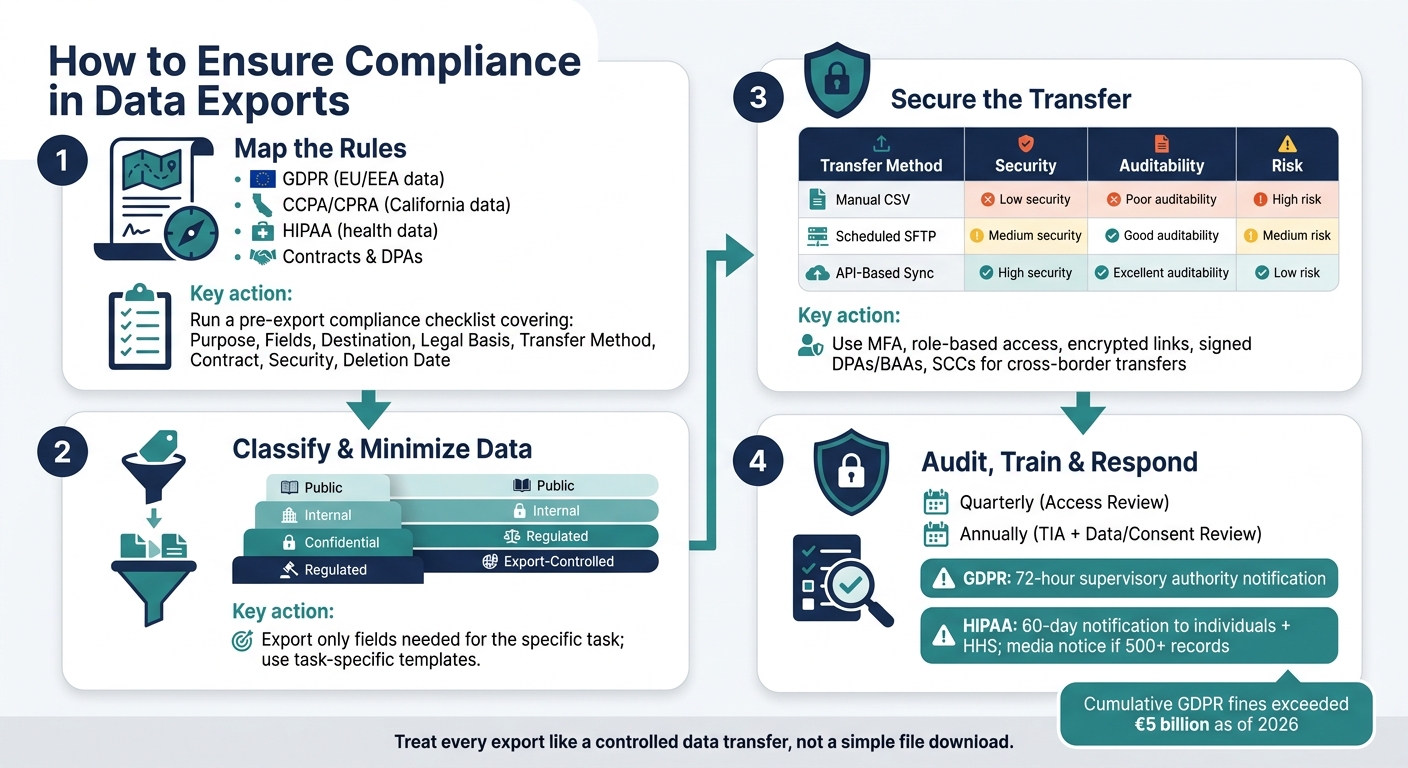
Data Export Compliance: 4-Step Process Checklist
Virtual Event: GDPR - Navigating The Minefield Of Data Export
sbb-itb-8aac02d
Step 1: Map the laws, contracts, and internal rules that apply
Before you export anything, figure out which rules apply to that file.
Match each rule to the data you plan to export
The rules change based on who the data is about, which fields are in the file, and where the file is going. EU/EEA personal data falls under GDPR. California resident data falls under CCPA/CPRA. Some bulk health or financial exports to countries of concern may fall under DOJ Data Security Program limits. And if you're exporting technical material like source code or blueprints, EAR or ITAR may come into play.
Contracts matter too. So do DPAs.
GDPR Article 28 says you need a DPA when a third party processes personal data. California service provider contracts also need to say the vendor will not sell the data or use it outside the agreed service. If either document is missing or expired, stop the export.
You should also check internal retention schedules. That helps keep expired or old records out of the file. After you've mapped the rules, cut the export down to only the fields needed. Nothing extra.
Build a pre-export compliance checklist
A short checklist goes a long way here. For sales lead generation and RevOps teams, it's often the simplest way to keep exports under control without slowing work to a crawl.
The point is simple: make sure the export serves a specific job and includes only the data needed for that job.
| Checklist Item | What to Confirm |
|---|---|
| Purpose | Define the task, such as segmentation or email validation. |
| Fields | List exact fields included; remove all non-essential personal data. |
| Destination | Identify recipient country and entity; flag countries of concern. |
| Legal Basis | Confirm lawful basis and any required consent. |
| Transfer Method | Verify DPF certification, SCC coverage, or BCR coverage for cross-border transfers. |
| Contract | Confirm a signed DPA or service provider contract is on file. |
| Security | Ensure encryption or pseudonymization is applied. |
| Deletion Date | Set a specific deletion date for the recipient and document it. |
Run this check for every export. Once the rules are clear, the next move is to classify the data and cut down exposure.
Step 2: Classify data and export only what is necessary
Use the checklist to label every field before export.
Label personal, sensitive, and restricted data in source systems
Set up a five-tier classification system for CRM and sales data. Tag each field in your source system as one of these categories:
- Public - non-identifiable data, such as industry or company size
- Internal - standard business data like interaction history or support ticket counts
- Confidential - PII such as name, email, phone, and address
- Regulated - PHI, financial records, payment-related details, or precise geolocation data
- Export-Controlled - bulk biometric, health, financial, or precise geolocation data subject to transfer restrictions
Only fields marked as needed for the task should make it into the export template.
It also helps to make these labels easy to spot inside your CRM. Use custom field labels or restricted views so anyone handling exports can see, right away, whether a field is Regulated or Export-Controlled. That simple visual cue can stop people from pulling extra data out of habit.
Free-text notes and inferred traits like "high net worth" are common blind spots. Strip them out before any export unless you can confirm a current business need.
Use filtered views and export templates to reduce exposure
Export from filtered views, not full record views. Build task-specific export templates with pre-set column groups approved for a given workflow. For example, a re-engagement campaign only needs email, first name, and last inactive date. Everything else should be removed by default.
Use built-in export approvals and column controls to enforce that smaller field set. Different platforms handle this in different ways, but the idea is the same: make the stripped-down export the default, not the exception.
For California resident data, CCPA/CPRA treats data minimization as a required standard, mirroring GDPR Article 5(1)(c). After classification, limit the file to approved fields and lock down how it moves.
Step 3: Secure the export channel and document the transfer
Once you've trimmed the export down to only what needs to move, the next job is simple: move it safely and keep a paper trail. The transfer path matters a lot here because it affects both control and traceability.
Choose approved transfer methods and block ad hoc sharing
Some transfer methods are much easier to control than others. API syncs over TLS cut down on file handling, which helps reduce exposure. SFTP is a good fit for scheduled, repeat exports because it encrypts data in transit and gives you server-side logs. Manual CSV downloads are the weakest option. Files can be copied, emailed, or saved locally with little visibility.
| Export Method | Security | Auditability | Compliance Risk |
|---|---|---|---|
| Manual CSV Download | Low (often unencrypted at rest) | Poor (hard to track local copies) | High |
| Scheduled SFTP | Medium | Good | Medium |
| API-Based Sync | High | Excellent | Low |
After that, tighten up how files can leave the system. Don’t leave room for side-door sharing. At the policy level and the technical level, block unapproved paths out.
- Disable personal cloud storage integrations in your CRM
- Restrict email attachments that contain export files
- Ban unmanaged USB devices for data transfers
- Use MFA-protected, expiring links
- Encrypt any temporary storage
Every account that touches export data should have multifactor authentication turned on, no exceptions. Pair that with role-based access control. Give export roles read-only access in the source system, and use temporary permissions that expire on their own. That way, access doesn’t hang around after a migration wraps up or a project gets handed off.
Handle vendors, cross-border transfers, and approvals
Before exported data goes to any third party, check the vendor first. Make sure they have current SOC 2 or ISO 27001 certification, and put the right agreement in place. For GDPR data, use a DPA. For HIPAA data, use a BAA.
Cross-border transfers need extra care. If data is going to a country without an adequacy decision, you’ll need Standard Contractual Clauses (SCCs) and a documented Transfer Impact Assessment (TIA). A defensible TIA is usually 8 to 25 pages long and should be reviewed once a year, or sooner if the destination country’s legal climate changes.
For any export with more risk, document the full approval chain. Write down who approved it, which data categories were included, what transfer method was used, and where the data went. Log the requester, time, scope, method, and destination. Hash the file before transfer and verify it after import. Keep the approval record, transfer log, and integrity check together so they’re ready for export audits and incident reviews.
Step 4: Audit exports, train users, and respond to incidents
Once your transfer controls are in place, the job shifts to monitoring and response. This is the part that keeps small issues from turning into audit findings or breach headaches.
Run routine reviews and keep records for audits
Use a simple audit rhythm so problems show up early, not the week before an audit or right after an incident.
| Audit Component | Recommended Frequency | Key Elements to Check |
|---|---|---|
| Access Review | Quarterly | Admin permissions, MFA status, session timeout settings |
| Transfer Impact (TIA) | Annually or after material legal changes | Destination country laws, encryption methods, subprocessor lists |
| Data and Consent Review | Annually | Data usage, new integrations, documented lawful basis, timestamped opt-ins and withdrawal records |
Review admin accounts, privileged exceptions, bulk exports, and external connectors. Flag unauthorized columns and sensitive fields. Then confirm that destination IPs and hostnames line up with approved regional zones.
For audits, keep an evidence pack ready. That should include data classification maps, signed DPAs, SOC/ISO reports, and export test reports. Retention rules vary by framework: FINRA, 3 years; HIPAA, 6 years; GDPR, 5 years or more. And the stakes are not small. Cumulative GDPR fines exceeded €5 billion as of 2026.
Audits matter most when they feed into a fast response process. Field-level logs should show who accessed, changed, or exported each record. Assign one named compliance owner in RevOps or Sales Operations. Notify the DPO, Legal, and the CRM Compliance Owner in RevOps first. Keep an internal breach register for every incident, including non-reportable ones.
Your response plan should also include pre-written notification templates. Under GDPR, you must notify the relevant supervisory authority within 72 hours of becoming aware of a breach. HIPAA gives covered entities 60 days to notify affected individuals and HHS, and it also requires media notice if more than 500 records are involved. An annual tabletop exercise helps test whether your team can hit those deadlines.
Training matters here too. Sales and marketing teams should know what counts as personal data, when export approval is needed, and what to do after a mis-send. Add alerts for unusual export volume and requests tied to tight deadlines.
Conclusion: A repeatable compliance process for your team
The steps in this guide are meant to stack on each other. Start by figuring out which laws, contracts, and internal rules apply to your data. Classify and minimize what you export. Use secure, auditable transfer methods with tight access controls. Check every vendor and cross-border recipient before data moves. Then close the loop with regular audits, trained users, and a tested incident response plan.
You do not need to rebuild this process from scratch every time someone exports data. The aim is a documented process your team can follow the same way each time. If you want tools that support stronger governance, visibility, and secure data handling in day-to-day sales operations, Sales, Leads & CRM is a good place to start when comparing CRM and sales platforms built with these requirements in mind.
FAQs
How do I know which export laws apply?
Map your cross-border data flows first. You need to know where the data starts and where it ends up.
For U.S.-based organizations, check whether those transfers trigger the Department of Justice’s Data Security Program. Also review whether your technology or technical data falls under ITAR or EAR.
If the data comes from other regions, look at local laws too. That may include the EU’s GDPR or China’s PIPL. Then document your data practices so you can support compliance over time.
What data should I leave out of an export?
Export only the data you need for the job at hand. As a default rule, leave out sensitive fields such as government or tax IDs, bank account details, credit card numbers, health records, biometric data, and exact location data.
It’s also smart to skip free-text notes. Those fields often hide all kinds of stuff people didn’t mean to spread around - pasted passwords, internal comments, or medical information.
For testing or staging, use anonymized names and email addresses instead of real customer data.
What should I do if an export is sent by mistake?
Act fast to limit risk. If the file was sent through an internal system or placed on a shared drive, try to recall it or remove it right away. If it was sent by email, ask the recipient to permanently delete it and confirm that they’ve done so.
Document the incident in plain terms: who sent the data, what the export included, and who received it. That record can help show compliance and accountability if regulators review the case or run an audit.